13
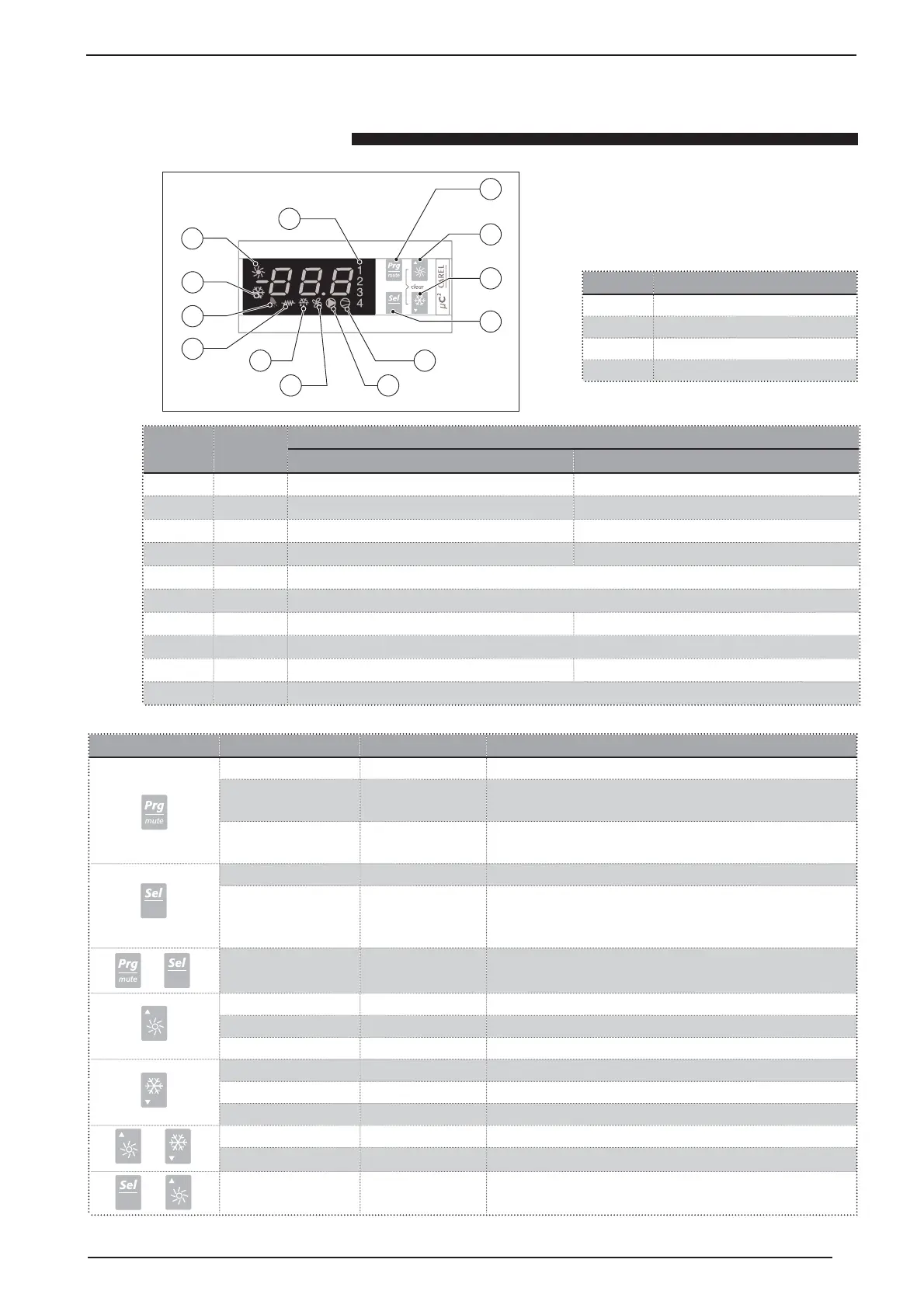
Use of buttons
A
B
C
D
E
F
G
H
I
L
M
O
N
Symbol Colour
Meaning
State ON State FLASHING
E (1 - 2)
Amber
Compressor 1 and/or 2 on Switch on request
E (3 - 4)
Amber
Compressor 3 and/or 4 on Switch on request
F
Amber
Heat pump mode ON Request HEAT PUMP mode
G
Amber
chiller Mode ON Request for mode CHILLER
H
Red
Alarm on
I
Amber
Resistance activated
L
Amber
Defrost on Request for defrost
M
Amber
Fan on
N
Amber
Pump on Request for pump to be switched on
O
Amber
Compress/s on (if unit has more than one compressor this light means that at least one is on)
Button Meaning
A
Programming button
B
Increase button
C
Decrease button
D
Select button
BUTTON MODE FUNCTION PRESSING
Mode ON Prolonged Pressing Loading of default values in the controller’s EEPROM memory
Navigation menu Once Pressing Pressing this button leads back to previous menu (till exiting menu,
with changes saved in the EEPROM)
Mode normal Once Pressing If alarm is on turn off buzzer (if there is one) and deactivate alarm
relay
Mode normal Pressing for 5 sec. Access to USER parameters
Navigation menu Once Pressing • Select item in programming and visualising environment
value of USER parameters
• Confirm variation to USER parameters
Mode normal Pressione per 5 sec. Parameter programming using password
Navigation menu Once Pressing Select upper item in menus
Mode modify Once Pressing Increase parameter value
Mode normal Pressione per 5 sec. Go from STAND-BY mode to CHILLER mode and viceversa
Navigation menu Once Pressing Select lower item in menus
Mode modify Once Pressing Decrease parameter value
Mode normal Pressione per 5 sec.
Go from STAND-BY mode to HEAT PUMP mode and viceversa
Mode normal Pressione per 5 sec. Manually reset alarm
Navigation menu Pressione per 5 sec. Immediate zero set of hour counter
Mode normal Pressione per 5 sec. Force defrosting for both fridge circuits
+
+
+



 To Next Page