6
Front Panel Layout
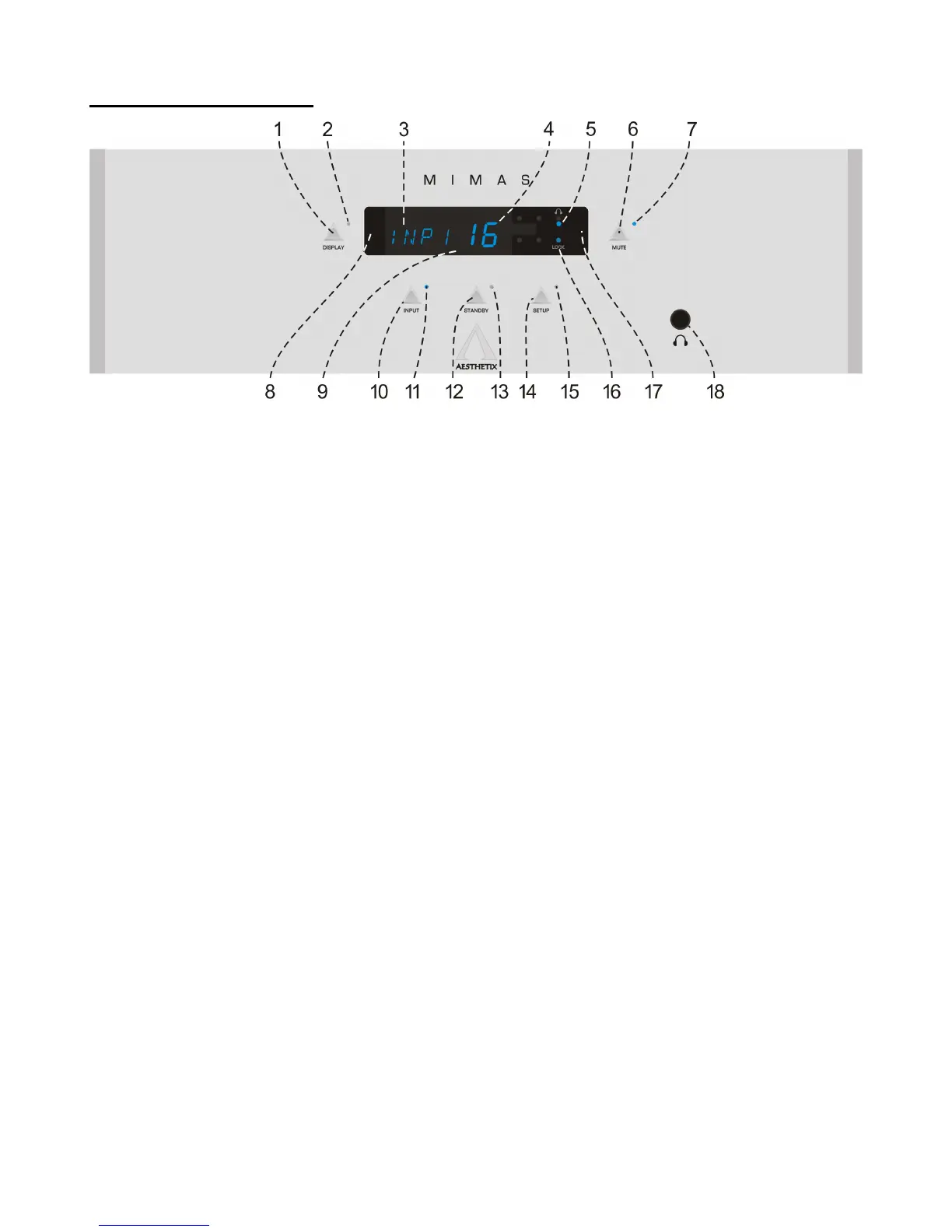
Figure 1 - Front Panel Layout
1. DISPLAY button. Press to extinguish or illuminate the display. This button is also used in some Setup
menus.
2. Display LED. Not used in normal operation. It is illuminated in some Setup menus, indicating that the Display
button is used for changing the currently selected parameter.
3. In the main menu, the four left characters are the name of the currently selected input.
4. In the Main menu, the larger, two rightmost numbers represent the current volume level.
5. Headphone LED. Illuminates when the output signal is routed to the headphone jack only.
6. MUTE button. Toggle to mute or un-mute the Mimas.
7. Mute LED. Illuminates when the Mute function is active.
8. Pressing the left side of the DISPLAY will lower the volume, or decrement the value when in a sub-menu.
9. LED DISPLAY.
10. INPUT button. Used to select an Input. Also used in some Setup menus for parameter selection.
11. INPUT LED. Illuminates when the MAIN menu is active or when the Input button can be used to make edits
in any of the Setup menus.
12. STANDBY button. After the rear panel MAIN POWER switch is turned on and the Mimas has completed its
Warm Up cycle, press the front panel STANDBY button to exit the standby mode. Pressing this button again
will put the Mimas into STANDBY and illuminate the Standby LED.
13. Standby LED. Illuminates when the Mimas is in Standby, flashes when coming out of Standby.
14. SETUP button. Accesses all setup menus. Press to exit the Setup Menu system.
15. Setup LED. It is illuminated when in any of the Setup menus.
16. LOCK LED. Illuminates when the Mimas locks onto a digital input signal.
17. Pressing the right side of the DISPLAY will raise the volume, or increment a value when in a Setup menu.
18. HEADPHONE jack. When enabled, the output signal is re-routed from the main outputs, to the headphones.



 To Next Page