1716
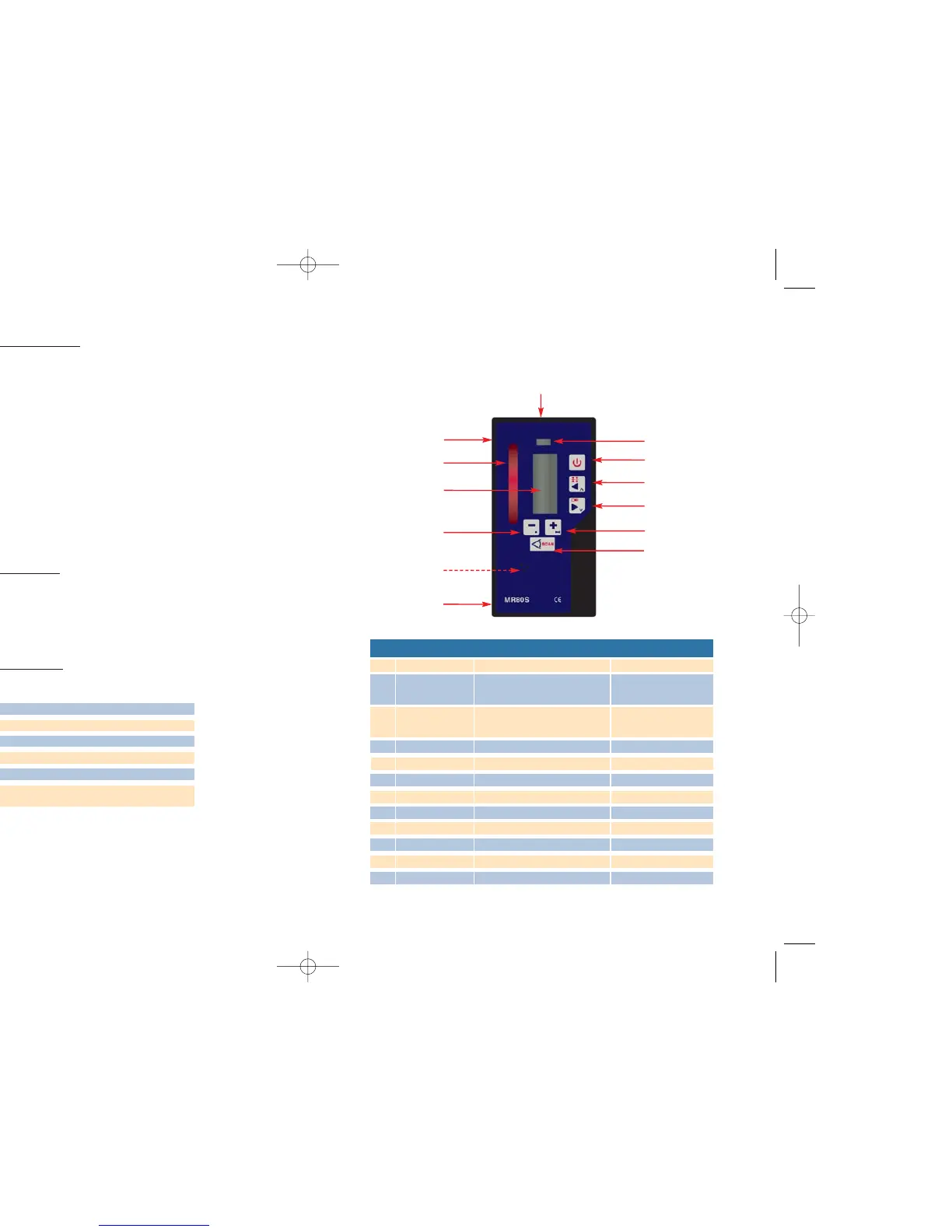
MR80S Detector / Remote control :
The MR80S can be used as a remote control as well as a laser detector.
Key Detector mode Remote mode Scanning mode
1 On/Off Change to remote mode
2 Coarse / Fine Move square shot to the left Aim scanning left
(vertical mode)
3 Sound on/off Move square shot to the right Aim scanning right
(vertical mode)
4 LCD Display
5 Battery location
6 Slots for brackets
7 Capture window
8 Magnet
9 Bubble vial
10 Decrease speed / dot left Decrease scanning angle
11 Increase speed / dot right Increase scanning angle
12 Switch to scanning mode Switch to rotation mode
1
2
3
4
5
6
6
7
10
11
12
8
9
• Using the MR50 detector
1. Press the On/Off button to turn on the detector
2. Press on the middle button to select the detection mode of the detector.
The coarse mode is the default mode when the MR50 is turned on.
A symbol will appear on the right part of the LCD display to inform you
that the MR50 is on coarse mode and a symbol will appear on the left part
of the LCD display to inform you that the MR50 is on fine mode.
3. Press on the right side button in order to select the sound level.
Three tones are available.
4. Turn the capture window towards the laser beam and move the detector up
or down according to the information given on the LCD display. An arrow
facing down will inform you that you have to move the detector down.
An arrow facing up will inform you that you have to move the detector up.
When an horizontal line appears on the display, the detector is at the same
level that the laser beam.
• Changing the battery
To install a new 9 Volts battery, open the battery cap (3) located on the back
of the detector.
First raise the left part of the cover then the right side.
Respect the polarity indications noted inside the battery compartment.
• MR5
0 Specifications :
MR50 operating distance 150 meters
Capture window 5 cm
Sound 3 tones
Power 9 volts alkaline battery
Dimensions 14 x 6 x 2,5 cm
Accuracy at 30meters Fine :0,2mm - 2mm
Coarse : 1mm - 6mm


 To Next Page