76
Manual Grade
It is possible to make manual grade on X and Y axis up to 5° on both axis.
Press the Auto/Man key (2) on the laser keypad. The Led indicator located near
the Auto/Man key (8) will blink. Select the rotation speed the most adapted to
the ambiant conditions or the scanning. Press the < or > arrows in order to
obtain a grade on the X axis.
To make a manual grade on the Y axis, press on the H.I Alert key. Both LED
(8 or 9) light indicators located on Auto/Man and H.I Alert key will blink.
Press the < or > arrows on the laser keypad in order to obtain a grade on the Y axis.
CAUTION: In manual mode, the beam rotates even if the laser is not leveled.
Adjusting beam left or right
After placing the laser in vertical position, the plumb beam out the top of the
head can be moved to the left or right. This is necessary to do squaring for
installing walls and partitions.
When the laser is first placed in vertical and that is has self-leveled, hold down
left < or > right keys to move plumb beam.
It is important to check while you're using the laser that it has not been
moved and that your setting is still accurate.
Batteries
Laser battery
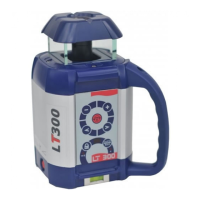
The LT300 has a NiCad rechargeable battery that should be charged for 15
hours before first use.
Charging the battery
1) Remove the cap on the jack located on the side of the laser. Insert the charger plug.
2) Plug the charger into an electrical outlet (110 volts or 220 volts, depending
on charger and country).
It will function only when selected. To activate this safeguard feature, press the
H.I. key (1).
Caution: H.I. Alert will function only 30 sec. after the laser is levelled, to let the
LT300 finishing his self-levellling.
If the laser is disturbed while in H.I. Alert mode, the head will stop rotating and the
beam will turn off. The led indicator (9) located near the H.I Alert key will stay on.
To start the laser rotating again, press On/Off twice.
Check if the beam elevation has changed from its original benchmark position.
The laser is no longer in H.I. Alert mode. Press key (1) to return to H.I. Alert.
Rotation
R
otation speed
The head rotates at 6 speeds: 0, 90, 150, 300, 450, and 600 rpm. 300 rpm is the
default setting.
You can also stop the rotation (0 rpm) and point the beam in using keys or
remote control
+ or - (4 and 5).
To start the rotation again just press the key four (4) a few seconds.
Press the + to increase the rotation or - to decrease the rotation speed.
The laser beam is more visible at slower rotation speeds. The faster speed
(600 rpm) is required for many machine control receiver applications.
Scanning
Scanning mode allows you to see the beam easier at a distance.
To switch from rotation to scan, press the scanning key (3).
Use the
+ or - keys on the keypad to change scan lengths.
Hold down the < or > arrows to move the scan left or right.
To stop scanning, press again on the scanning key (3).


 To Next Page