DX-D 100 Mobile X-ray Unit
User Manual
46
0188K EN 20201116
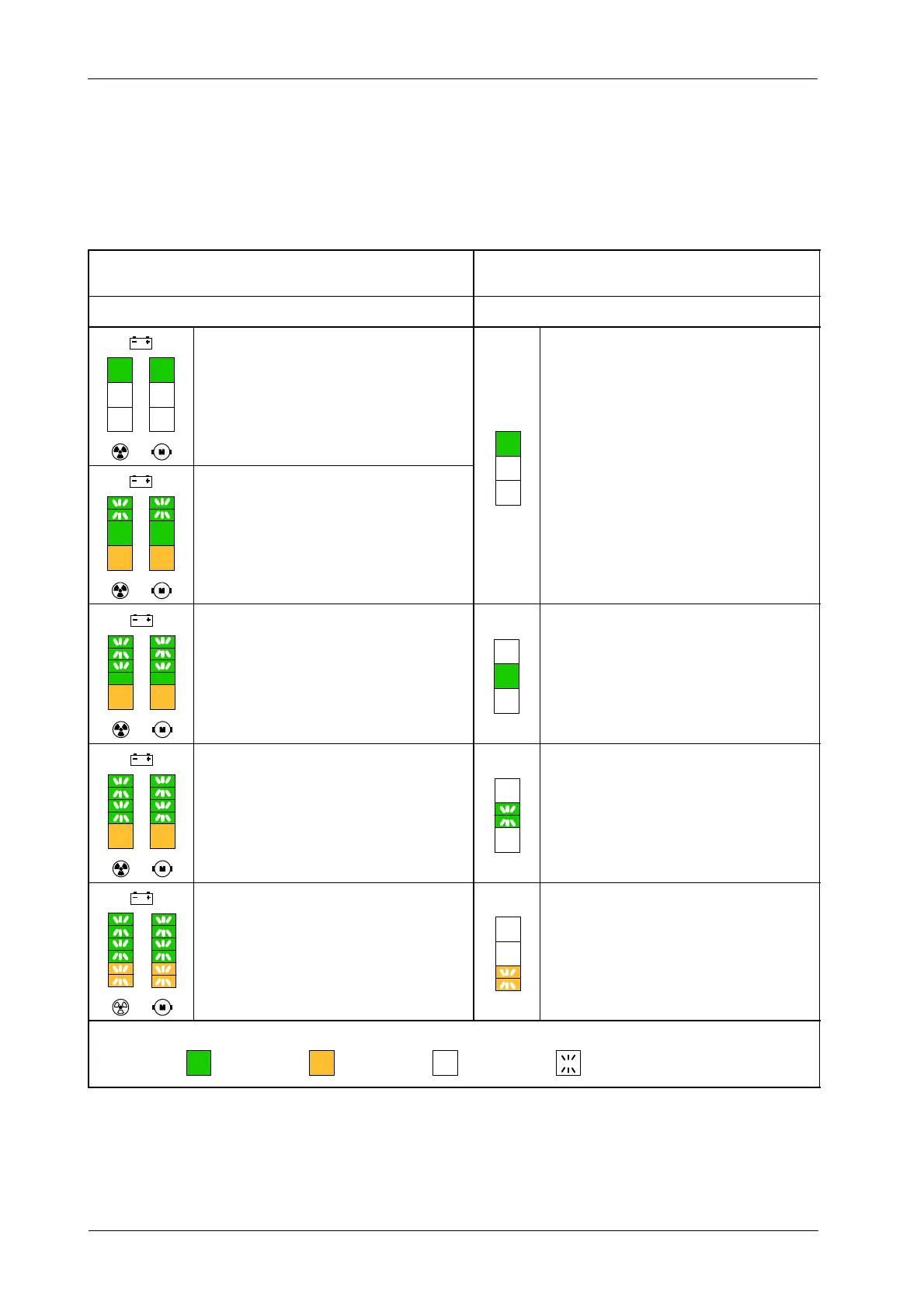
Both columns comprise three Indicators, each one representing a battery status
as described below:
MOBILE UNIT IN CHARGING MODE
(PLUGGED TO MAINS)
MOBILE UNIT IN STAND-ALONE MODE
(UNPLUGGED FROM MAINS)
LED INDICATORS AND STATUS LED INDICATORS AND STATUS
After charging during approximately 9 hours, the upper
Green Indicators are lighting steady and the rest of the
Indicators below are off. The batteries charge level is
100 % of the total charge.
When the u
er Green Indicators li
ht stead
normal
After charging during approximately 2.5 to 6 hours, the
upper Green Indicators are scrolling up and the lower
Green Indicators and the Orange Indicators are lighting
steady.
In 4 hours, the batteries charge level is 80% of the total
charge.
,
operation is allowed.
After charging during approximately 1.5 to 2.5 hours,
Indicators are scrolling up from the upper half of the lower
Green Indicators and the rest of the Indicators below are
lighting s teady.
When the lower Green Indicators light steady, normal
operation is allowed although it is recommended to
charge the Batteries.
After charging during approximately 30 to 90 minutes, all
Green Indicators are scrolling up and the Orange
Indicators are lighting steady.
When the lower Green Indicators start blinking, normal
operation is allowed but it is urgent to charge the
Batteries.
After charging during approximately lessthan 30minutes,
all t he Indicators are scrolling up.
When the Orange Indicator blinks, exposures are not
allowed. It is necessary to charge the Batteries.
Green Orange Indicator Off Blinking / ScrollingIndicator colors:


 To Next Page