17
4. Other members must join the group within 2 minutes.
5. After each member joins successfully, the LEDs of the joined unit and of the creator's unit
flash purple.
After grouping is completed, the DMC intercom conference starts automatically.
4.1.1.2 Joining DMC intercom groups
You can join or rejoin a DMC intercom group created by another rider.
If your DMC group connection is lost, you remain part of the group. Once in range of any other
group member, you automatically reconnect.
If your DMC group splits with some group members remaining in range of each other but not in
range of all group members, you can continue speaking with the members still in range. Once in
range of any other group member, you automatically reconnect.
If you join a new DMC group, you automatically leave your existing DMC group.
To join an existing DMC group:
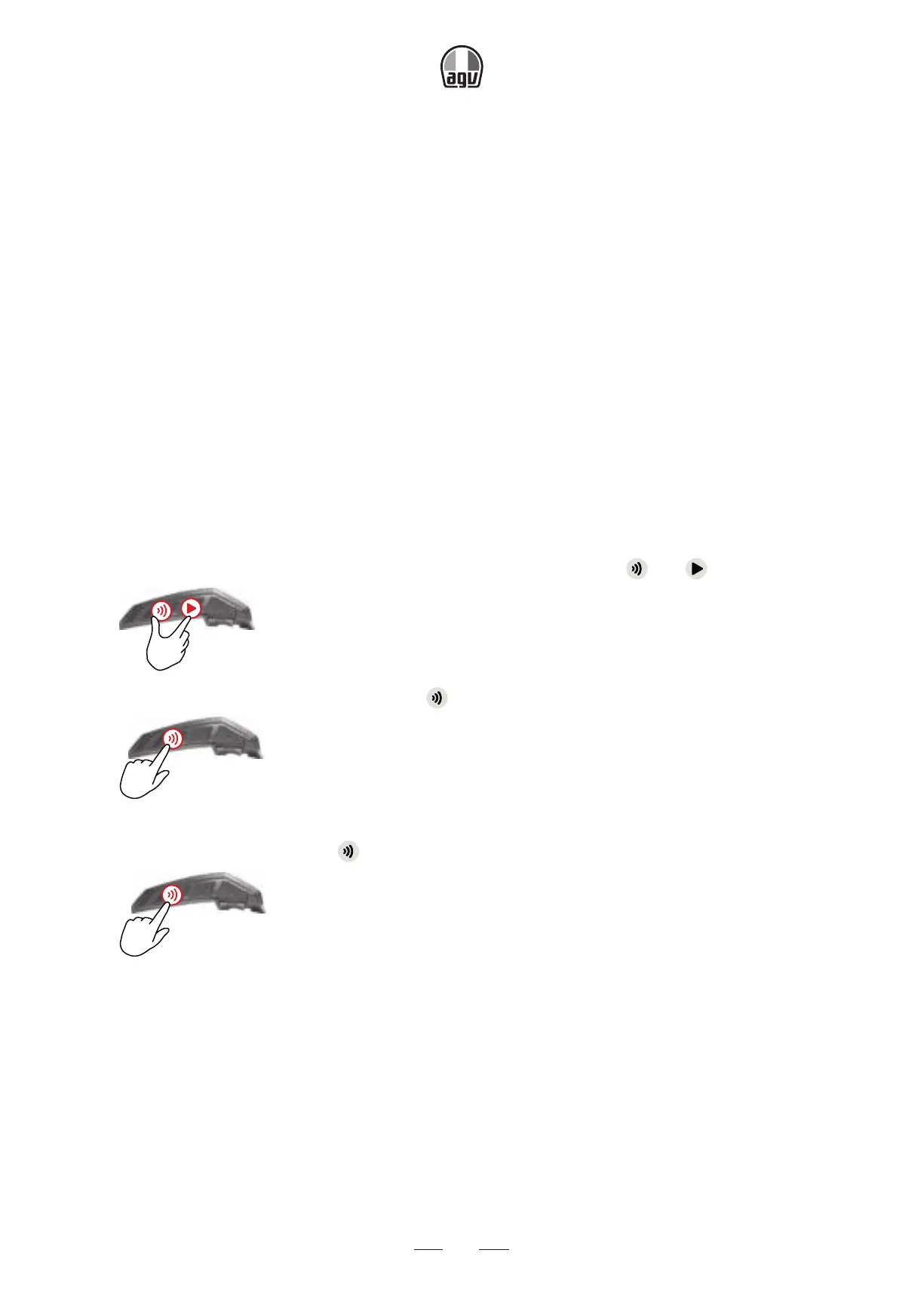
1. Confirm both your INSYDE and the creator's unit are in DMC intercom mode (LED flashes
green slowly): if your INSYDE is not in DMC intercom mode, tap
and .
x1
2. Both you and the group creator: press for 5 seconds.
5”
→ The LED flashes green quickly.
3. Only the group creator: tap
.
x1
→ The LED flashes red and green quickly.
The color of the flashing LED indicates whether you have been added to the group:
• Purple: successfully joined the group.
• Yellow: can't join the group because it has reached the maximum number of riders.
• Red: failed to join.


 To Next Page