27
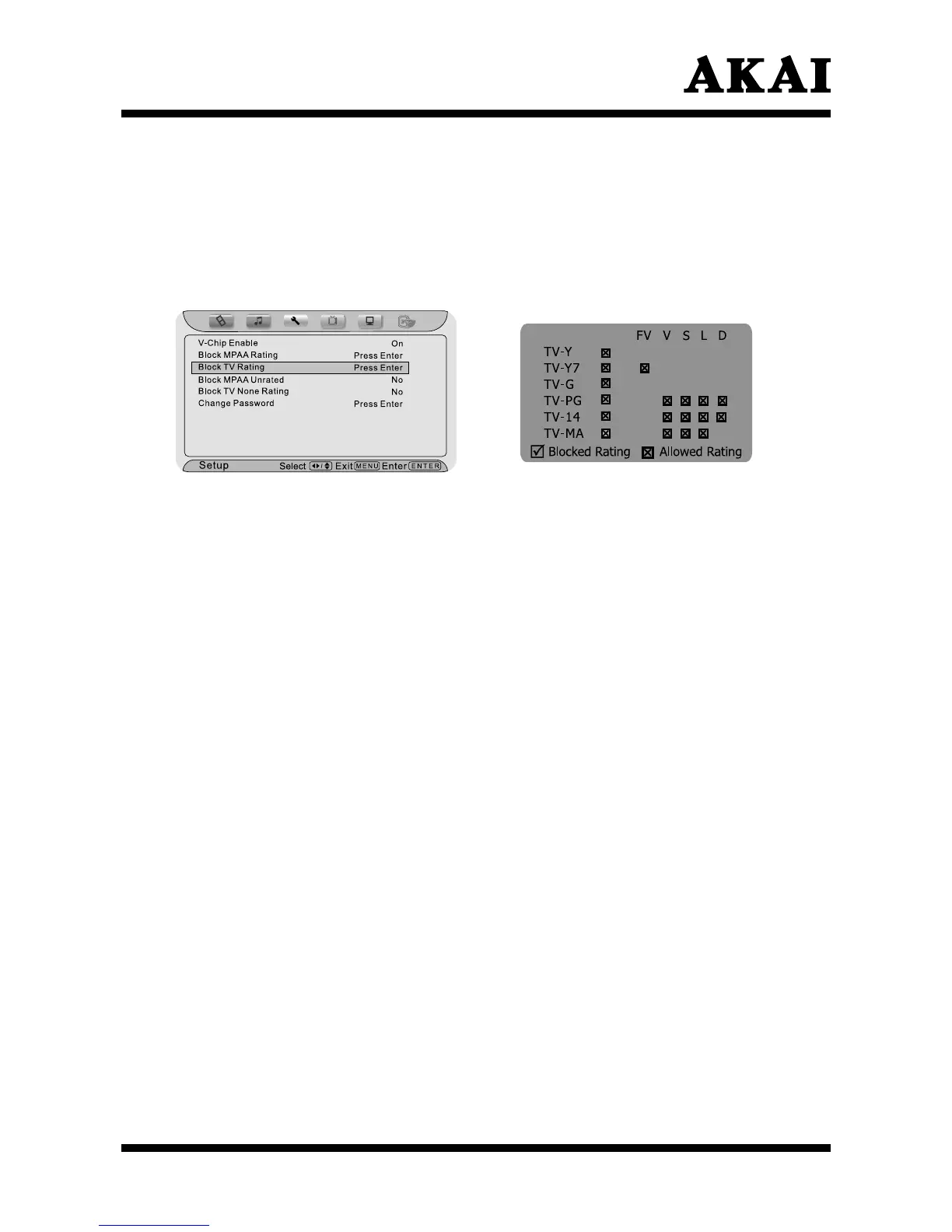
Using the “Block TV Rating” item
After entering the “V-Chip” menu, press ∧ or ∨ button to highlight the “Block
TV Rating” item.
Press the Enter button to confirm.
Press ∧ , ∨ , < or > button to select an item, then press the Enter button
to lock
(display “
”)
or unlock (display “
”).
For Television programs including made-for-TV movies:
Children TV Ratings:
• TV-Y (youth) (individual content categories do not apply)
• TV-Y7 (youth, 7 years and older)
General TV Ratings:
• TV-G (general audience) (individual categories do not apply)
• TV-PG (parental guidance suggested)
• TV-14 (14 years and older)
• TV-MA (mature audience)
Content Categories:
• Dialog - sexual dialogue (applies to TV-PG and Above, TV-14)
• Language - adult language (applies to TV-PG and Above, TV-14 and
Above, TV-MA)
• Sex scenes - sexual situations (applies to TV-PG and Above, TV-14 and
Above, TV-MA)
• Violence (applies to TV-PG and Above, TV-14 and
Above, TV-MA)
• F Violence - fantasy violence (applies only to TV-Y7)
Press Menu button to exit the sub-menu.



 To Next Page