36
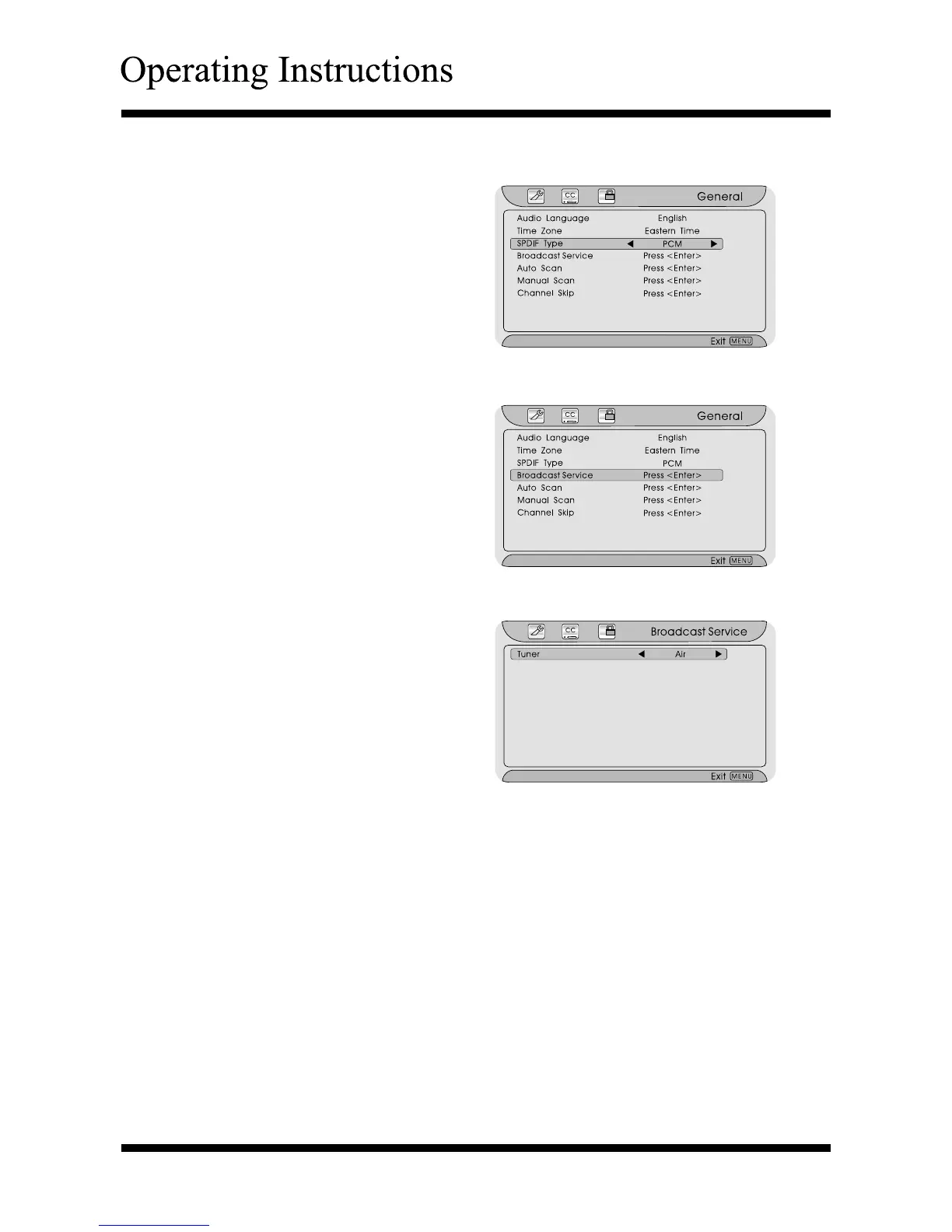
Using the “SPDIF Type” item
After entering the “General” menu,
press ∧ or ∨ button to highlight
the “SPDIF Type” item.
Press < or > button to select
“Dolby Digital”, “PCM” or “OFF”.
Press the Menu or Exit button to
return or exit.
Using the “Broadcast Service” item
After entering the “General” menu,
press ∧ or ∨ button to highlight
the “Broadcast Service” item.
Press the Enter button to confirm.
Press the Menu or Exit button to
return or exit.
Using the “Tuner” item
After entering the “Broadcast
Service” menu, press < or >
button to select “Air” or “Cable”.
Using the “Auto Scan” item
Auto Scan is used to automatically search all receivable channels.
After entering the “General” menu, press ∧ or ∨ button to highlight the “Auto
Scan” item.
Press the Enter button to confirm and to start scan the channels automatically.
The channel that search will automatically store in “DTV” programs.
Searching for after completing, return, the first program will be automatically
manhunt.
Press the Menu or Exit button to return or exit.
Note: If you want to stop scanning, press the Menu button.



 To Next Page