37
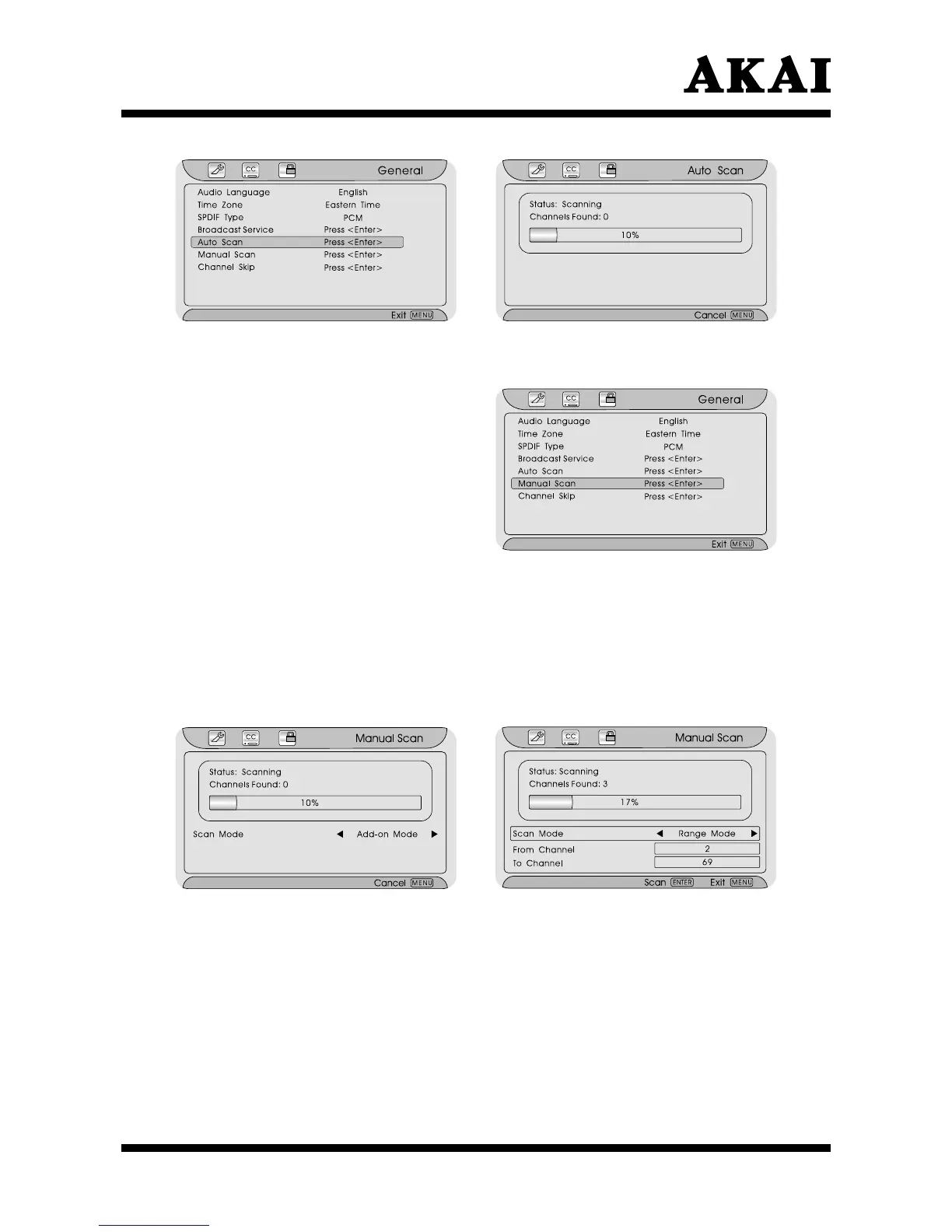
Using the “Manual Scan” item
Manual Scan is used to manually search the receivable channels. There are
Add-on Mode and Range Mode.
After entering the “General” menu,
press ∧ or ∨ button to highlight
the “Manual Scan” item.
Press the Enter button to confirm.
Press < or > button to select
“Add Mode” or “Rage Mode”.
Press the Enter button to confirm
and to search the channels
- Add Mode: Scan missing channels.
- Rage Mode: Scan with a range of channels.
Press the Menu or Exit button to return or exit.
Note:
Default scan mode is Add-on Mode.
If there are no new channels since the last scanning. The channels found will
be 0.
Using the “Channel Skip” item
After entering the “General” menu, press ∧ or ∨ button to highlight the
“Channel Skip” item.
Press the Enter button to confirm and pop up the “Channel Skip” menu.
Press ∧ or ∨ button to choose an item, then
press the Enter button to
confirm or cancel your selection
.
When you select
“”, it can skip channels.
Press the Menu or Exit button to return or exit.



 To Next Page