EasyManua.ls Logo

Akai AP-Q310 - Page 44

Akai AP-Q310
53 pages
Print Icon
To Next Page IconTo Next Page
To Previous Page IconTo Previous Page
Loading...
MODEL
AP-Q41/C
ITI,
ORDINARY
ADJUSTMENT
1.
STYLUS
PRESSURE
ADJUSTMENT
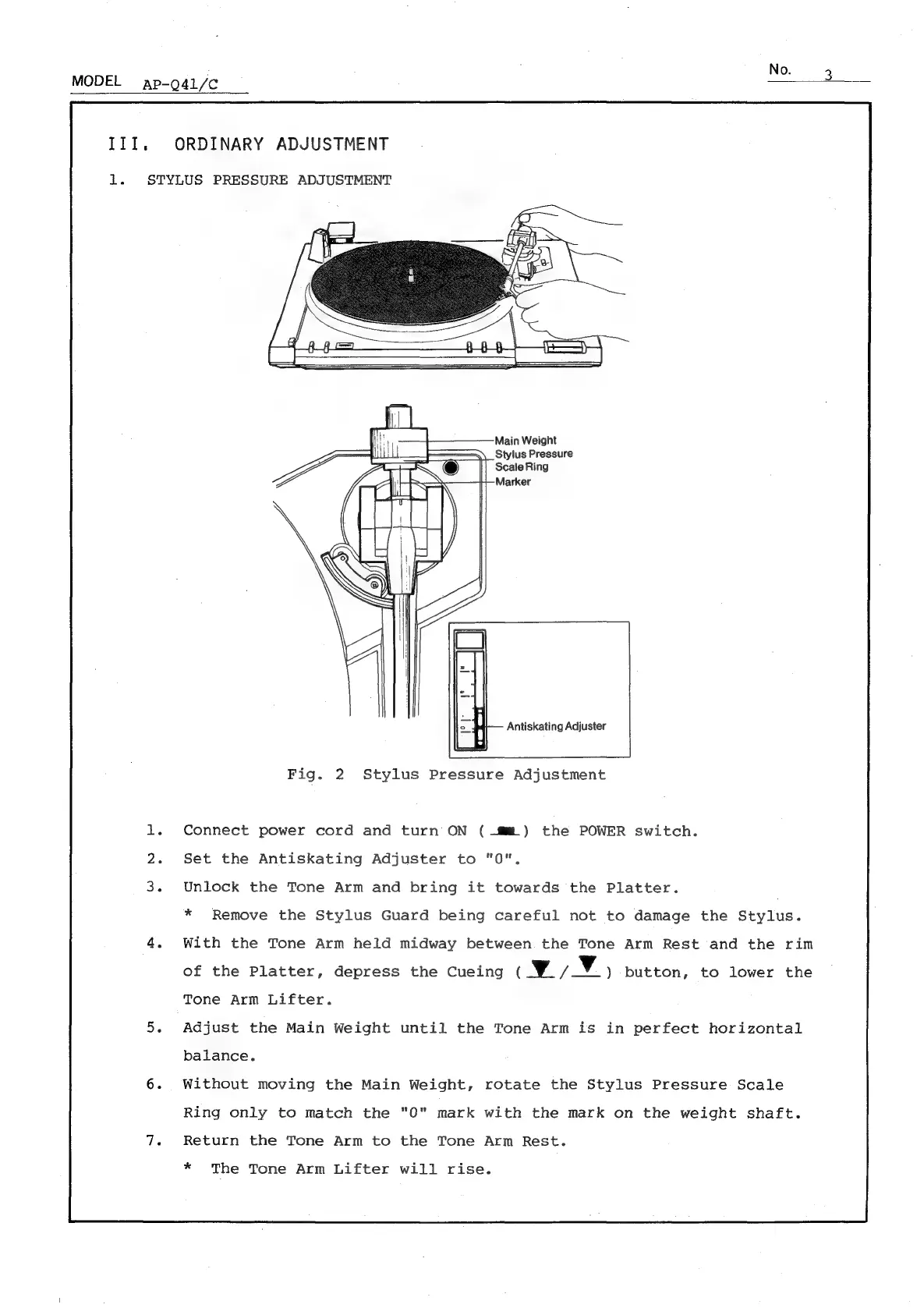
Main
Weight
Stylus
Pressure
Antiskating
Adjuster
Fig.
2
Stylus
Pressure
Adjustment
Connect
power
cord
and
turn
ON
(Mt)
the
POWER
switch.
Set
the
Antiskating
Adjuster
to
"0".
Unlock
the
Tone
Arm
and
bring
it
towards
the
Platter.
*
Remove
the
Stylus
Guard
being
careful
not
to
damage
the
Stylus.
With
the
Tone
Arm
held
midway
between
the
Tone
Arm
Rest
and
the
rim
of
the
Platter,
depress
the
Cueing
(Wy)
button,
to
lower
the
Tone
Arm
Lifter.
Adjust
the
Main
Weight
until
the
Tone
Arm
is
in
perfect
horizontal
balance.
Without
moving
the
Main
Weight,
rotate
the
Stylus
Pressure
Scale
Ring
only
to
match
the
"0"
mark
with
the
mark
on
the
weight
shaft.
Return
the
Tone
Arm
to
the
Tone
Arm
Rest.
*
The
Tone
Arm
Lifter
will
rise.

Related product manuals