EasyManua.ls Logo

Akai AP-Q310 - Page 45

Akai AP-Q310
53 pages
Print Icon
To Next Page IconTo Next Page
To Previous Page IconTo Previous Page
Loading...
MODEL
AP-041/c
Lock
the
Tone
Arm
in
place
and
rotate
the
Main
Weight
counterclockwise,
as
viewed
from
the
front
(the
Stylus
Pressure
Scale
Ring
will
move
with
it),
until
the
desired
Stylus
Pressure
Scale
indication
is
at
the
mark
on
the
shaft.
The
range
of
adjustment
is
from
0
to
2.5
grams.
*
For
AP-Q41C
only:
The
recommended
stylus
pressure
for
the
cartridge
supplied,
SMB-12,
is
1.5
grams.
Set
the
Antiskating
Adjuster
to
the
corresponding
stylus
pressure,
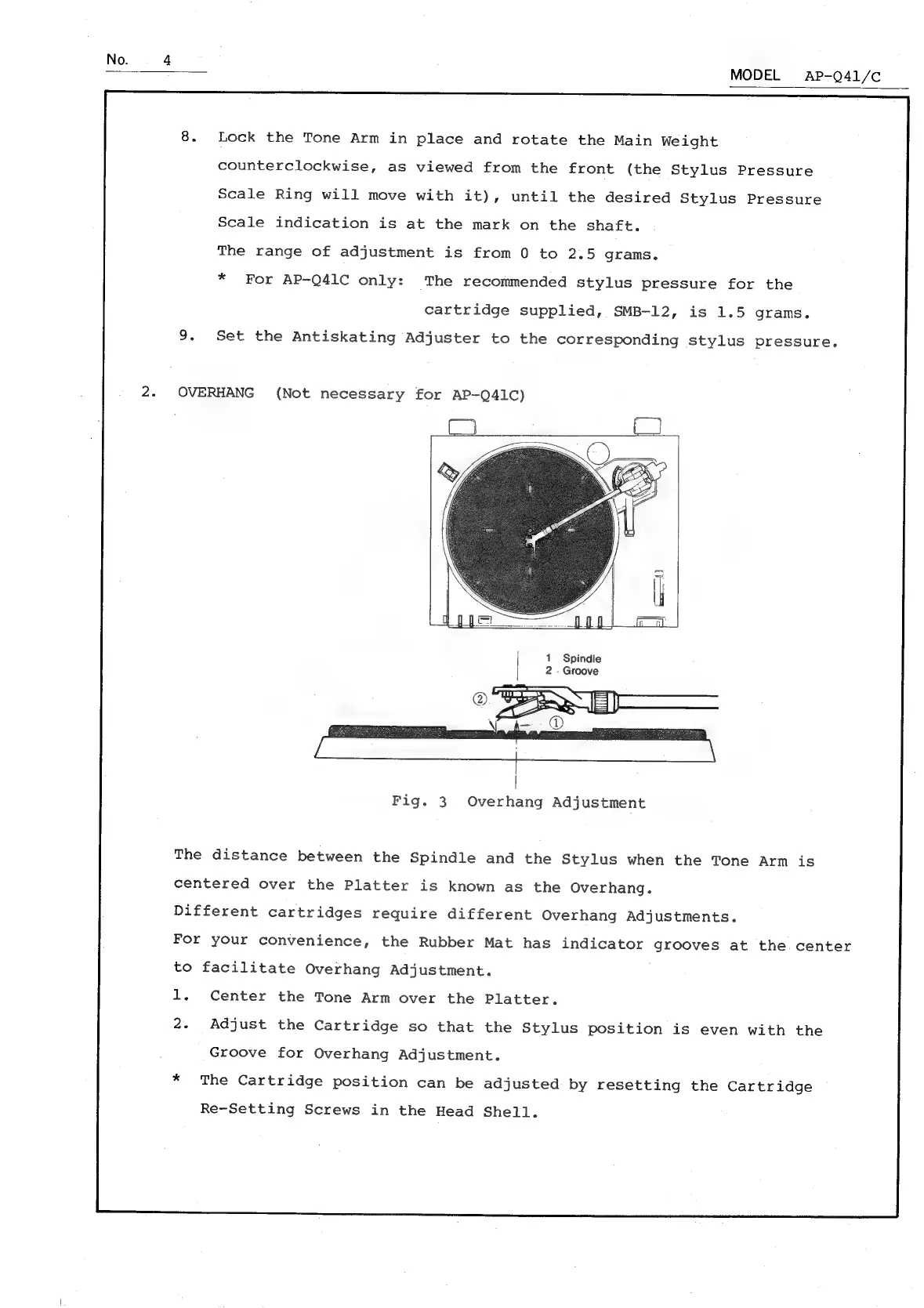
OVERHANG
(Not
necessary
for
AP-Q41C)
1
Spindle
2
-
Groove
Fig.
3
Overhang
Adjustment
The
distance
between
the
Spindle
and
the
Stylus
when
the
Tone
Arm
is
centered
over
the
Platter
is
known
as
the
Overhang.
Different
cartridges
require
different
Overhang
Adjustments.
For
your
convenience,
the
Rubber
Mat
has
indicator
grooves
at
the.
center
to
facilitate
Overhang
Adjustment.
1.
Center
the
Tone
Arm
over
the
Platter.
2.
Adjust
the
Cartridge
so
that
the
Stylus
position
is
even
with
the
Groove
for
Overhang
Adjustment.
*
The
Cartridge
position
can
be
adjusted
by
resetting
the
Cartridge
Re-Setting
Screws
in
the
Head
Shell.

Related product manuals