A-61904 September 2018 29
4 Maintenance
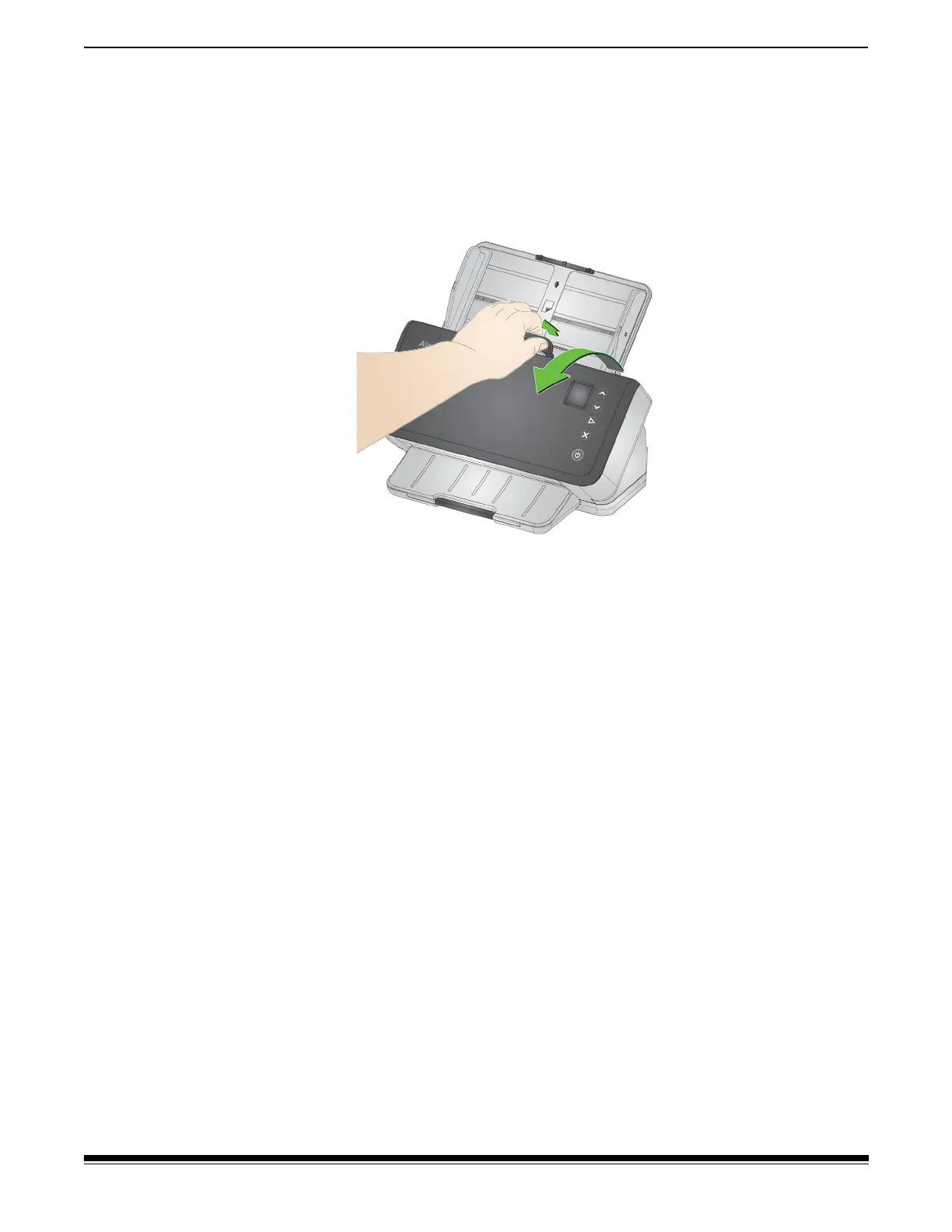
Opening the scanner cover
1. Pull the scanner cover release lever to release and open the
scanner cover.
2. When you finish cleaning the scanner or replacing a part, close the
scanner cover.
Cleaning procedures
Your scanner needs to be cleaned periodically. For any of these issues
you should first clean your scanner:
• your pages do not feed easily
• several pages feed at the same time
• streaks appear on your images
• pages exiting the scanner have roller/tire marks
Transport cleaning sheets, roller cleaning pads, and Staticide and
Brillianize wipes are all available for purchase from Kodak Alaris. Refer
to the link for your scanner in “Supplies and Consumables” on page 40
for supplies required to clean your scanner.
IMPORTANT: Use only cleaners recommended by Kodak Alaris. Do not
use household cleaners. Do not use alcohol or products
containing alcohol.
Allow surfaces to cool to ambient temperature before
cleaning. Do not use cleaners on hot surfaces.
Use adequate ventilation. Do not use cleaners in
confined areas.
After cleaning, allow rollers to dry before resuming
scanning.



 To Next Page