12 813
12. Displays and error messages on the control unit
12.1 Battery charge status of the e-motion wheels
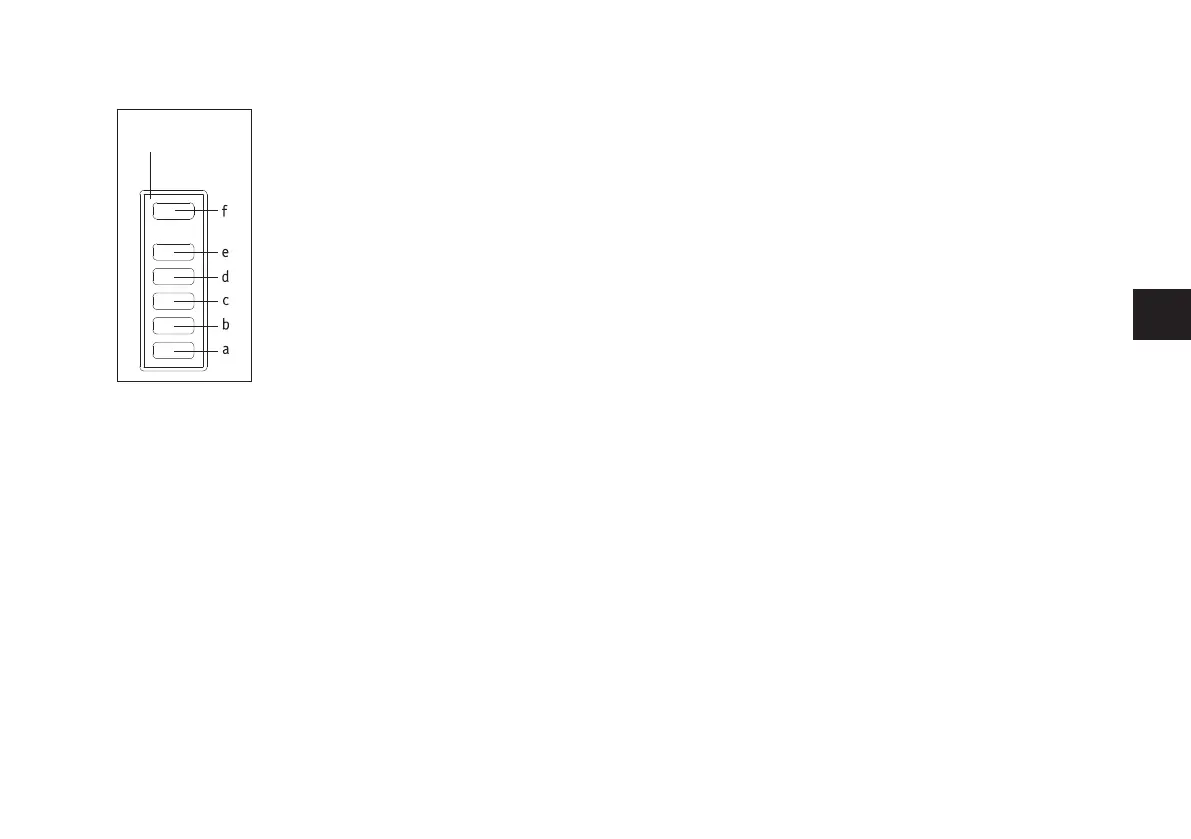
If the control unit is connected to the drive wheels, the display [17] shows the charging status of the weaker
battery as follows:
LED [a] flashes: Battery charge status < 10%
LED [a] lights up: Battery charge status > 10%
LEDs [a] and [b] light up: Battery charge status > 20%
LEDs [a], [b] and [c] light up: Battery charge status > 40%
LEDs [a], [b], [c] and [d] light up: Battery charge status > 60%
LEDs [a], [b], [c], [d] and [e] light up: Battery charge status > 80%
12.2 The charge status of the control unit battery
The charging status of the control unit battery is only indicated in the display [17] by LED [f].
LED [f] lights up green continuously: Battery capacity > 20-100%
LED [f] lights up yellow continuously: Battery capacity > 10-20%
LED [f] lights up red continuously: Battery capacity > 2-10%
LED [f] flashes red continuously: Battery capacity < 2%, battery almost empty
12.3 Error and warning messages on the control unit
Error and warning messages are shown on the LED display [1] on the affected wheel(see e-motion M25 oper-
ating manual
.
• The LED [f] flashes red if a serious error occurs that prevents further travel with the e-motion wheels.
Check the LED display [1] on the affected e-motion wheel for precise identification of the error. Altern-
atively, the wheel can be connected to the e-motion Mobility app for fault analysis.
• If a warning occurs that allows you to continue your journey, the LED [f] flashes yellow.
Check the LED display [1] on the affected e-motion wheel to identify the exact warning.
• If an error has occurred on the control unit, the LED [f] lights up red. The control unit then switches off
automatically after 10 seconds.
17



 To Next Page