2 83
2. Attaching and removing the control unit
A retaining plate [21] for mounting the control unit to your wheelchair was attached by your specialist dealer.
You can insert the control unit into the retaining plate and remove it at any time.
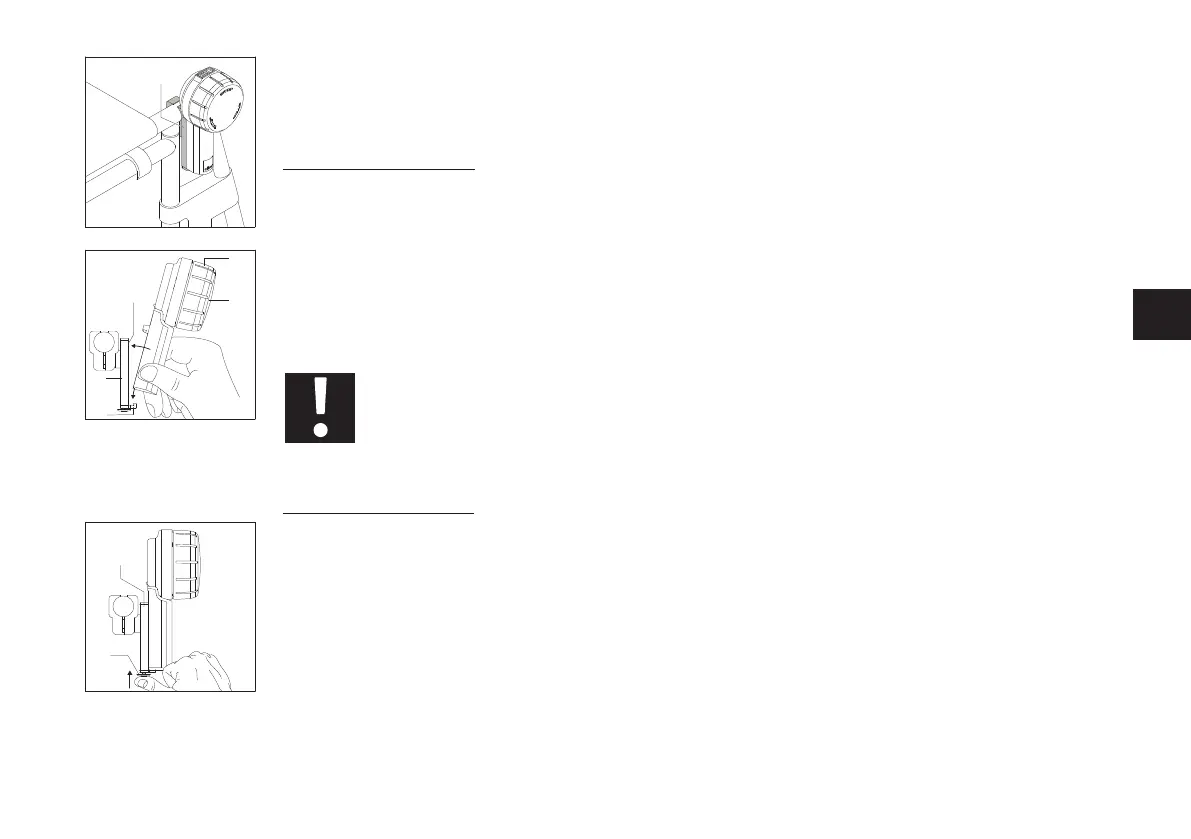
Attaching the control unit
• Apply the parking brakes of your wheelchair.
• Switch off both e-motion wheels (see the e-motion M25 operating manual).
• If the control unit is switched on, switch it off as well (see Chapter 9).
• Then insert the control unit into the mount [21a] on the retaining plate [21] at a slight angle. In doing so,
hold the control unit by the handle at the bottom. Do not ever hold it by the speed dial [16] (see diagram).
• Tilt the control unit towards the retaining plate [21] until it audibly locks into place in the mount [21b].
• Check that the control unit is seated securely in the retaining plate [21].
When inserting the control unit into the retaining plate [21], do not ever hold it by the
speed dial [16]. Hold it only by the handle (see diagram opposite). This prevents you from
switching on the control unit unintentionally.
Removing the control unit
• Apply the parking brakes of your wheelchair.
• If you have not already done so, switch off both e-motion wheels (see the e-motion M25 operating manual).
• Switch off the control unit (see Chapter 9).
• Press the locking mechanism [22] on the lower end of theretaining plate [21].
• Remove the control unit from the retaining plate [21]. In doing so, hold the control unit by the handle.
Do not ever hold it by the speed dial [16].
• Put the control unit down in a safe place.
21



 To Next Page