English
Scanner Operation Overview
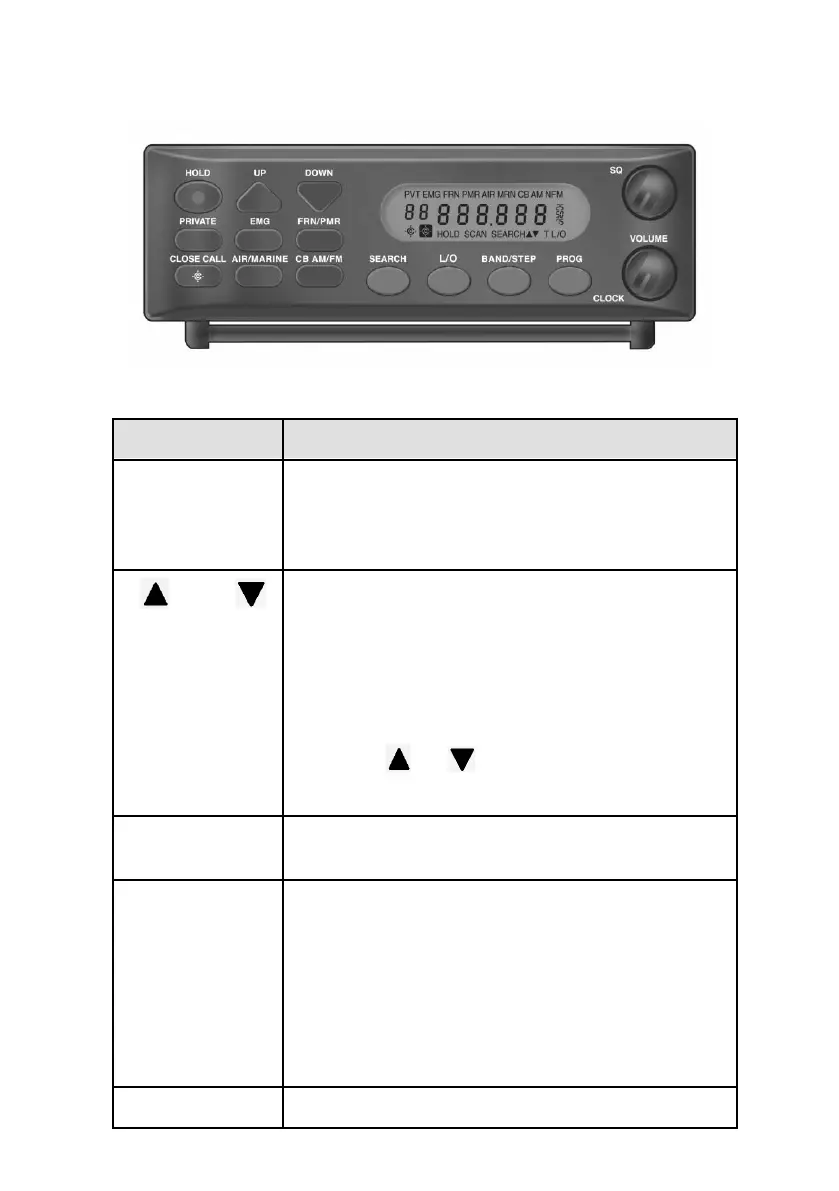
AE355M Front Panel
Press this key to stop scanning or searching and
to remain on the current frequency. “
HOLD
”
displays on the screen.
Press
HOLD
a second time to resume scanning.
Press these directional keys to:
• Manually search up or down for frequencies
while in Hold mode.
• Change direction of a search during Search
mode.
• Quickly search up or down for frequencies
(hold or for longer than 1 second)
while in Hold mode.
Scans user-programmed channels programmed
into the PRIVATE bank.
Press this key to scan the EMG bands.
NOTE: For Germany (Band Plan 2) EMG covers the
4 m Band for Safety and Emergency Organizations.
For Band Plan 1, EMG covers the Mosque frequencies
and EMG has 100 PRIVATE channels. These user
programmed channels are scanned after the
preprogrammed channels if the EMG is selected.
Press this key to scan the Freenet (FRN) and


 To Next Page