— 11 —— 10 —
INSTALLATION
u
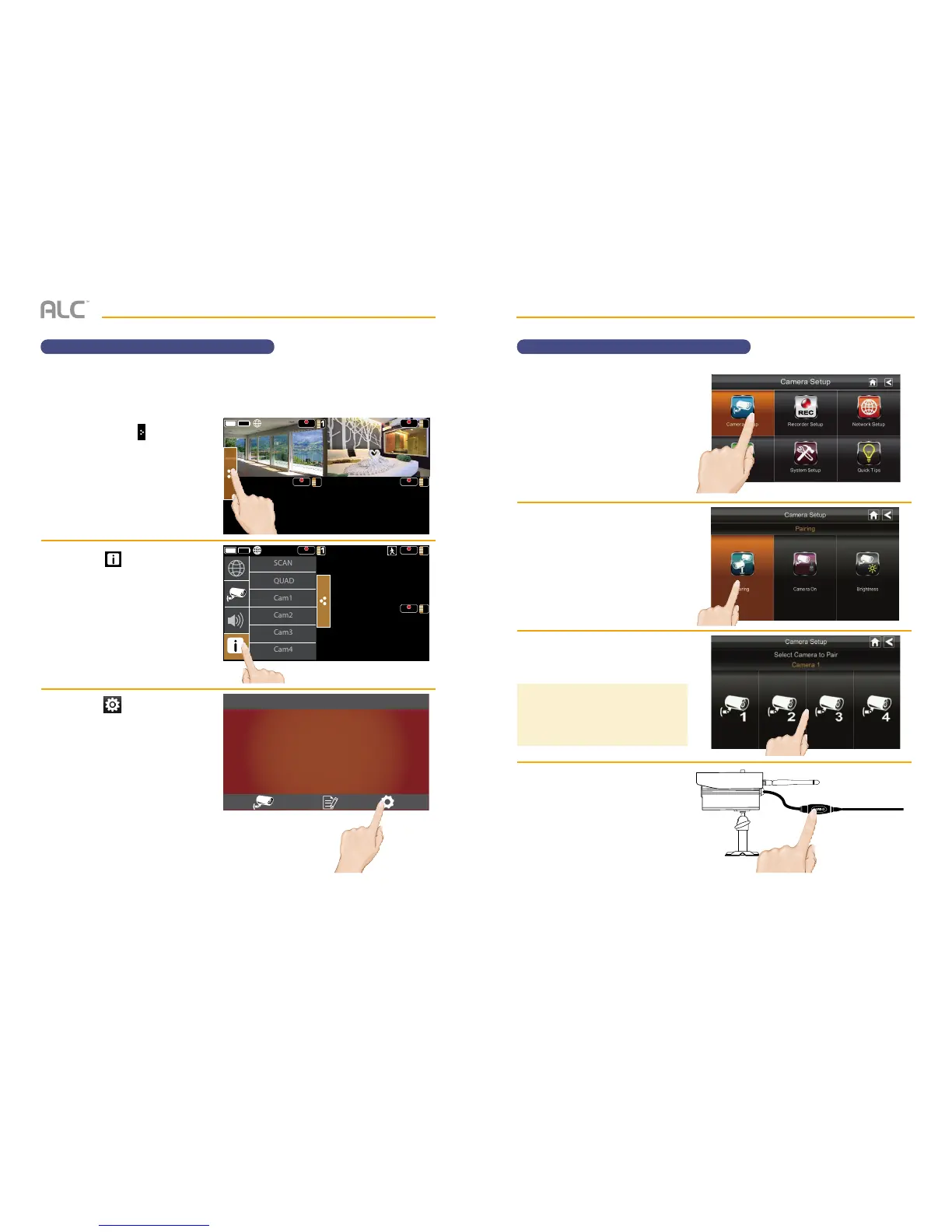
Tap the Pop Up Menu tab to
access the Menu options.
v
Tap the icon to enter the
screen as shown at right.
w
Tap the icon to access the
System Setup screen.
REC REC
2
REC
4
REC
3
REC REC
REC
4
SCAN
QUAD
Cam1
Cam2
Cam3
Cam4
Pop up
menu tab
Motion
status
08-27-2014 10 : 22 AM
Wireless Made Simple.
ALC
Camera Pairing
When you add a new camera to your system, you have to “introduce” the camera and monitor
to each other so they can communicate.
INSTALLATION
Camera Pairing
x
Tap Camera Setup to access
the Camera Setup screen.
y
Tap Pairing.
U
Tap the camera image you want to
pair. A processing icon displays for
a 60 second countdown.
V
Tap and release the Pairing button
on that camera’s power cord.
The countdown will end when
the pairing process is complete.
When paired, the camera’s Link
Status LED will blink green. If a
camera is already assigned to
the selected channel, the monitor
overwrites that camera link with
the
new one.
TIP: Only pair one camera at a time! The
monitor links to the first camera it detects.
If two or more cameras are in pairing mode,
you can’t control which camera the monitor
will detect first.



 To Next Page