Residential HRV/ERV
22
With this wiring, the unit can be operated at the following settings:
- Off
- Low Speed Exchange
- High Speed Exchange
- Low Speed Recirculation (except for models H/E110-TF)
- High Speed Recirculation (except for models H/E110-TF)
Low and High speeds can be adjusted with FlexControl (refer to page 33).
B) Activating the EvacMAX option
When using one or more timers with your unit, you can activate the EvacMAX option. This
function provides a boost for maximum ventilation. Once your unit is wired, unplug the HRV
and then plug it back in while holding down the black button on the control panel for two
seconds. The light will blink once. This means the EvacMAX option is activated.
If you wish to turn off this function, press down the push button for two seconds. The light
will blink twice to indicate the EvacMAX option has been turned off.
Note that EvacMAX is not available for units ending with -NOVO.
C) Unit wiring for Slave Mode
In slave mode, an external device or switch will dictate when the unit will operate. This is the
case for VentZone® Systems, use of third party thermostats with built in HRV/ERV controls,
and use of external third party switches that are used to enable/disable the unit. Installations
requiring a switch to enable or disable the unit via a wall switch will need to be placed into
slave mode.
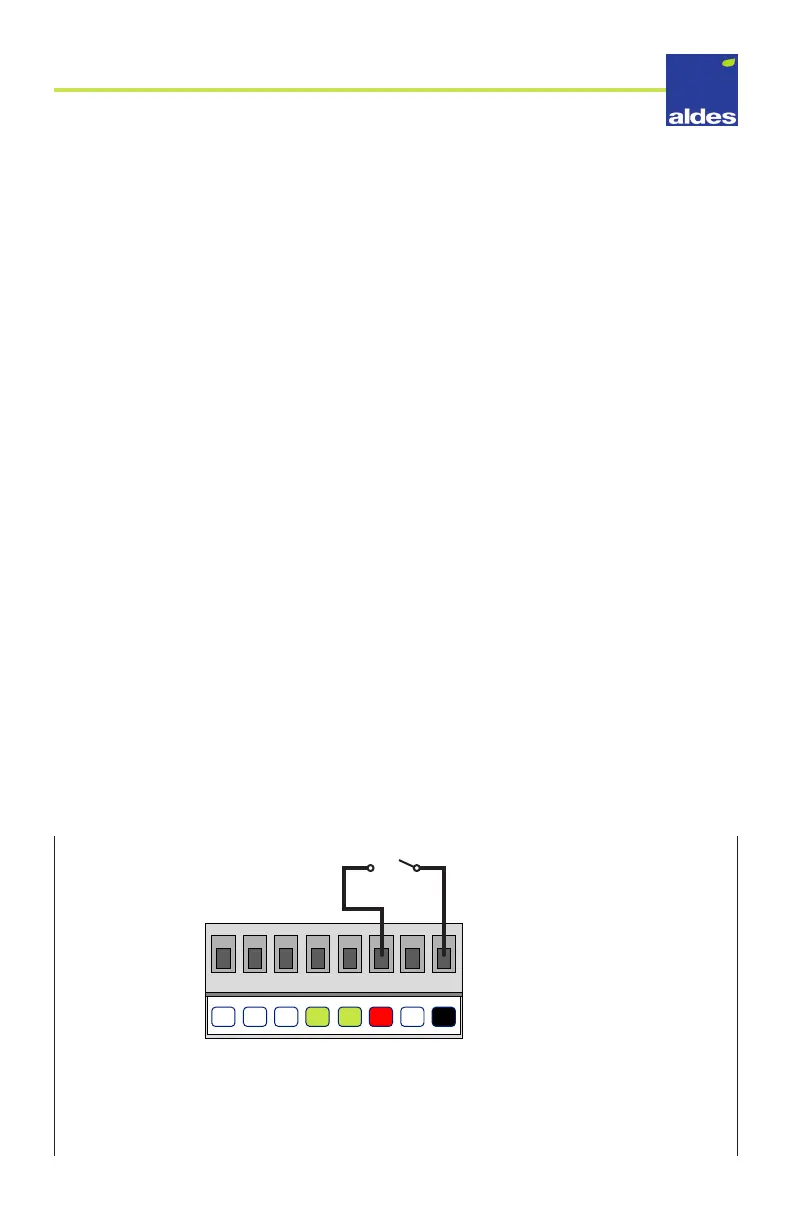
To enable low speed exchange, a connection must be made between terminals 1 and 3 (see
illustration below). If this connection is open, the HRV/ERV will be put into standby mode.
This connection can be made using any 24V switch or dry contact controller, such as a smart
thermostat with integrated ventilator control or a programmable timer.
Slave Mode - Enabling Low Speed
NO
NC
GRN
GRN
RED
WHT
8
7 6
2
1
345
(SWITCH)
TERMINAL BLOCK
BLK
COM



 To Next Page