11
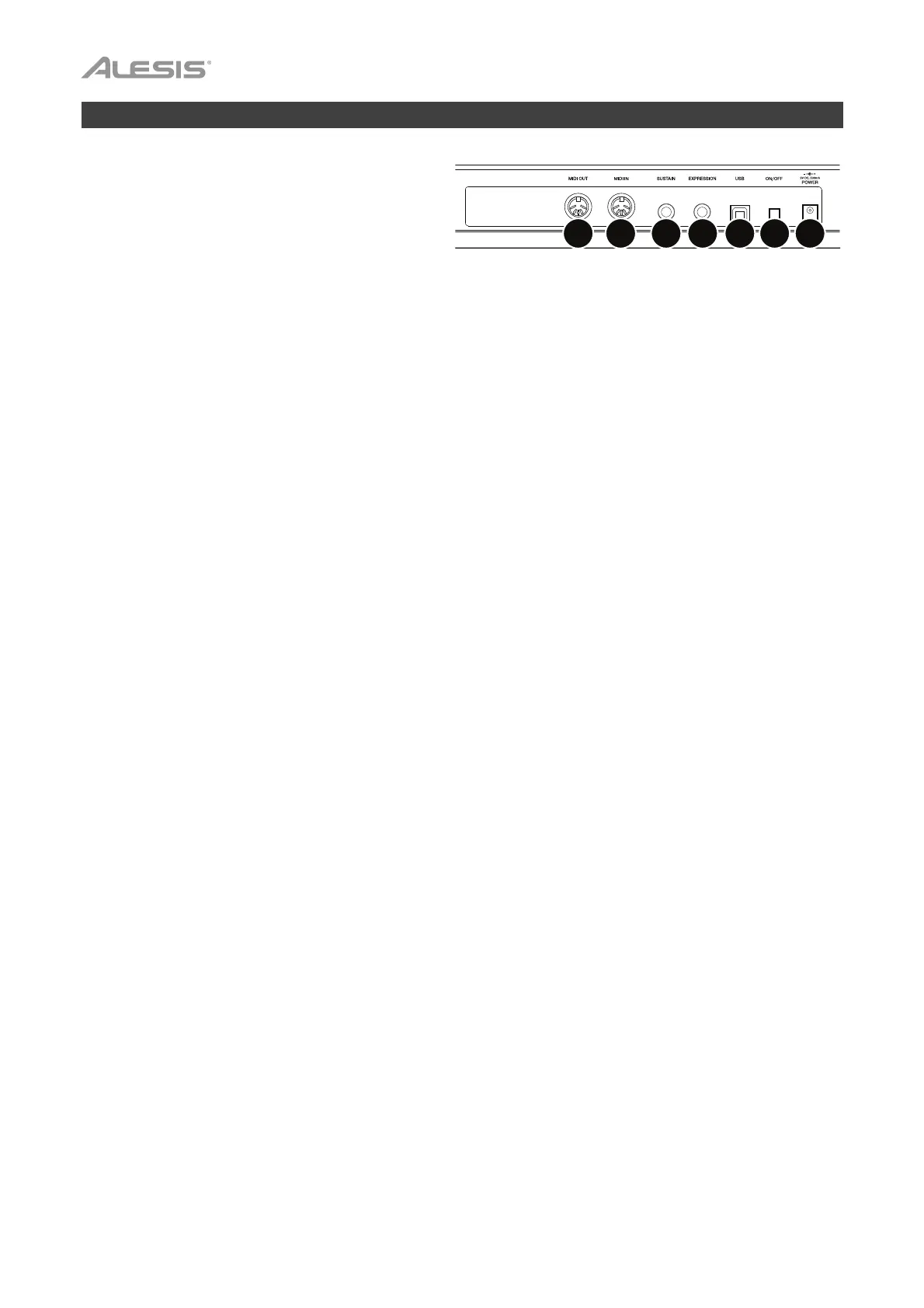
Rear Panel
1. Power Button: Press this button to power the
VX49 on or off.
2. Power Input: Connect this power input to a
power outlet using an optional power adapter (9
VDC, 500 mA, center-positive, sold separately).
3. USB Port: Use a standard USB cable to
connect this USB port to your computer. The computer’s USB port provides ample power to VX49. If you
connect it to a USB hub, make sure it is a powered hub. This connection is also used to send and
receive MIDI data to and from your computer.
When using VX49 with external MIDI equipment:
• If an external device is connected to the MIDI Out, your computer can send MIDI messages out
along this path: Computer VX49 External Device.
• If an external device is connected to the MIDI In, the external device sends MIDI messages in along
this path: External Device VX49 Computer. MIDI messages can then be sent to an external
device via the MIDI Out, but they must pass through the computer first.
4. MIDI Out: Use a standard five-pin MIDI cable to connect this MIDI Out to the MIDI In of an external MIDI
device (e.g., a synthesizer, sequencer, drum machine, etc.). Please see the above USB Port description
for information about how MIDI messages are routed while using VX49.
5. MIDI In: Use a standard five-pin MIDI cable to connect this MIDI In to the MIDI Out of an external MIDI
device (e.g., another MIDI controller). The MIDI messages sent to this MIDI In will be sent to your
computer via the USB port. Please see the above USB Port description for information about how MIDI
messages are routed while using VX49.
6. Sustain Pedal Input: Connect an optional 1/4” (6.35 mm) TS sustain pedal to this input.
7. Expression Pedal Input: Connect an optional 1/4” (6.35 mm) TRS expression pedal to this input.
4
5
6
7
312


 To Next Page