17
Controlling Your Patch or Your DAW
VX49 has two modes that let you view and control your patch parameters in VIP or functions your DAW:
Control Mode and MIDI Mode.
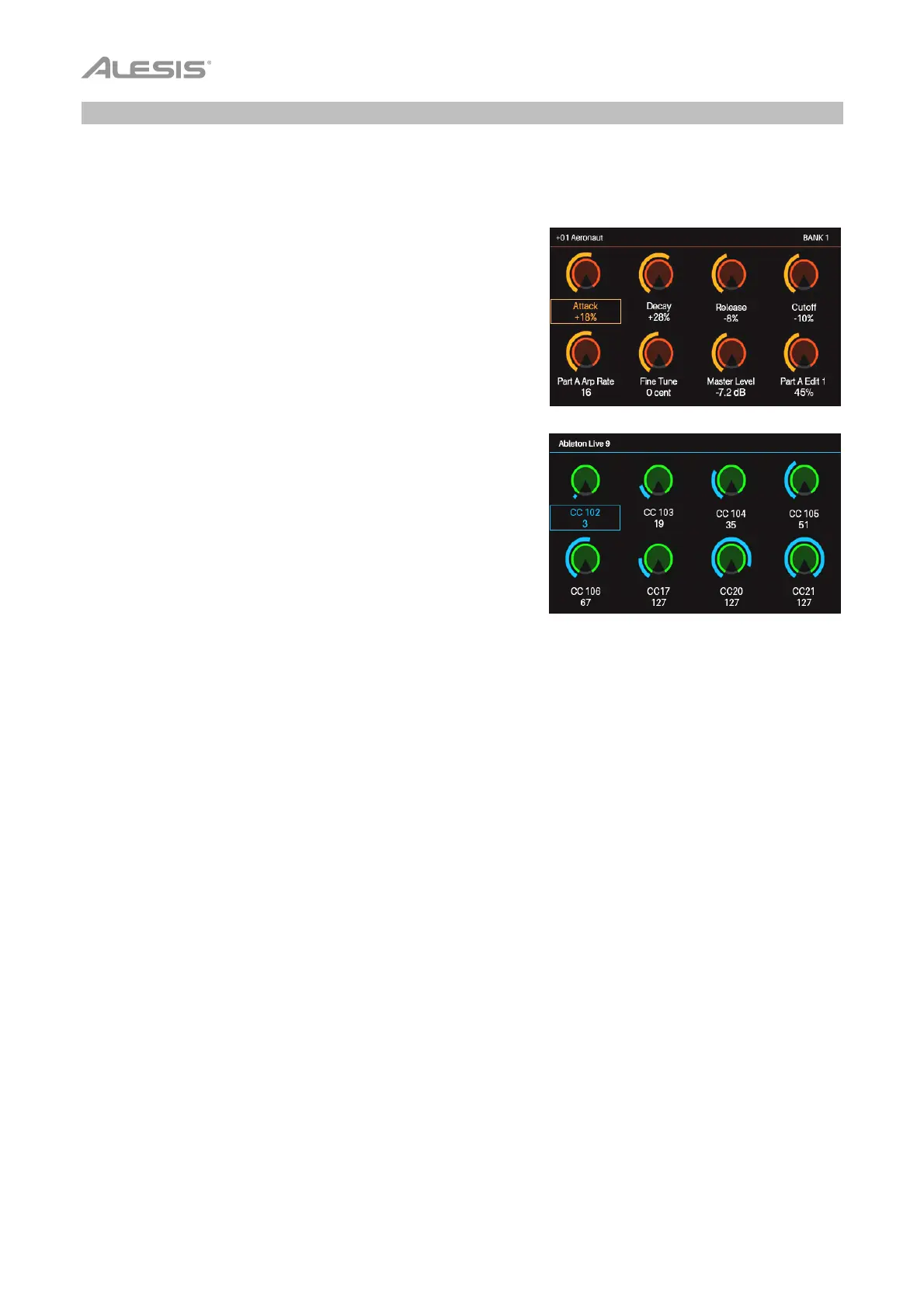
Control Mode shows you the current settings of VX49’s controls
in VIP. Press the Control mode button to enter it. You can
access this mode only when using VIP.
To adjust the value or change the state of a control, simply turn the
encoder or press the switch or pad.
To learn how to edit the parameters of these controls (minimum
values, maximum values, CC or note numbers, etc.), see the
Control Edit Mode chapter.
MIDI Mode shows you the current settings of VX49’s controls
when used with your DAW (or an external MIDI device). Press
Shift and the Control (MIDI) mode button to enter it.
To adjust the value or change the state of a control, simply turn
the encoder or press the switch or pad. If you’re using VIP, you
can do this in MIDI Mode (or MIDI Edit Mode) or Setup Mode. If
you’re not using VIP, you can do this in any mode.
To learn how to edit the parameters of these controls (minimum
values, maximum values, CC or note numbers, etc.), see the
MIDI Edit Mode chapter.


 To Next Page