38 | Setting up the monitor
Attaching the VESA adapter (optional)
By installing the supplied VESA adapter onto the back of the display, you can
attach a wall-mount kit or 3rd-party arm (sold separately) to the monitor.
NOTE: The wall-mount kit or 3rd-party arm is not shipped with this
monitor.
1. Plac
e the monitor panel on a soft cloth or cushion on a stable flat surface.
2. Remove
the monitor stand. (See Removing the monitor stand.)
3. At
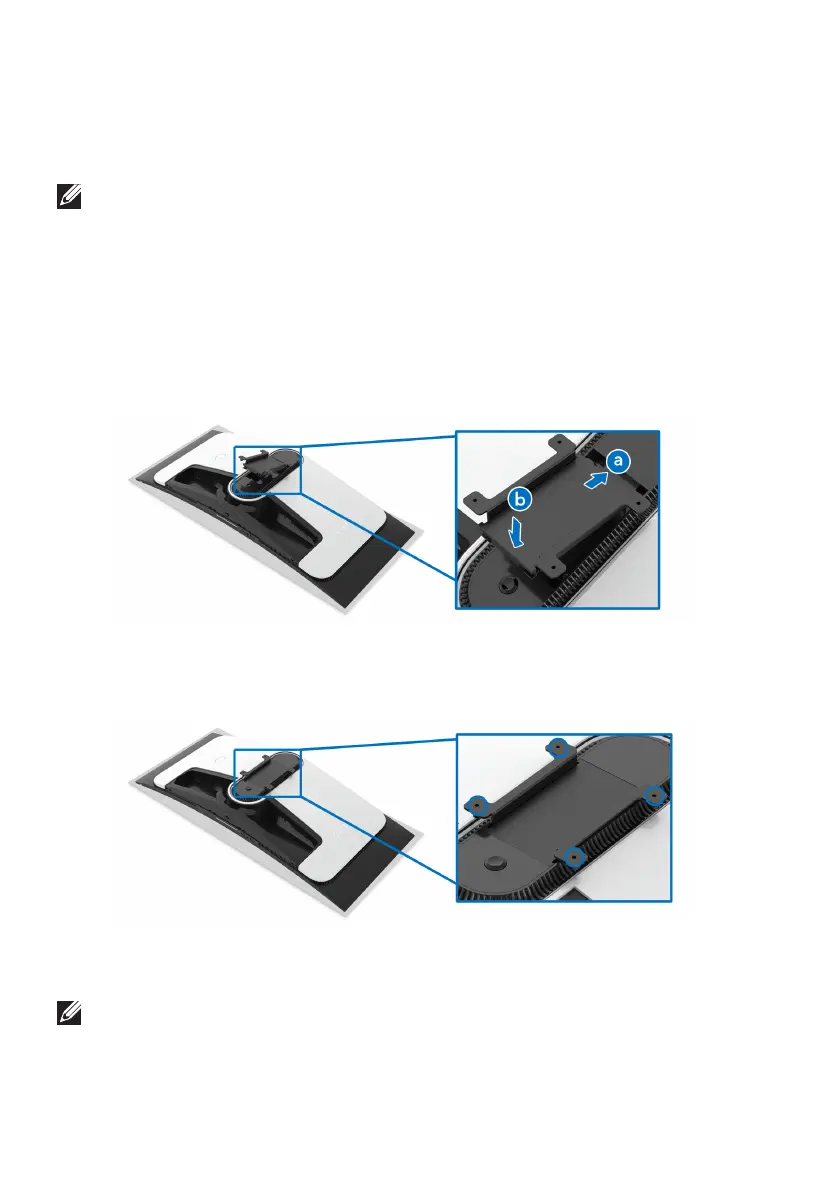
tach the supplied VESA adapter to the monitor.
a. Ins
ert the tabs on the VESA adapter into the slots on the display back
cover.
b. Lowe
r the VESA adapter to snap it into place.
4. Using a Phillips crosshead screwdriver, tighten the wall mounting kit
(100 mm x 100 mm) to the VESA adapter with four screws (M4 x 10 mm,
s
hipped with the monitor).
5. Mount the monitor on the wall by following the instructions that come with
the purchased wall-mount kit/3rd-party arm.
NOTE: For use only with UL-listed wall mount bracket with minimum
weight or load bearing capacity of 27.68 kg.















 To Next Page