Label Description Use
1 Regulatory label Lists the regulatory approvals.
2 Cable-management clips (2) To organize the cables neatly.
3 Barcode, serial number, and
Servic
e Tag label
See this label if you need to contact
Dell for technical support. The Service
Tag is a unique alphanumeric identifier
that enables Dell service technicians to
identify the hardware components in
your monitor and access warranty
information.
4 Stand release button Releases the stand from the monitor.
5 Cable-management slot (at
th
e back of the stand)
To organize cables by routing them
through this slot.
6 I/O cover Protects the I/O ports.
12 | About your monitor
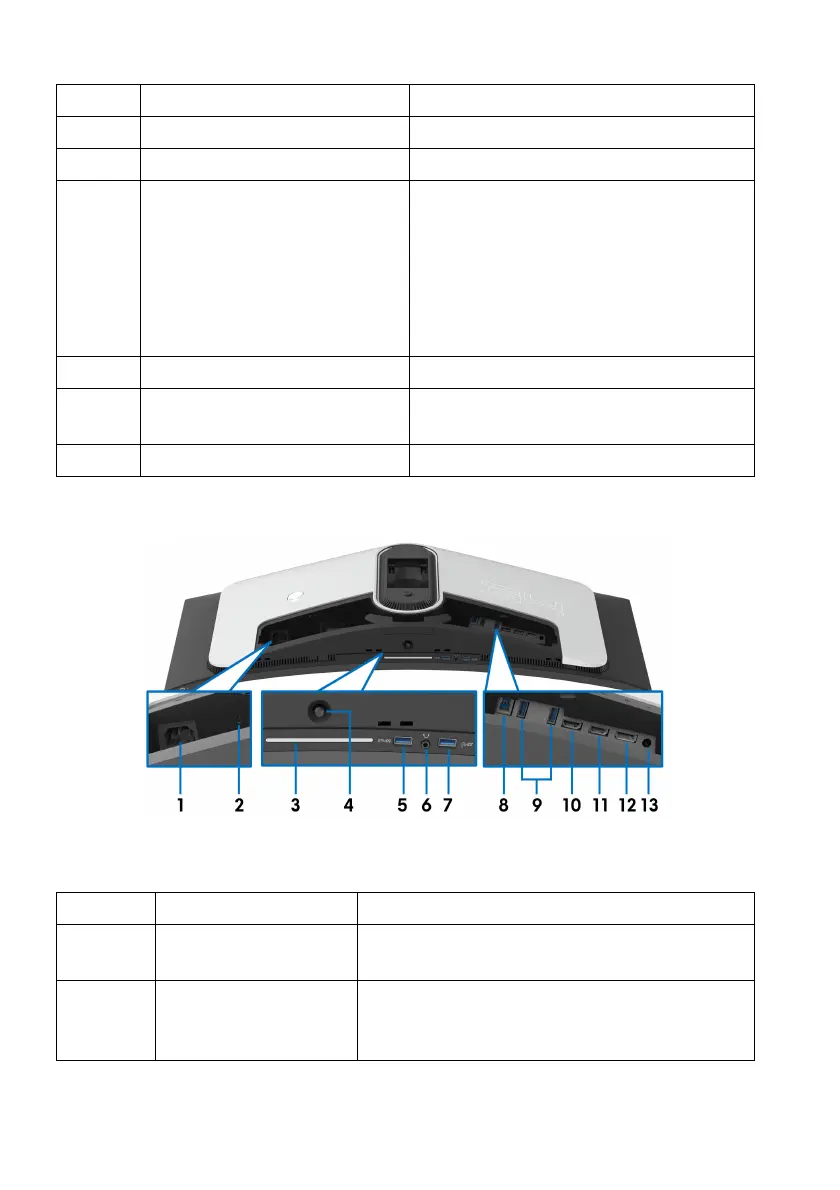
Rear and bottom view
Rear and bottom view without monitor stand
Label Description Use
1 Power connector Connect the power cable (shipped with your
monitor
).
2 Security-lock slot
(based on
Kensington
Security Slot)
Secure the monitor with a security lock
(security lock not included).















 To Next Page