Setting up your gaming mouse | 17
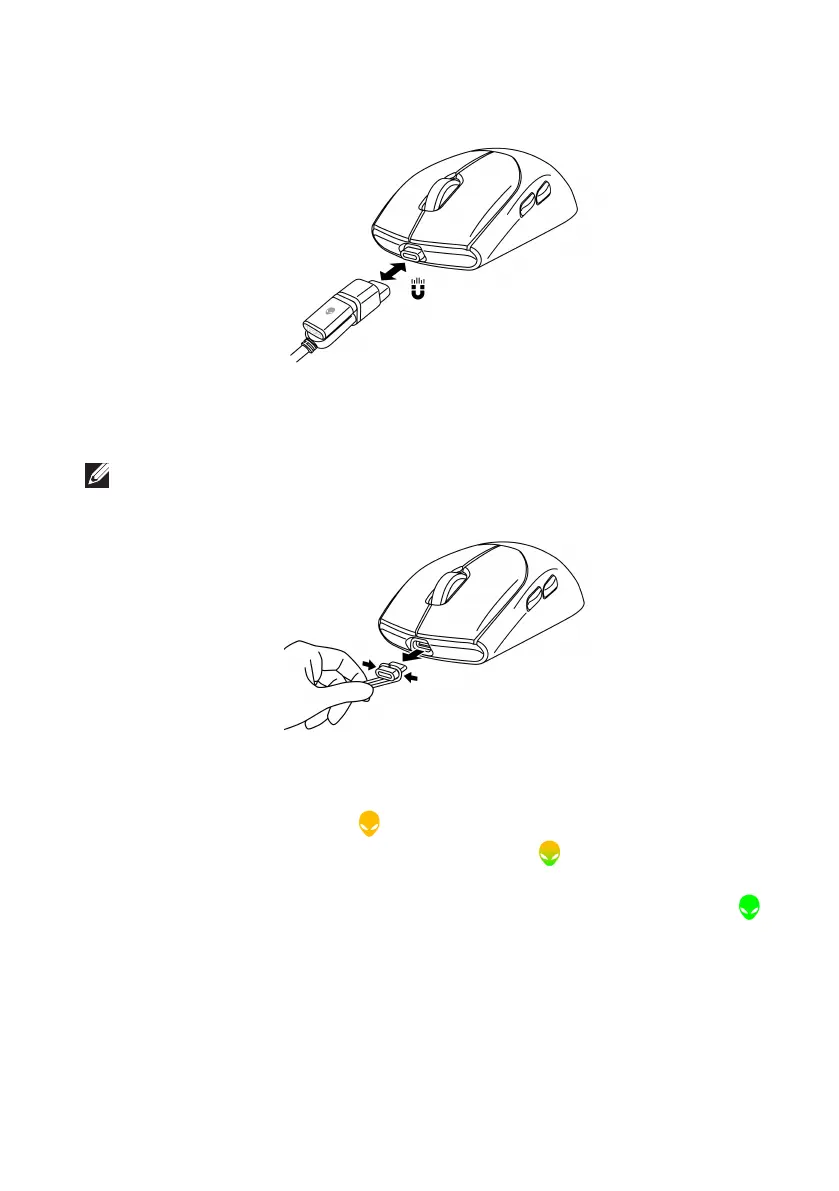
4. Snap the magnetic end of the USB-C magnetic dongle to the magnetic
port of the dongle extender.
5. When the battery is fully charged, the battery indicator blinks in green for
2 seconds and then stays static green for 10 seconds. After 12 seconds, it
reverts to the user default lighting.
NOTE: Use the clip to remove the USB-C magnetic dongle from the
mouse.
Battery indicator colors
• Low power: Amber pulsing ( )
• Charging: Morphing between amber and green ( ) for 12 seconds. After 12
seconds, it reverts to the user default lighting.
• Fully charged: Blinks in green for 2 seconds and then stays static green ( )
for 10 seconds. After 12 seconds, it reverts to the user default lighting.


 To Next Page