EasyManua.ls Logo

Alinco DJ-V57 - User Manual

Alinco DJ-V57
72 pages
Print Icon
To Next Page IconTo Next Page
Loading...
ALINCO, INC.
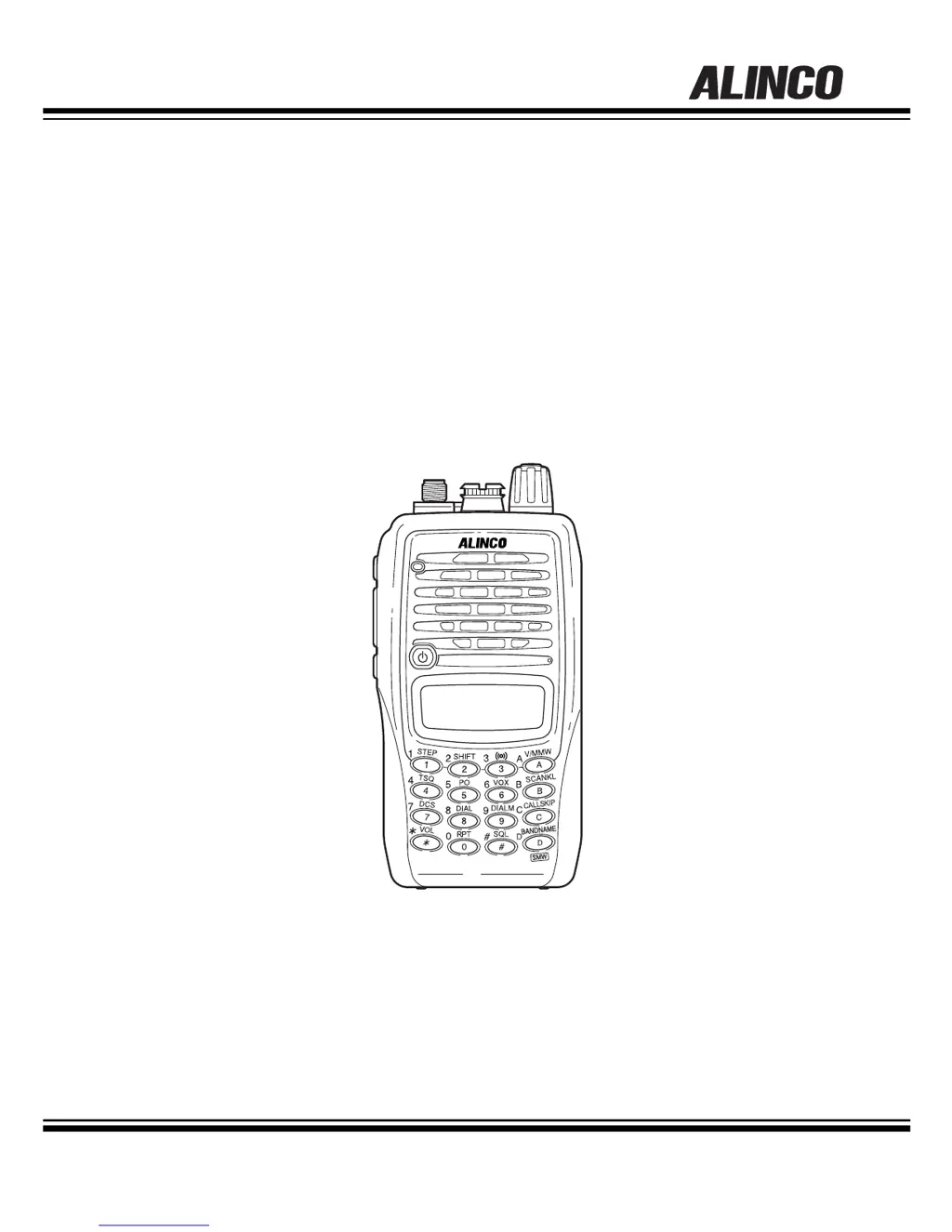
144/430MHz DUAL BAND FM TRANSCEIVER
DJ-V57
Instruction Manual
Thank you for purchasing your new Alinco transceiver. Please read this manual
carefully before using the product to ensure full performance, and keep this manual for
future reference as it contains information on after-sales service.
In case addendum or errata sheets are included with this product, please read those
materials and keep them together with this instruction manual for future reference.

Table of Contents

Other manuals for Alinco DJ-V57

Questions and Answers

  • B
    Bobby GreenAug 15, 2025
    What to do if there is no speaker audio or reception on my Alinco Transceiver?
    • C
      cthomasAug 16, 2025
      If you're experiencing no speaker audio or reception on your Alinco Transceiver, here are a few things to check: * Ensure the volume isn't too low by adjusting the audio level. * Verify the squelch level isn't set too high. * Make sure tone squelch and DCS are turned off. * Also, confirm you are not pressing the PTT key and transmitting; release the PTT key.
  • J
    Janice LoweAug 18, 2025
    How to fix Alinco Transceiver when nothing appears on the display?
    • E
      Eileen DanielsAug 18, 2025
      If nothing appears on the display of your Alinco Transceiver when you turn it on, the issue might be due to: * A poor battery pack connection: Check that the battery pack terminals are clean and that the pack is correctly attached. * An exhausted battery: Recharge or replace the battery. * Releasing the power key too quickly: Hold the power key down until the display shows figures.
  • A
    Alexis BirdAug 21, 2025
    Why can't my Alinco Transceiver transmit or talk to other stations?
    • M
      Matthew GrayAug 21, 2025
      If you can't transmit or talk to other stations with your Alinco Transceiver, consider these potential causes: * You might not be pressing the PTT key firmly enough. Ensure you press the PTT key and confirm that the TX/RX lamp lights red. * You could be off-frequency. Make sure you are within the TX range and check the shift status. * The frequency might be incorrect. Verify the shift status and repeater settings.
  • D
    David MartinezAug 25, 2025
    What to do if the frequency display is incorrect on my Alinco Transceiver?
    • S
      Scott SteeleAug 25, 2025
      If the frequency display on your Alinco Transceiver is incorrect, it could be due to: * A CPU error: Reset the unit. * A channel name being set: Refer to the Naming Memory Channels function.
  • A
    Abigail Wilson DVMAug 27, 2025
    Why frequency and memory number don't change on my Alinco Transceiver?
    • D
      Desiree JamesAug 27, 2025
      If the frequency and memory number on your Alinco Transceiver aren't changing, it could be because: * Keylock is enabled: Turn off Keylock. * The transceiver is in Call mode: Select the VFO or Memory mode.
  • A
    Alex BrownAug 30, 2025
    What causes the display to flash or go out when transmitting on my Alinco Transceiver?
    • S
      sarah92Aug 31, 2025
      If the display flashes or goes out when you transmit on your Alinco Transceiver, the battery may be exhausted. Recharge or replace the battery.
  • G
    gilmoreroySep 2, 2025
    Why does the display flash or disappear during reception on my Alinco Transceiver?
    • S
      Sara HernandezSep 2, 2025
      If the display flashes or disappears during reception on your Alinco Transceiver, it's likely that the battery is exhausted. Try recharging or replacing the battery.
  • R
    Rebecca JohnsonSep 5, 2025
    Why key entry is not possible on Alinco Transceiver?
    • H
      Howard BryantSep 5, 2025
      If key entry is not possible on your Alinco Transceiver, the Keylock function may be activated. Turn off Keylock.
  • N
    Nicole WeaverSep 8, 2025
    Why Alinco Transceiver won't scan?
    • M
      Misty PowellSep 8, 2025
      If your Alinco Transceiver won't scan, it might be because the squelch is unmuted. Set the squelch so that noise mutes.
  • B
    beth00Sep 12, 2025
    How to troubleshoot if repeater-access can't be used on Alinco Transceiver?
    • B
      bentonedwinSep 12, 2025
      If repeater-access can't be used on your Alinco Transceiver, the parameters may be set incorrectly. Set the correct parameters to suit your local repeaters.

Summary

Safety Warnings

General Warnings and Symbols

Explains hazard symbols (Danger, Alert, Caution) and general warnings.

Environment and Conditions of Use

Guidelines for using the radio in different environments.

Handling the Product Safely

Precautions for operating and handling the transceiver.

Charger and Power Supply Safety

Safety instructions for using chargers and power adapters.

Accessories Installation and Handling

Battery Pack Safety Precautions

Important safety guidelines for handling and charging battery packs.

Battery Pack Charging Procedures

Detailed instructions on how to charge the battery pack.

Preventing Battery Short-Circuiting

Guidance to prevent short circuits when handling battery packs.

Basic Operation Procedures

Power On;Off and Volume Adjustment

Instructions for powering the unit on/off and setting audio volume.

VFO Mode Frequency Setting

Guide to setting frequencies in VFO mode using dial or keypad.

Shift Direction and Offset Frequency

Instructions for setting repeater offset frequencies and shift directions.

Transmitting and Output Levels

How to transmit, select output power levels, and use the monitor function.

Selective Calling Operations

Auto Dialer Setup and Generation

How to program and generate DTMF auto-dialer codes.

Special Functions

Repeater-Access Function

How to apply repeater access settings to frequencies.

VOX and ALERT Functions

How to use the Voice Operated Transmit (VOX) and Alert functions.

Set Mode Configuration

Entering and Operating Set Mode

Instructions on how to access and navigate the Set mode menu.

Set Mode Parameters (Part 1)

Covers Battery Save, Timer/Busy Scan, Beep, and VOX Delay settings.

Set Mode Parameters (Part 2)

Covers Auto-Power-Off, FM/NFM, and Attenuator settings.

Cloning and Packet Operation

Maintenance and Reference

Troubleshooting Common Issues

A table listing symptoms, causes, and actions for troubleshooting.

Resetting Procedures and Defaults

How to perform full or partial resets and view factory defaults.

Specifications

General Transceiver Specifications

Frequency ranges, channel steps, impedance, power, and temperature.

Transmitter and Receiver Specifications

Details on output power, modulation, sensitivity, and audio output.

Alinco DJ-V57 Specifications

General IconGeneral
Channels200
Memory channels200
Receiver SystemDouble conversion superheterodyne
Impedance50 ohms
TypeHandheld
Frequency Range (RX)136-174 MHz
Frequency Range136-174 MHz, 400-480 MHz
ModulationFM
RF Power output5W (VHF), 4W (UHF)
Power Output5W (VHF), 4W (UHF)
Weight240 g
Receiver Sensitivity0.16 µV (12 dB SINAD)
Voltage7.2 VDC

Related product manuals