ALLEN&HEATH 25 AP10733_1_XONE:PX5 User Guide
XONE:SYNC continued
Receiving MIDI Clock via USB from an external DAW or DJ performance software
The Xone:PX5 can be configured to receive MIDI Clock from an external DAW or DJ performance
software via the USB connection. Connect the Xone:PX5 directly to your computer using a type A-B
USB cable.
Ensure that your software is set-up to transmit MIDI Clock to the Xone:PX5.
Please consult your software application documentation for details on how to do this.
Now, when you start your external DAW, the Xone:PX5 BPM engine will follow the tempo set in
the DAW, and the XONE:FX engine will be in sync.
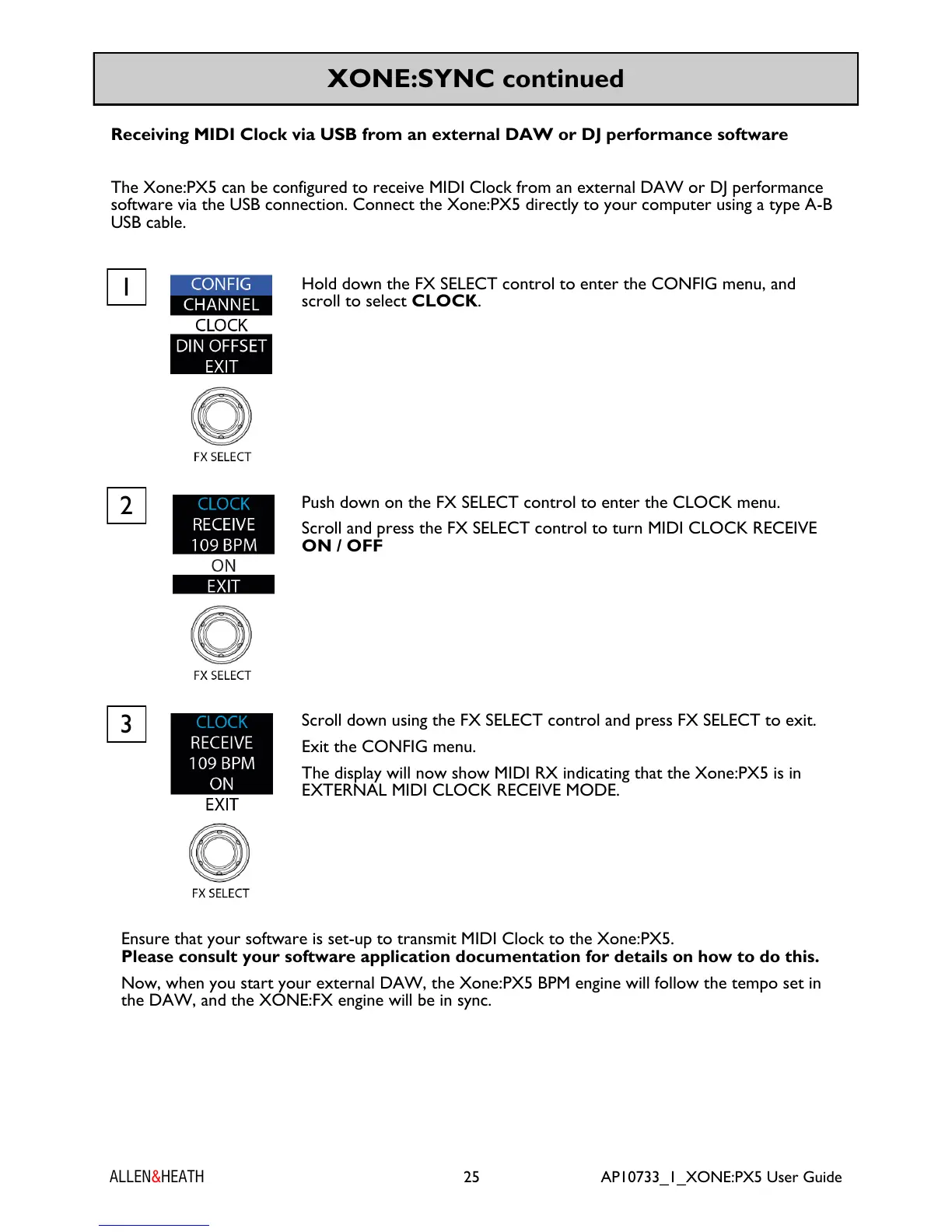
Push down on the FX SELECT control to enter the CLOCK menu.
Scroll and press the FX SELECT control to turn MIDI CLOCK RECEIVE
ON / OFF
2
Hold down the FX SELECT control to enter the CONFIG menu, and
scroll to select CLOCK.
1
Scroll down using the FX SELECT control and press FX SELECT to exit.
Exit the CONFIG menu.
The display will now show MIDI RX indicating that the Xone:PX5 is in
EXTERNAL MIDI CLOCK RECEIVE MODE.
3


 To Next Page
 Loading...