ALLEN&HEATH 19 AP10733_1_XONE:PX5 User Guide
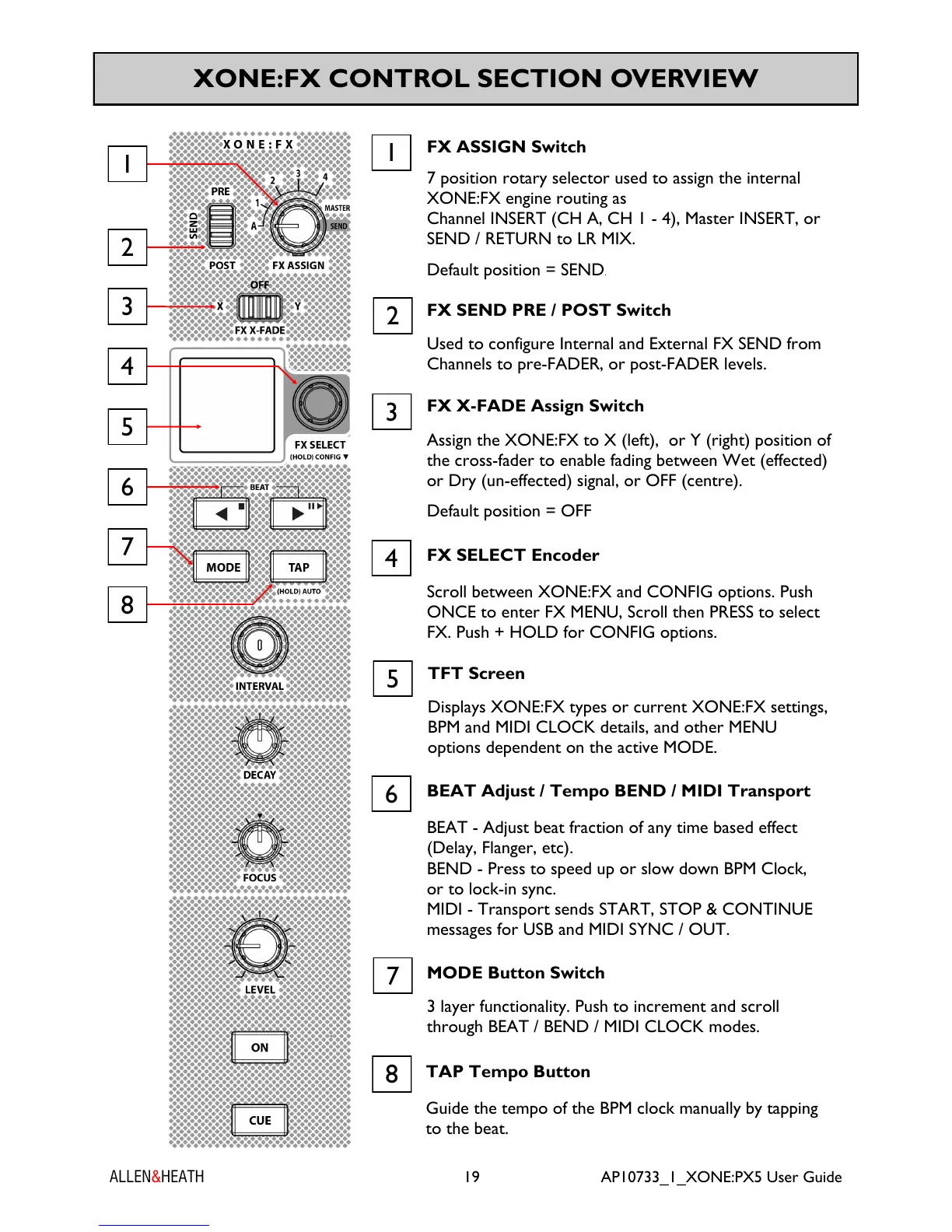
XONE:FX CONTROL SECTION OVERVIEW
1
FX ASSIGN Switch
7 position rotary selector used to assign the internal
XONE:FX engine routing as
Channel INSERT (CH A, CH 1 - 4), Master INSERT, or
SEND / RETURN to LR MIX.
Default position = SEND.
FX SEND PRE / POST Switch
Used to configure Internal and External FX SEND from
Channels to pre-FADER, or post-FADER levels.
2
MODE Button Switch
3 layer functionality. Push to increment and scroll
through BEAT / BEND / MIDI CLOCK modes.
7
TAP Tempo Button
Guide the tempo of the BPM clock manually by tapping
to the beat.
8
FX X-FADE Assign Switch
Assign the XONE:FX to X (left), or Y (right) position of
the cross-fader to enable fading between Wet (effected)
or Dry (un-effected) signal, or OFF (centre).
Default position = OFF
3
TFT Screen
Displays XONE:FX types or current XONE:FX settings,
BPM and MIDI CLOCK details, and other MENU
options dependent on the active MODE.
5
FX SELECT Encoder
Scroll between XONE:FX and CONFIG options. Push
ONCE to enter FX MENU, Scroll then PRESS to select
FX. Push + HOLD for CONFIG options.
4
BEAT Adjust / Tempo BEND / MIDI Transport
BEAT - Adjust beat fraction of any time based effect
(Delay, Flanger, etc).
BEND - Press to speed up or slow down BPM Clock,
or to lock-in sync.
MIDI - Transport sends START, STOP & CONTINUE
messages for USB and MIDI SYNC / OUT.
6
4
1
7
8
6
3
2
5


 To Next Page
 Loading...