ALLEN&HEATH 52 AP10733_1_XONE:PX5 User Guide
REPLACING THE CROSS-FADER
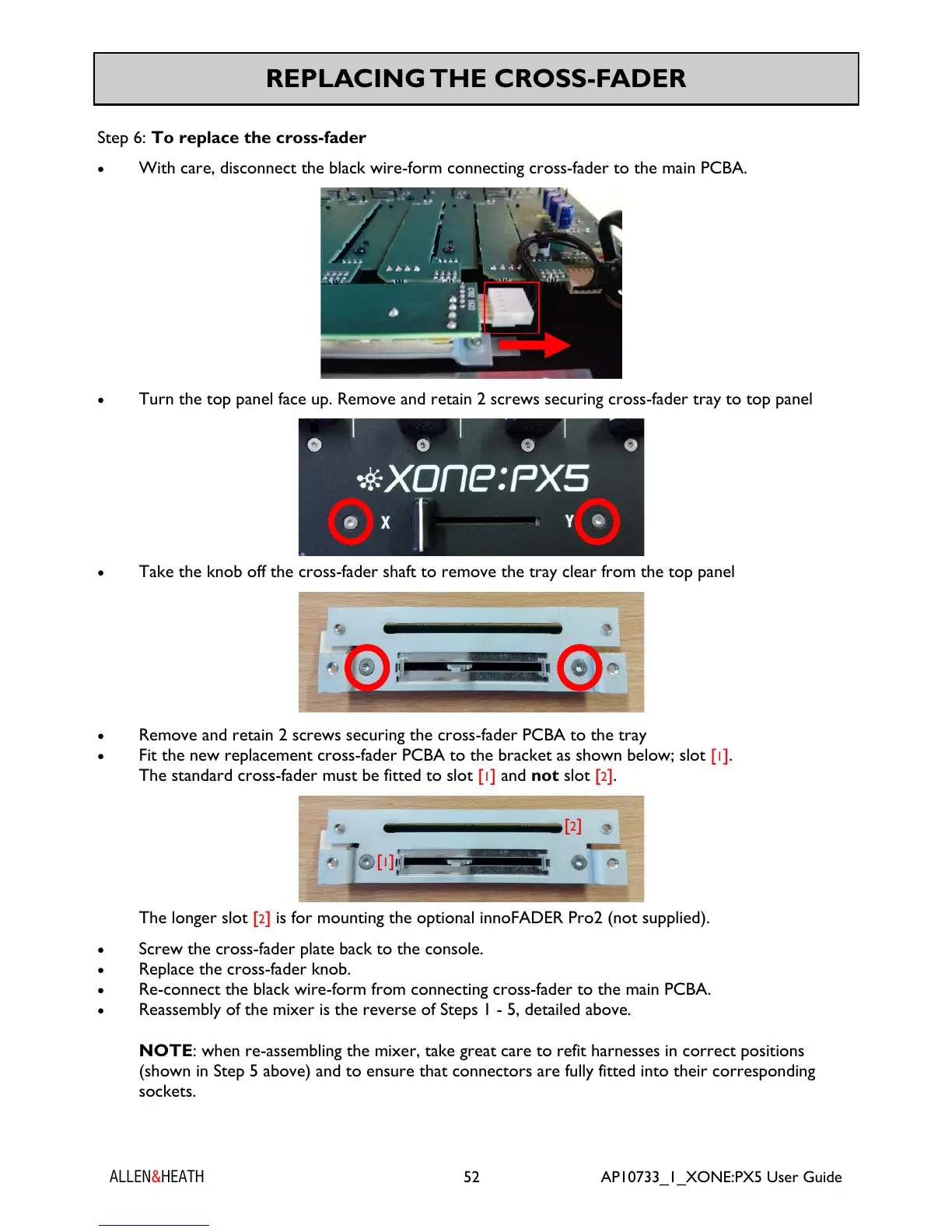
Step 6: To replace the cross-fader
With care, disconnect the black wire-form connecting cross-fader to the main PCBA.
Turn the top panel face up. Remove and retain 2 screws securing cross-fader tray to top panel
Take the knob off the cross-fader shaft to remove the tray clear from the top panel
Remove and retain 2 screws securing the cross-fader PCBA to the tray
Fit the new replacement cross-fader PCBA to the bracket as shown below; slot [1].
The standard cross-fader must be fitted to slot [1] and not slot [2].
The longer slot [2] is for mounting the optional innoFADER Pro2 (not supplied).
Screw the cross-fader plate back to the console.
Replace the cross-fader knob.
Re-connect the black wire-form from connecting cross-fader to the main PCBA.
Reassembly of the mixer is the reverse of Steps 1 - 5, detailed above.
NOTE: when re-assembling the mixer, take great care to refit harnesses in correct positions
(shown in Step 5 above) and to ensure that connectors are fully fitted into their corresponding
sockets.
[1]
[2]



 To Next Page
 Loading...