Chapter 2
Installation
This Chapter covers the physical installation of the Wireless-N Broadband
Router.
Requirements
• Network cables. Use standard 10/100BaseT network (UTP) cables with RJ45 connectors.
• TCP/IP protocol must be installed on all PCs.
• For Internet Access, an Internet Access account with an ISP, and a DSL connection.
• To use the Wireless Access Point, all Wireless devices must be compliant with the IEEE
802.11g, IEEE 802.11b or IEEE 802.11n Draft specifications.
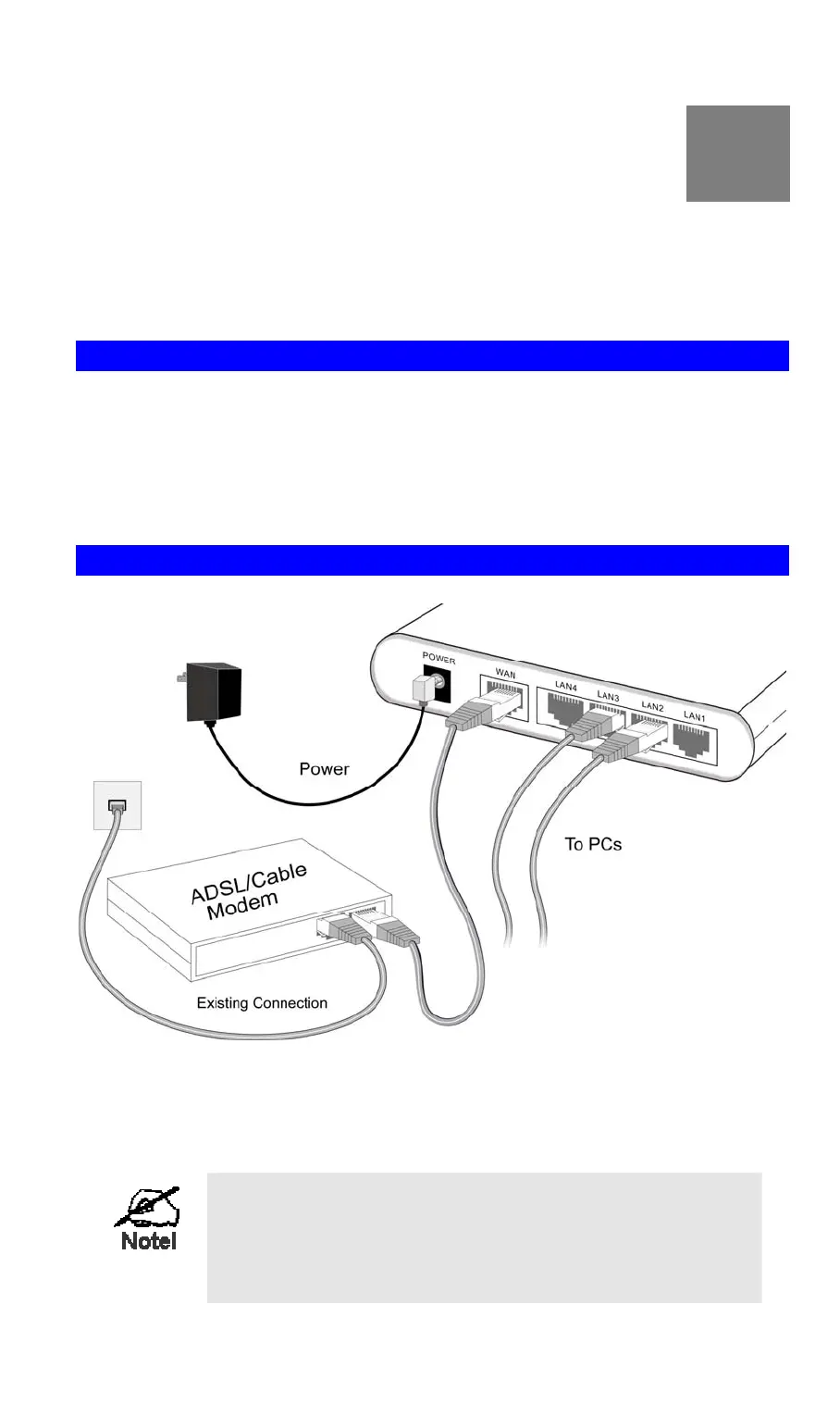
Procedure
Figure 4: Installation Diagram
1. Choose an Installation Site
Select a suitable place on the network to install the Wireless-N Broadband Router.
For best Wireless reception and performance, the Wireless-
N Broadband Router should be positioned in a central loca-
tion with minimum obstructions between the Wireless-N
Broadband Router and the PCs.
Also, if using multiple Access Points, adjacent Access
2
7



 To Next Page