FMI-B
FMI-S
Bedienungsanleitung
Operation manual
Notice d’utilisation
Instrucciones de servcio
Istruzioni per l’uso
www.alluris.de
Page 15 of 34
4.0 Setting measurement parameters
4.1. Selecting the parameter menue
Several settings menus allow to customize the general functions and
measurement settings of the instrument.
Series FMI-B30 and FMI-S30 and higher offer a memory and a statis-
tics function as well as limit value functions. Each of these functions
can be adjusted using the parameter menue.
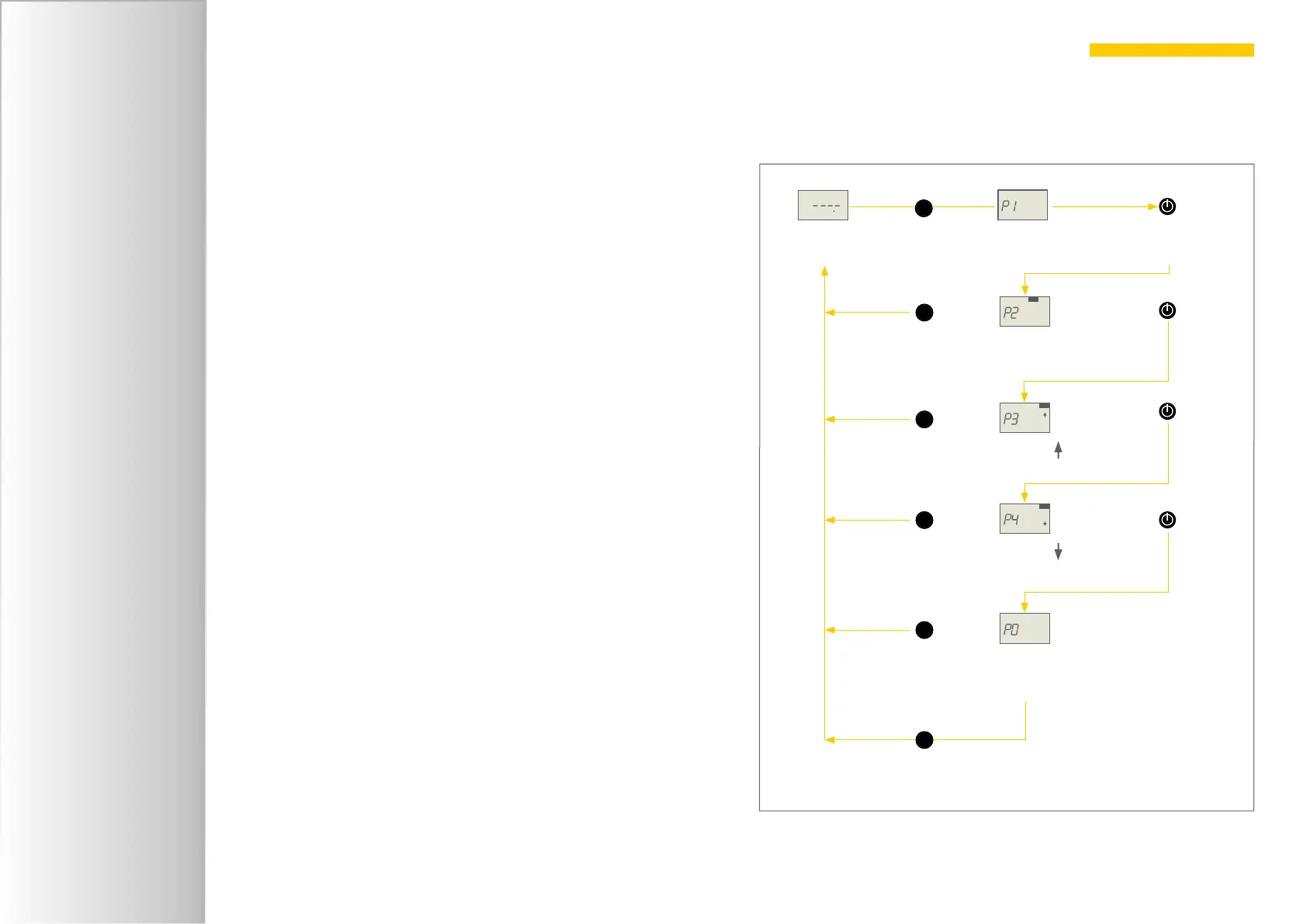
Select the parameter menu by pressing the S-key for 2 seconds star-
ting from the idle status of the device. In the same way you return from
any point of the parameter menu to the operation mode.
Pressing the I-key you select the following specific settings menus:
P1 General sengs
(see p. 16 chapter 4.2 General settings (P1))
P2 Memory (FMI-B30 and FMI-S30 and higher)
(see p. 19 chapter 4.4 Memory and statistic functions (P2))
P3 Upper limit (FMI-B30 and FMI-S30 and higher)
(see p. 24 chapter 4.5 Monitoring limit values (P3 und P4))
P4 Lower limit (FMI-B30 and FMI-S30 and higher)
(see p. 24 chapter 4.5 Monitoring limit values (P3 und P4))
PO Default sengs
(see p. 19 chapter 4.3 Resetting factory defaults (PO))
Pressing the S-key for 2 seconds you return to the operation mode.
idle
press 2 seconds =
select
settings menu
S
select next menu
P2 = Mem
(memory function)
P3 = Limit
(upper limit)
P1 = Standard
P4 = Limit
(lower limit)
PO = default
(reset default settings)
S
S
S
S
S
press 2 seconds =
return to
operation level
press 2 seconds =
return to
operation level
press 2 seconds =
return to
operation level
press 2 seconds =
return to
operation level
press 2 seconds =
return to
operation level
Select settings menus


 To Next Page
 Loading...