Product Introduction and Application Scenarios
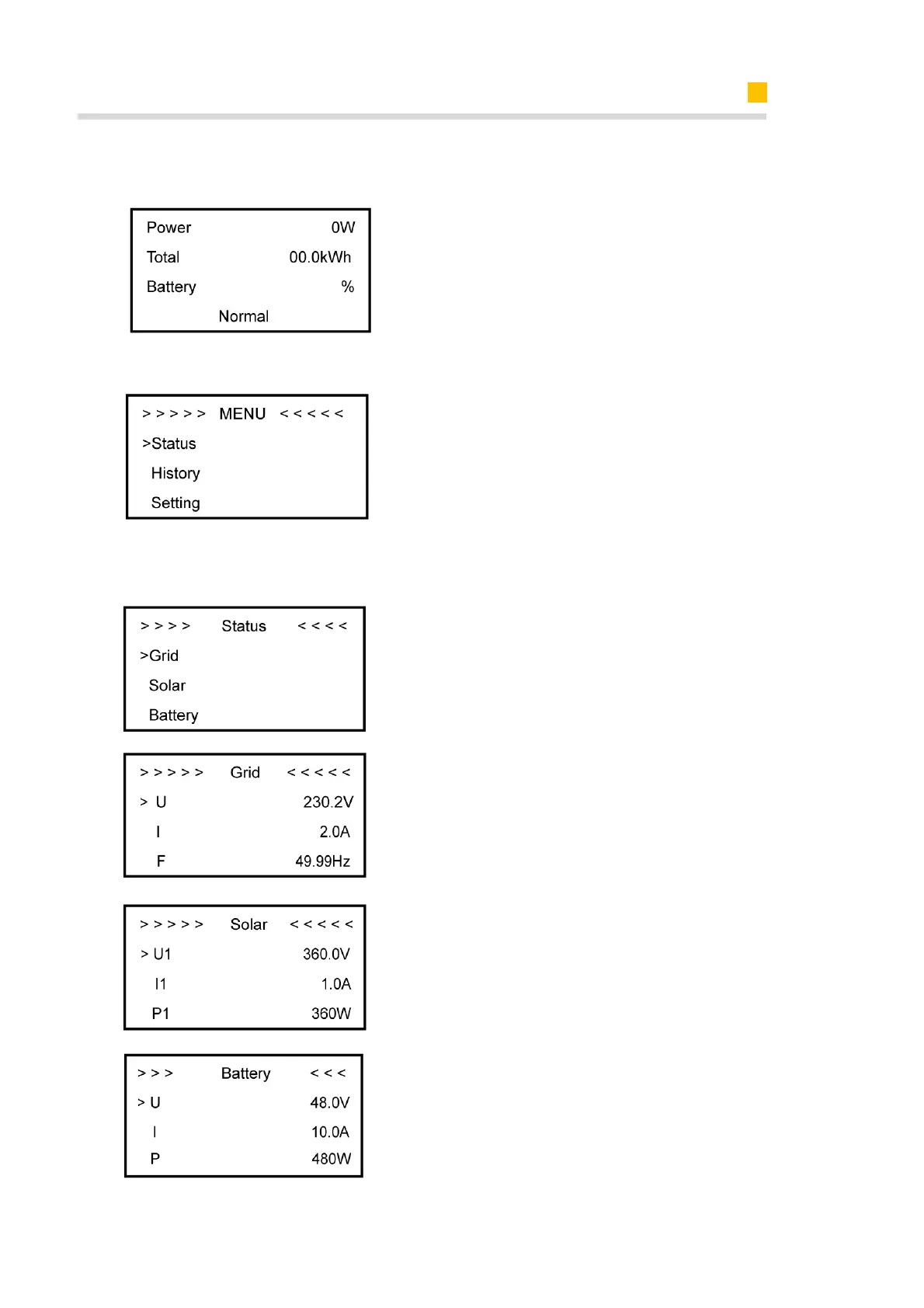
3.2.2.1 Main interface of the Inverter LCD
Main displays the inverter working
status and information, including:
1. Power: Current PV power
2. Total: Total power generation.
3. Battery: Current remaining battery
power (SOC).
4. Normal: Current working state of the
equipment, including Standby.
I In the Main interface, press ENT key to
eenter the menu’s main interface.
Use the up and down key to select a
sub-menu, press the ENT key to enter
the selected sub-menu, press Return
key to return to the previous layer.
3.2.2.2 Display Content of Sub-Menu Status Item
Status menu contains five sub-menus:
Solar, Battery, Grid, UPS and
Comm .These display the relevant
information about the current physical or
communication interface respectively.
Grid interface displays the real-time
information on the ultility grid side:
voltage U, current I, frequency F, PInv,
PMeterAC, PMeterDC.
Solar interface displays the real-time
information of PV side: voltage U1,
current I1, power P1, voltage U2, current
I2 and power P2.
Battery interface displays the real-time
information of battery side: voltage U,
current I, power P, residual capacity of
Battery (SOC), the internal environmental
temperature Temp













 To Next Page