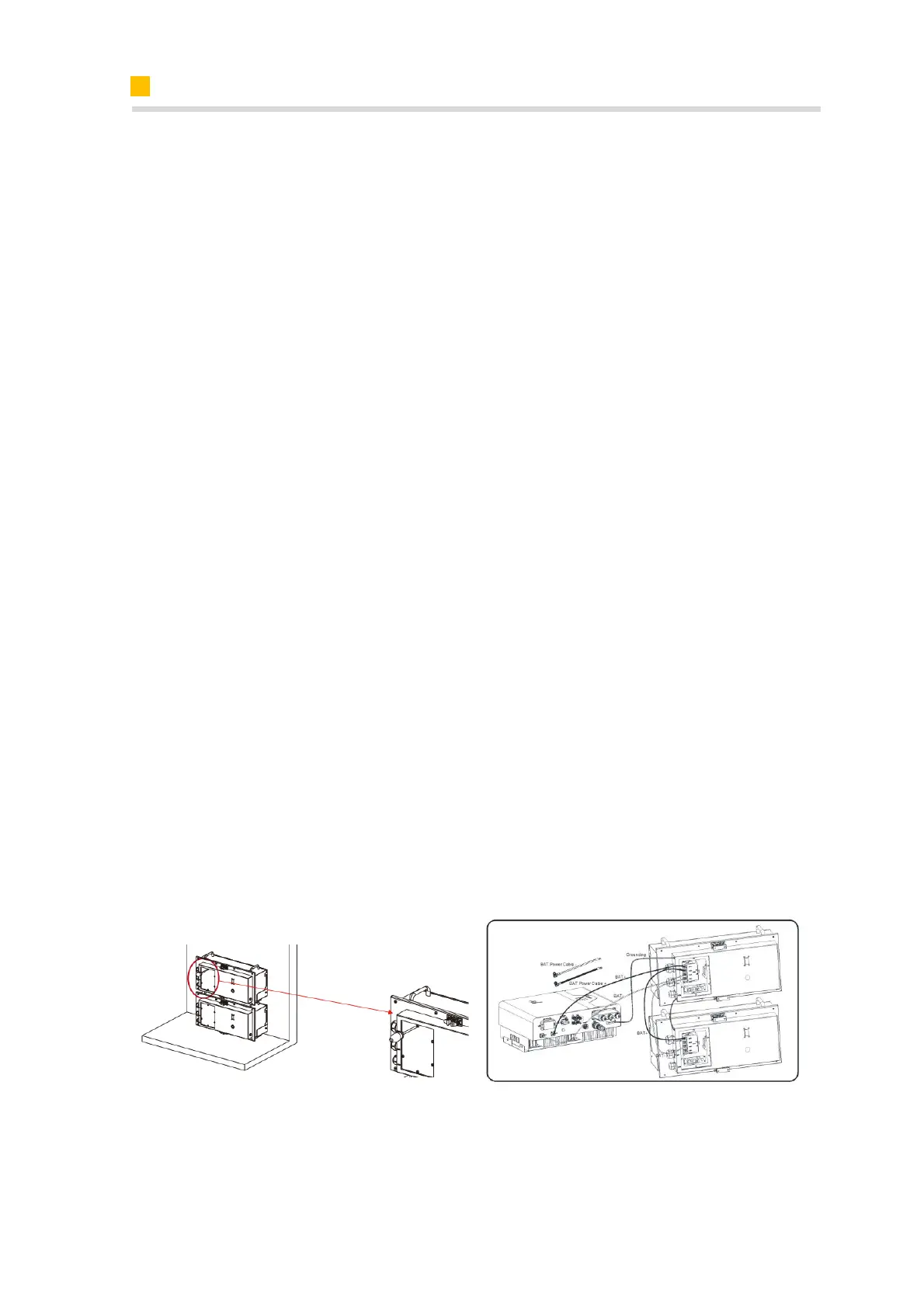
6.6.2. Electrical Connection Between the Inverter and M4856-P
For the electrical connection between the SMILE5-INV and first battery M4856-P, in-
staller need purchase the relative power cables and communication cables.
Communication cable connection:
a. Take out the battery communication cable.
b. Unscrew the 8 screws use T20 screwdriver and remove the maintenance cover of
M4856-P. Confirm that the status of circuit breaker is OFF. Please turn it off if it is ON.
c. Lead the battery communication cable through the small cable gland of M4856-P,
tighten the swivel nuts of the cable gland, insert the RJ45 plugs to the BMS communi-
cation port.
d. Lead the battery communication cable through the cable gland of the COM connec-
tion cover of SMILE5-INV, don’t tighten the swivel nuts of the cable glands, insert the
RJ45 plugs to the BMS communication port.
Power cable connection:
a. Take out the battery power cables.
b. Lead the battery positive and negative power cables through the large one cable
gland of M4856-P, use screwdriver PH3 with torque 4Nm to fasten the cable terminals
to the terminal blocks.
c. Remove the protective caps from the battery power connectors of SMILE5-INV.
d. Connect the battery power cables to the battery connector of SMILE5-INV
Please pay attention to the cable polarity, red cable is for battery positive.
The M4856-P provides the expansion battery communication cable and power cables.
For electrical connection between multiple M4856-P, please follow as above steps.
At last, please switch the circuit breaker of M4856 to on status, tighten the 8 screws of
the communication panel of M4856-P.
Cable sets between SMILE5-INV and M4856-P should be purchased separately.
Cable sets for expansion battery installation are provided by M4856-P;













 To Next Page