Instructions for use
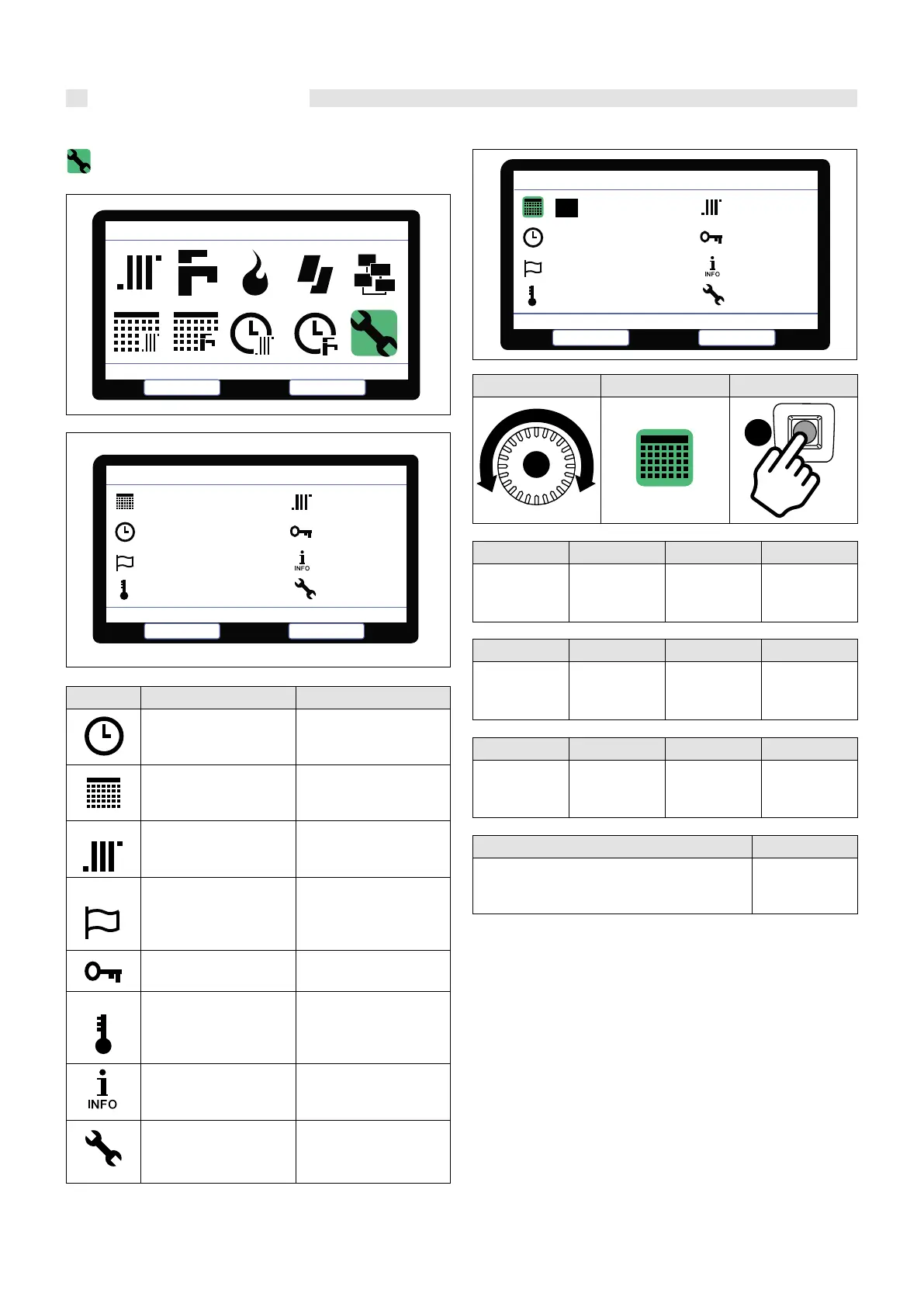
1.2 GENERAL SETTINGS
SYMBOL DESCRIPTION PROCEDURE
Adjusts the time
Aer having pressed but-
ton A, verify the changed
date and time
Sets the date
Aer having pressed but-
ton A, verify the changed
date and time
Sets the parameters (*1)
Aer having pressed but-
ton A, verify the changed
Central heating parameters
Set the language
Aer having pressed but-
ton A, refer to chapt. on
changing the national set-
ting
Enters and manages the
password
Aer having pressed button
A, verify the changed texts
Set the unit of temperature
Aer having pressed but-
ton A, refer to chapt. on
changing scale temperature
(Celsius or Farenheit) (*1)
Soware information
Display and device setting
1.2.1 SETTING THE DATE
ROTATE POSITION SELECT
SELECT
CONFIRM
SET
CONFIRM
DAY
with knob “C”
By pressing
Key “A”
the current
date with knob
“C”
e change by
pressing
KEY “A”
SELECT
CONFIRM
SET
CONFIRM
the current
MONTH with
knob “C”
By pressing
Key “A”
the current
month with
knob “C”
e change by
pressing KEY
“A”
SELECT
CONFIRM
SET
CONFIRM
the current
YEAR w i t h
knob “C”
By pressing
Key “A”
the current
year with knob
“C”
e change by
pressing KEY
“A”
SELECT CONFIRM
with knob “C”
DAY + MONTH + YEAR (all selected)
The new values
by pressing
Key “A”
C
A
Select.
General Setting
Select
Escape
Heat ing parameter
Select.
Escape
General Setting
25 25 oct o
11 : 28
English
°Celsius
Set the Date
Select.
Escape
General Sett ing
11 : 28
English
°Celsius
08 dec 2019
34


 To Next Page