Service manual AlphaCom XL transceiver Rev. 1.4 10-08-2011 Blz. 53/74
Performing a firmware (bios flash) upgrade locally
To upgrade firmware locally in the AlphaCom XL, the installer must have the following tools:
o computer with RS-232 port (or a USB to serial converter)
o serial programming cable (art.code. 003834).
o flash program FDT (Flash Development Toolkit)
o firmware update file
Power down the AlphaCom XL transceiver
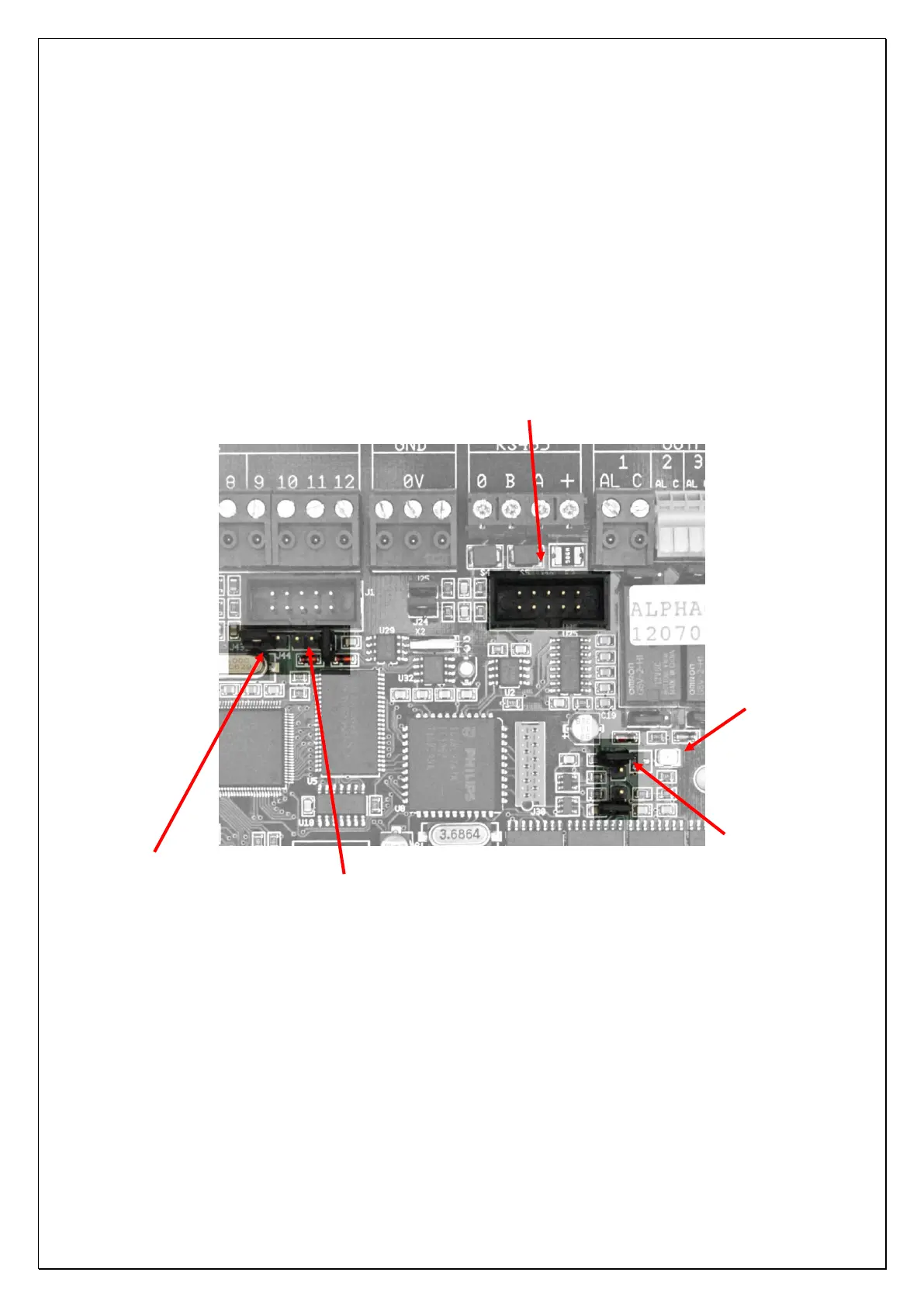
Connect the serial programming cable between the computer and the „boxed header‟ J32 on the AlphaCom
XL board. The boxed header can be found directly next to the relays and under the AL1 output.
Figure 6: Connections for flashing firmware (bios-update)
RS-232 connector for flashing
Jumper J44 for „flash‟ mode
Jumper J43 for normale „run‟
mode
Jumper J40 for „flash‟
mode.



 To Next Page