Service manual AlphaCom XL transceiver Rev. 1.4 10-08-2011 Blz. 18/74
Connecting serial logprinter from control panel
The AlphaCom XL is equipped with the possibility to connect a serial logprinter from a control panel. All
the messages, that are received from the control panel will be transmitted via IP to the central station.
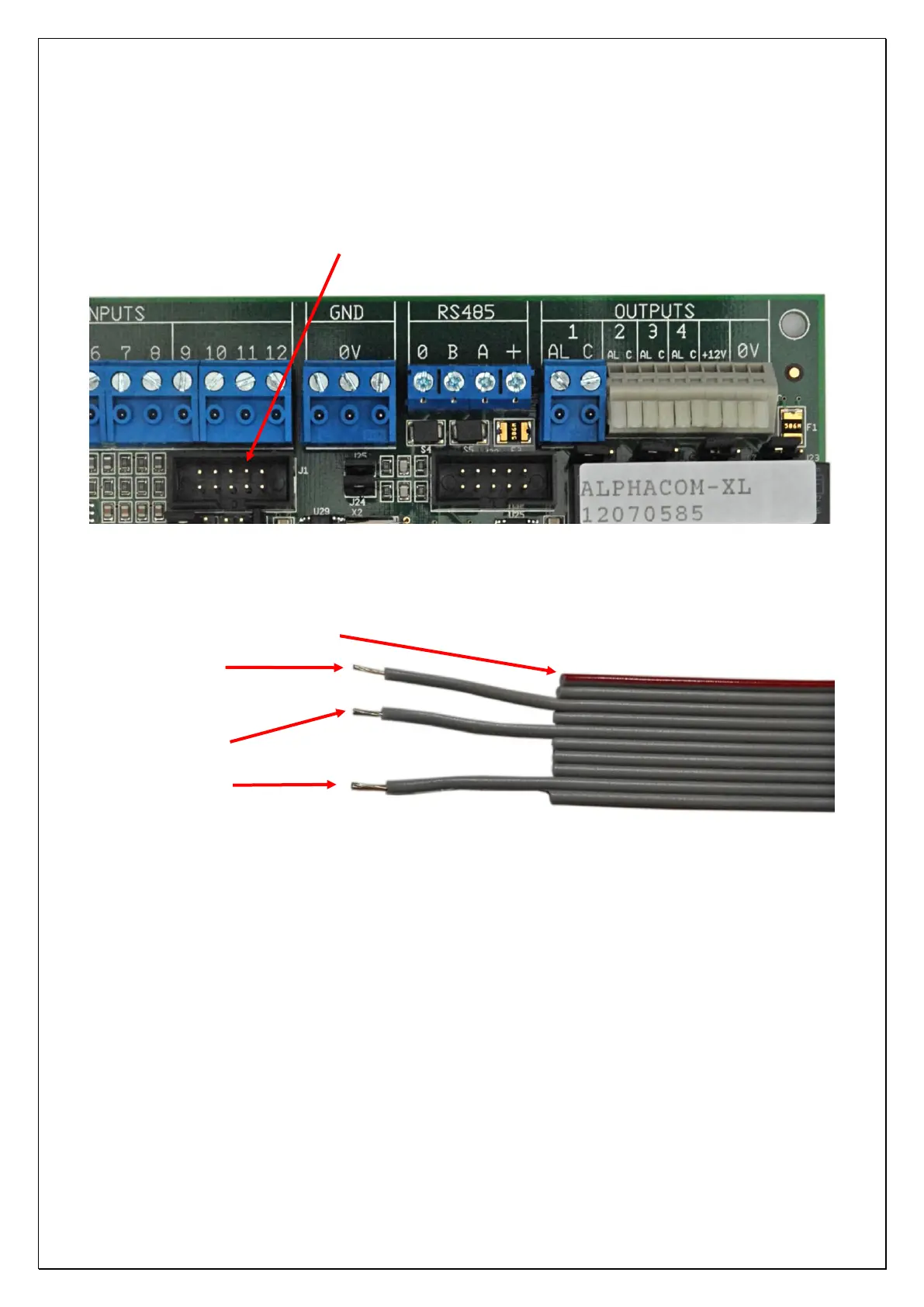
Connect the serial cable with the boxed connector to the 2
nd
serial port:
Figure 3: Connection serial logprinter to AlphaCom XL
Make the correct wiring to the logprinter output from the control panel, using following cable wires:
Figure 4: Serial cable from logprinter to AlphaCom XL
Wire 3: TX signal from AlphaCom XL back to the serial logprinter from the control panel. This is not a
„real‟ transmit data signal, but only a „high‟ indication, that the serial hardwarelink is established. For some
control panels (like the Galaxy productline) this signal is necessary.
Wire 5: RX signal from the serial logprinter to the AlphaCom XL. Via this wire, the serial messages are
received at the AlphaCom XL. Normally this wire will be connected to the transmit data of the logprinter
output.
Wire 9: ground connection.
RS-232 connector for (incoming) messages from logprinter
(serial port 3)



 To Next Page