SYSTEM SETTINGS
7
Settings - 103
The home pages can be modified by
adding the widgets of your choice and
positioning them as you wish on the
home pages. For more information on
configuring the home page, see the
section on "Adding and managing
widgets".
From the pop-up menu
26
, you can:
– delete widgets;
– reset to restore the default
configuration.
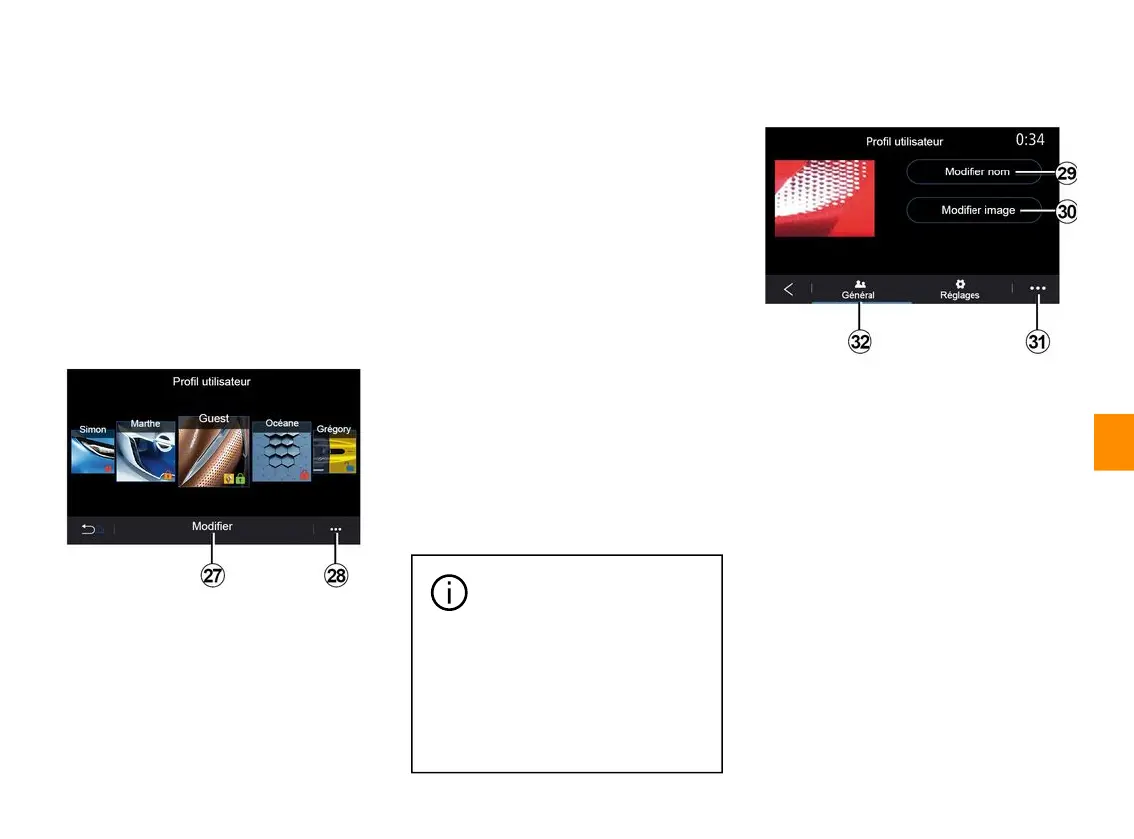
«Userprofile»
This menu lets you choose a user
profile to apply to the system.
Select the desired user profile.
Features linked to user profile
The following settings are stored in the
user profile:
– system language;
– set the distance unit (when
available);
– configure the home page;
– display settings;
– view presets;
– adjust the radio settings;
– navigation settings;
– navigation history;
– navigation favourites;
– adjust the privacy settings (locking
the profile);
– ...
"GUEST" profile
The GUEST profile gives you access
to the functions on the main menu.
The "Modify" tab
27
cannot be
accessed from this profile. The GUEST
profile is reset when the system
restarts, the settings are not stored.
From the pop-up menu
28
you can
manage the various profiles.
To better protect your
personal data, we
recommend that you lock
your profile.
For more information on the use
of your personal data, please
refer to the section on "Activating
services".
Change the name of user profile
From the "General" tab
32
, press the
"Edit name" button
29
to rename the
profile.
From the pop-up menu
31
, you can:
– lock/unlock the profile;
– duplicate the profile;
– delete all settings saved with the
profile;
– update the profile;
– ...
Change the photo of user profile
From the "General" tab
32
, press the
"Edit name" button
30
to select an
image from the multimedia system or
from an external storage device (USB
drive). For more information on
viewing photos, see the "Photo"
section.



 To Next Page