24
Before Adjustment
English
2
4
Adjusting the parametric
equalizer (Continued)
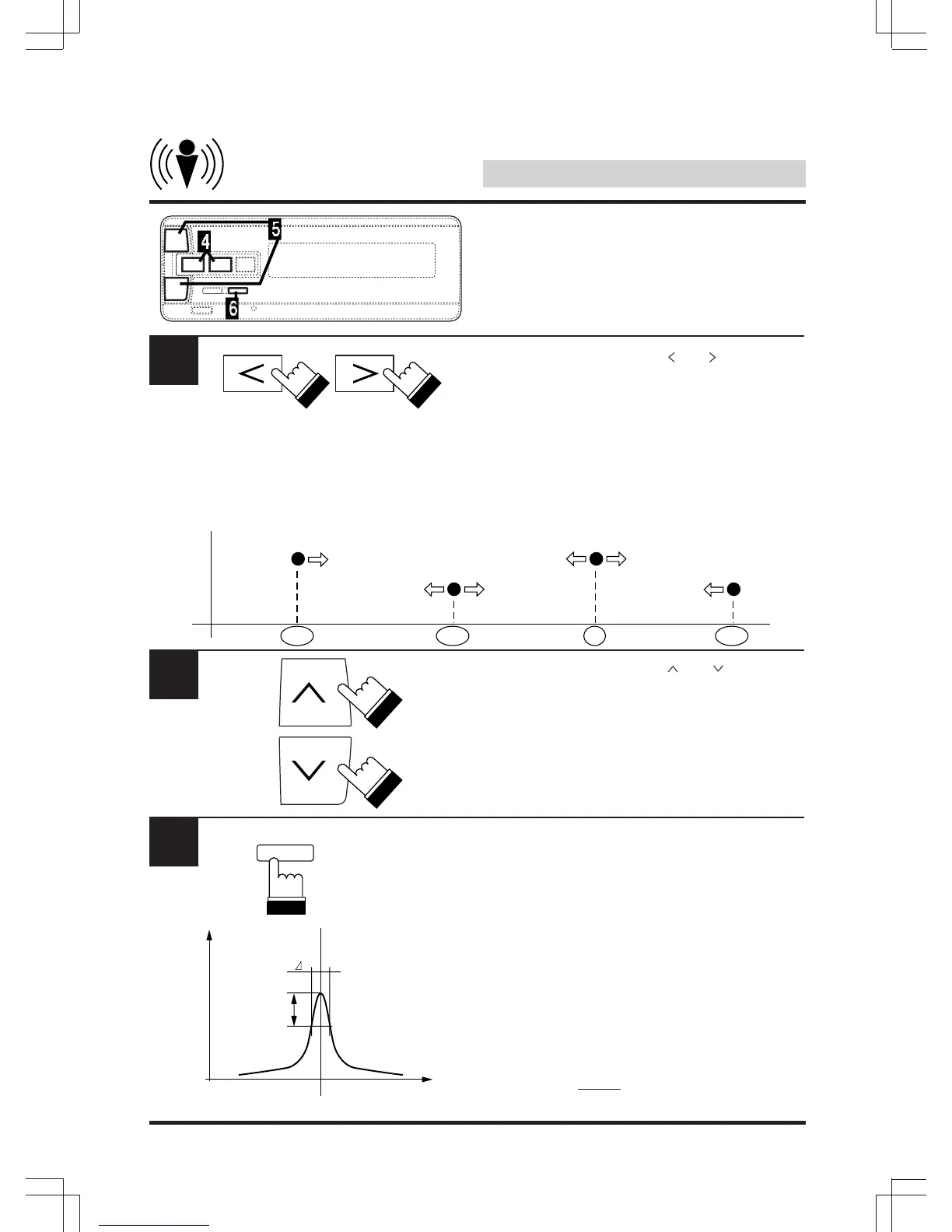
Within 5 seconds, use the “ ” or “ ” key to
adjust the frequency.
The frequency cannot be set any closer than 5
steps from the adjacent bands. (Refer to the
equalizer frequency steps on page 90).
For example, if the frequencies for the different
bands are set as shown below, the frequencies
of bands 1, 2 and 3 cannot be increased, and
the frequencies of bands 2, 3 and 4 cannot be
decreased.
Within 5 seconds, use the “ ” or “ ” key to
adjust the level.
The level can be adjusted between –5 and +5.
Within 5 seconds, press “BAND” for at least 2
seconds to adjust the bandwidth.
The band with can be adjusted in three steps:
1.0, 2.0 and 5.0.
Information:
The bandwidth indicates the sharpness of the
equalization curve at the selected frequency.
Specifically, it is the frequency of the peak “f”
divided by the frequency width (“> f” or the
difference between the –3dB points before and
after the selected frequency). The higher the
value of the bandwidth, the narrower the
adjusted range.
5
6
–3dB
FREQ.
LEVEL
f
125 160 200 250 315 400 500 630 800 1k 1.2k 1.6k 2k 4k 5k 8



 To Next Page