12
Chapter
3
Chapter 3
Using the System
This chapter describes how to work with each of the major components on DE2 in
detail.
3-1
Configuring the FPGA in JTGA Mode
DE2 provides users both JTAG and AS mode to download bitstream to the FPGA.
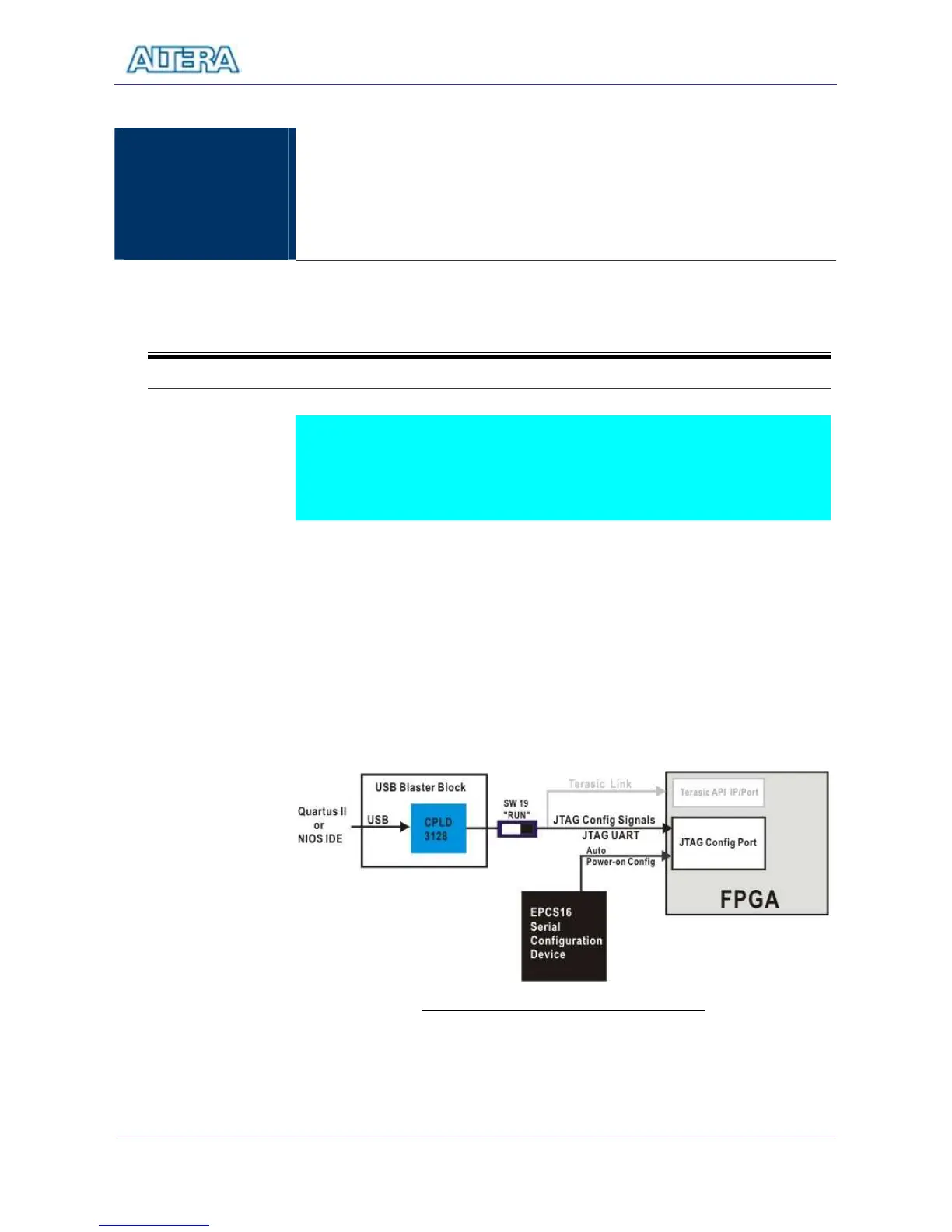
The first and recommended method is to configure FPGA via JTAG mode. Figure
3.1 describes the block diagram of the JTAG programming method. Follow the
steps below to program the FPGA:
Ensure the 9V power is supplied to the DE2 Board.
Connect USB Cable to the USB Blaster Port of DE2.
Set the Switch (SW19) to “RUN” position, as shown in Figure 3.2.
Now users can use JTGA mode to configure FPGA using SOF file. The
connection is shown in Figure 3.1.
Once the bitstream downloading is finished, the FPGA start to behave
according to the bistream.



 To Next Page