
EasyManua.ls Logo

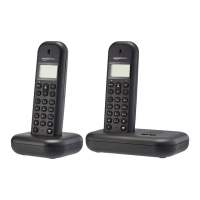
AmazonBasics B07PGK776D - User Manual

AmazonBasics B07PGK776D
202 pages
Print Icon
To Next Page IconTo Next Page
Loading...
B07PGK776D, B07PJT9PC2, B07PHP4ZYC, B07PJTJ452,
B07PKVT8WQ, B07PKWPH5X, B07PGJR7LW, B07PJSZTJT,
B07PGJTRSJ, B07PGJR7MG, B07PDGMMFD, B07PHNQQR4
DECT Home Telephone With Answering Machine
Téléphone sans Fil avec Répondeur
DECT-Telefon mit Anrufbeantworter
Telefono Fisso DECT con Segreteria Telefonica
Teléfono DECT Doméstico con Contestador Automático
DECT Huistelefoon met Antwoordapparaat
+

Table of Contents

Questions and Answers

  • P
    Pamela HendricksAug 4, 2025
    How to fix AmazonBasics Telephone when it does not work at all?
    • H
      higginsantonioAug 4, 2025
      If your AmazonBasics Telephone isn't working at all, first ensure the batteries are correctly installed and charged. Next, check that the mains adapter is securely plugged into a functioning outlet. Also, confirm the telephone line cord is firmly connected to both the telephone base and the wall jack. If issues persist, unplug the base from its power source, wait 15 seconds, and plug it back in, allowing a minute for synchronization. You might also try removing and re-inserting the batteries or replacing them if necessary. As a last resort, disconnect the base from the wall jack and test with another working telephone to rule out wiring problems.
  • C
    Craig BeckAug 10, 2025
    What to do if my AmazonBasics Telephone shows a low battery?
    • C
      christopher36Aug 10, 2025
      If your AmazonBasics Telephone displays 'Low battery', place the handset in the base for recharging. Alternatively, remove and reinstall the batteries, use the handset until the battery is fully depleted, and then recharge it in the base. If the problem persists, try replacing the batteries. Make sure the handset is correctly placed in the base or charger. You can also remove and reinstall the batteries, then charge the handset for up to 15 hours. If none of these steps work, consider purchasing new batteries.
  • M
    Melissa TerryAug 16, 2025
    Why does my AmazonBasics Telephone say 'OUT OF RANGE'?
    • W
      williamsbettyAug 16, 2025
      If you see 'OUT OF RANGE' displayed on your AmazonBasics Telephone, try to reduce the distance between the handset and the base station. Also, ensure that the base station is properly connected to a mains power source. If problems persist, check your network subscription.
  • M
    Madison HansonAug 22, 2025
    What to do if there is no dialling tone on my AmazonBasics Telephone?
    • D
      Derek DayAug 22, 2025
      If you press the key on your AmazonBasics Telephone and don't hear a dial tone, check all connections. Unplug and then plug the mains back in. Make sure the telephone cord is securely plugged into both the base station and the phone socket. Verify the base station plug and the 230V plug are properly connected by removing and plugging them back in. Also, ensure that the line is not in use. Lastly, make sure you are using the original telephone line cord that came with the phone.
  • S
    smorrisAug 28, 2025
    How to fix no display on AmazonBasics Telephone?
    • A
      April VelazquezAug 28, 2025
      If your AmazonBasics Telephone has no display, the battery may be empty. Recharge the battery.

Summary

Welcome Guide

Important Safeguards

Provides essential safety precautions for using the device.

Getting to Know Your Phone

Handset Overview

Illustrates and identifies the different parts of the handset.

Installing Your Phone

Connecting the Base Station

Steps to connect the base station to power and phone line.

Installing and Charging Handset Batteries

Operation

Switch Handset On;Off

Instructions to turn the handset power on or off.

Making and Receiving Calls

Procedures for dialling, answering, and ending calls.

Call Transfer and Hands-free

Advanced Operation Features

Phonebook and Paging

Phonebook Management

Guide to adding, viewing, editing, and deleting phonebook entries.

Phonebook Entry Management

Call Blocking

Blocking Calls by Type

Methods to block international, withheld, unavailable, or payphone calls.

Blocking Calls by Number

Call Block List and Calls List

Caller ID and Calls List

Details on caller information and managing incoming call records.

Personal Settings: Clock, Alarm, and Handset Tones

Personal Settings: Naming, Auto Answer, Language, and Do Not Disturb

Base Settings: Eco Modes and Prefixes

Base Settings: PIN, Registration, and Deregistration

PIN Code, Handset Registration, and Deregistration

Managing PIN codes and registering/deregistering additional handsets.

Answering Machine Operation: Basic Functions

Answering Machine Operation: Playback and Recording

Answering Machine Operation: Modes and Remote Access

Remote Answering Machine Access

How to operate the answering machine remotely using a phone.

Answering Machine Remote Access

Troubleshooting: General Issues

General Phone Not Working Issues

Solutions for common problems like no dial tone or power issues.

Troubleshooting: Battery and Connectivity

Battery and Connectivity Troubleshooting

Diagnosing and resolving issues related to battery charging and connections.

AmazonBasics B07PGK776D Specifications

General IconGeneral
BrandAmazonBasics
ModelB07PGK776D
CategoryTelephone
LanguageEnglish