In text mode, input number 1/4 (English character G/H/I)
Shift current activated control.
Go to previous menu or cancel current operation.
When playback, click it to restore real-time monitor mode.
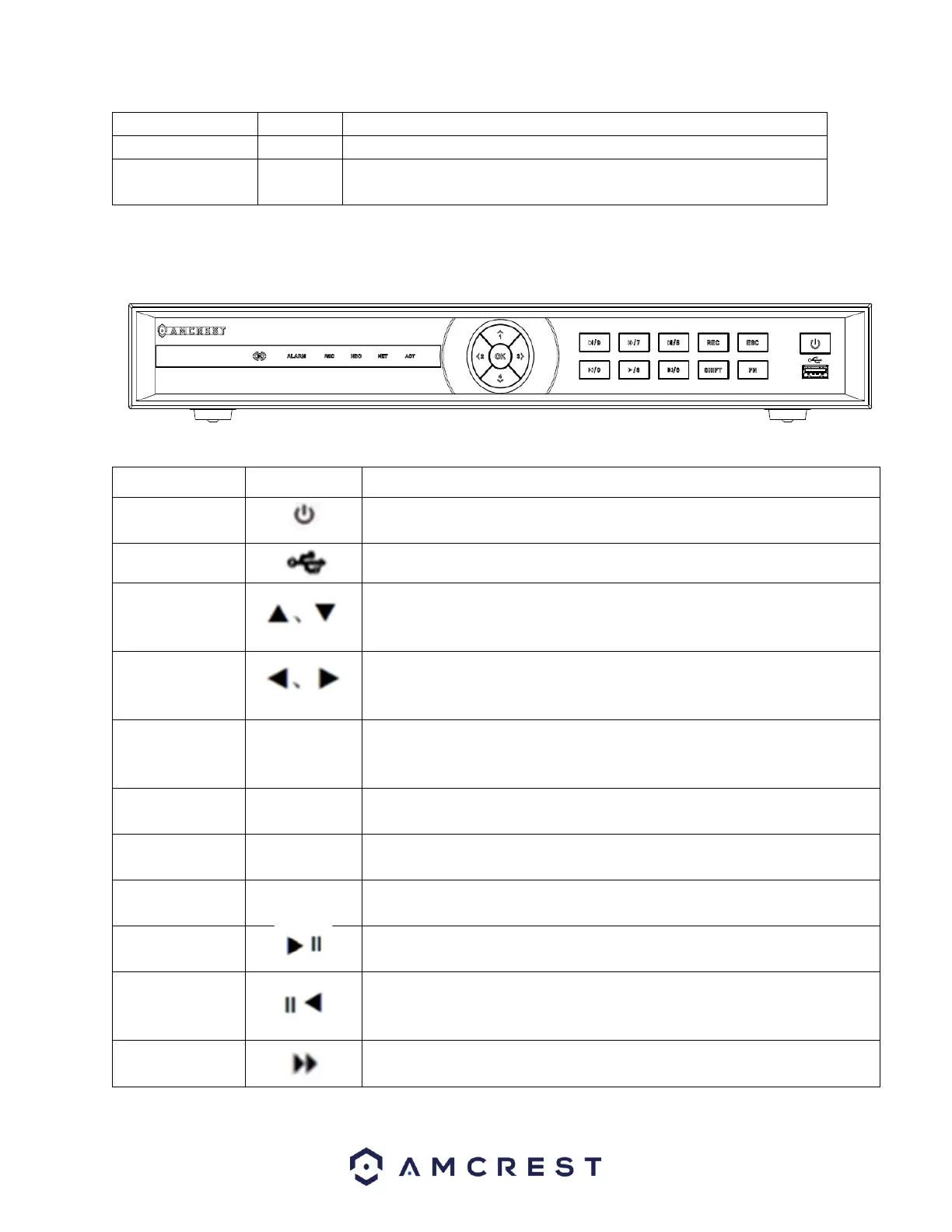
Applicable for Amcrest 52XXX Series NVRs
Press and hold this button for five seconds to shut off or power on the
NVR. Use the switch on the back of the NVR to initially power the device.
Front panel USB 2.0 Port.
Activate current control, modify setup, move up and down in a menu
Increase/decrease numeric functions.
Tilt camera up and down using PTZ menu (if applicable).
Move left or right in a menu.
When viewing playback, use these buttons to scan forwards or
backwards.
Confirm a current operation
Go to default button
Go to menu
Go to previous menu or cancel a current operation.
When using playback, used to restore real-time monitor mode.
Manually stop/start a recording. Use the directional keys or numeric keys
to select the recording channel.
I In a textbox, click this button to switch between numeric characters or
provide capitalization to a word, etc.
Click this button to pause or resume playback. In text mode, input number
5.
Reverse
Playback/
Pause/6
During playback or pause mode, click this button to reverse playback.
In reverse playback, click this button to pause. In text mode, input number
6.
Various fast speeds and normal playback. In text mode, input
number 7



 To Next Page