40 Rev. 7
Operation
Setup Menu : Supply
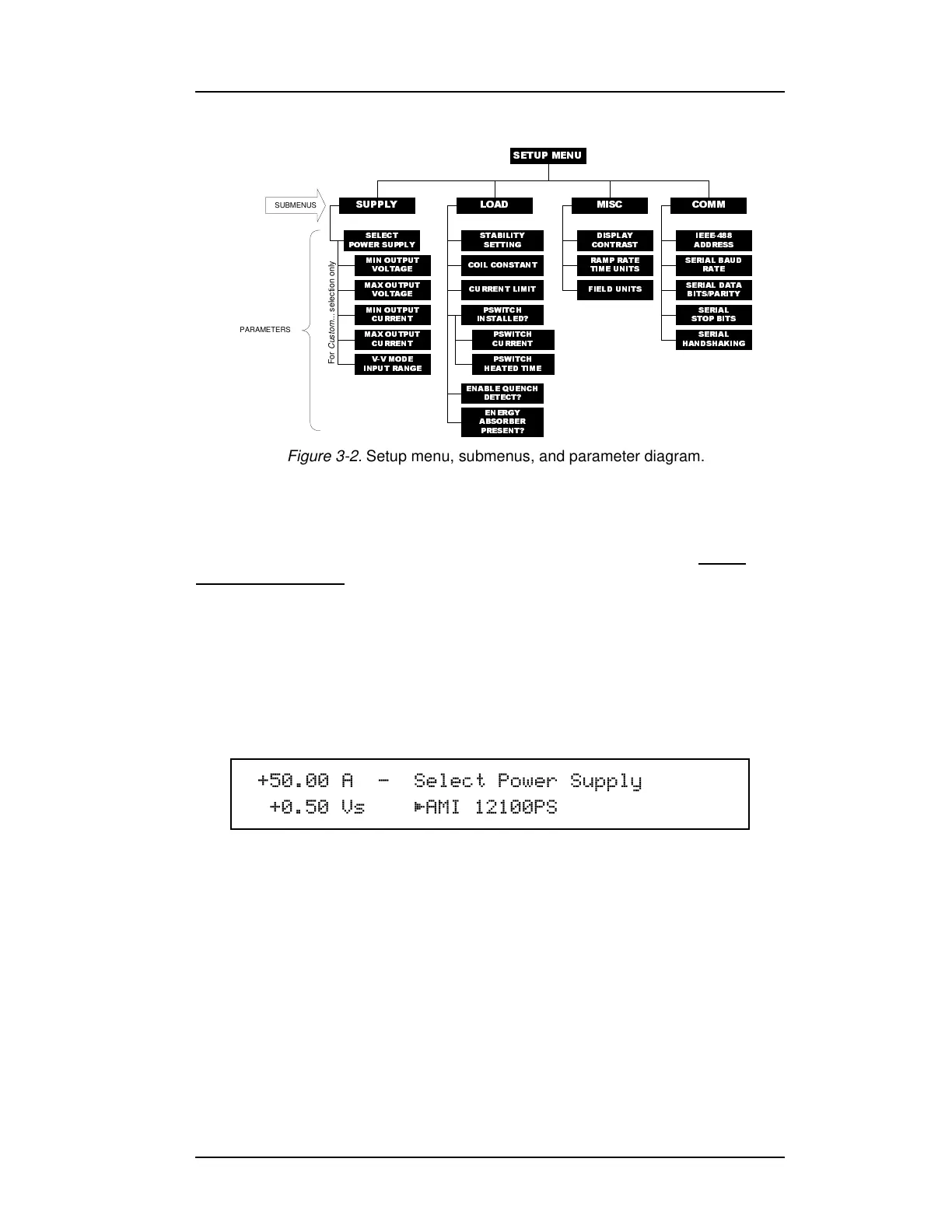
3.2.1 Supply Setup Submenu
The Supply setup submenu provides for the specification of the power
supply parameters
. If you wish to set the limits of operation for a
connected magnet, refer to the current limit and the voltage limit
configurations.
If using a standard power supply supported by AMI, selecting a power
supply within the Select Power Supply menu sets all the remaining
parameters in the supply menu according to Table 3-2.
3.2.1.1 Select Power Supply
The select power supply parameter provides a selection menu that
contains presets for standard AMI power supplies. Use the
237,21
key to cycle through the list of selections. The selection becomes
effective immediately. If a supply other than Custom... is selected,
all remaining items within the Supply submenu are automatically
set and cannot be edited. The available selections and associated
supply parameters are provided in Table 3-2.
6(7830(18
6(/(&7
32:(56833/<
0,1287387
92/7$*(
0$;287387
92/7$*(
0,1287387
&855(17
0$;287387
&855(17
9902'(
,13875$1*(
67$%,/,7<
6(77,1*
&2,/& 2167$17
(1(5*<
$%625%(5
35(6(17"
',63/$<
&2175$67
5$035$7(
7,0(81,76
6(5,$/%$8'
5$7(
6(5,$/'$7$
%,763$5,7<
/2$' 0,6& &2006833/<
SUBMENUS
PARAMETERS
(1$%/(48(1&+
'(7(&7"
,(((
$''5(66
6(5,$/
6723%,76
6(5,$/
+$1'6+$.,1*
36:,7&+
&855(17
36:,7&+
+($7('7,0(
36:,7&+
,16 7$//('"
For Custom... selection only
&855(17/,0,7 ),(/'81,76
Figure 3-2. Setup menu, submenus, and parameter diagram.
$ × 6HOHFW3RZHU6XSSO\
9V $0,36



 To Next Page