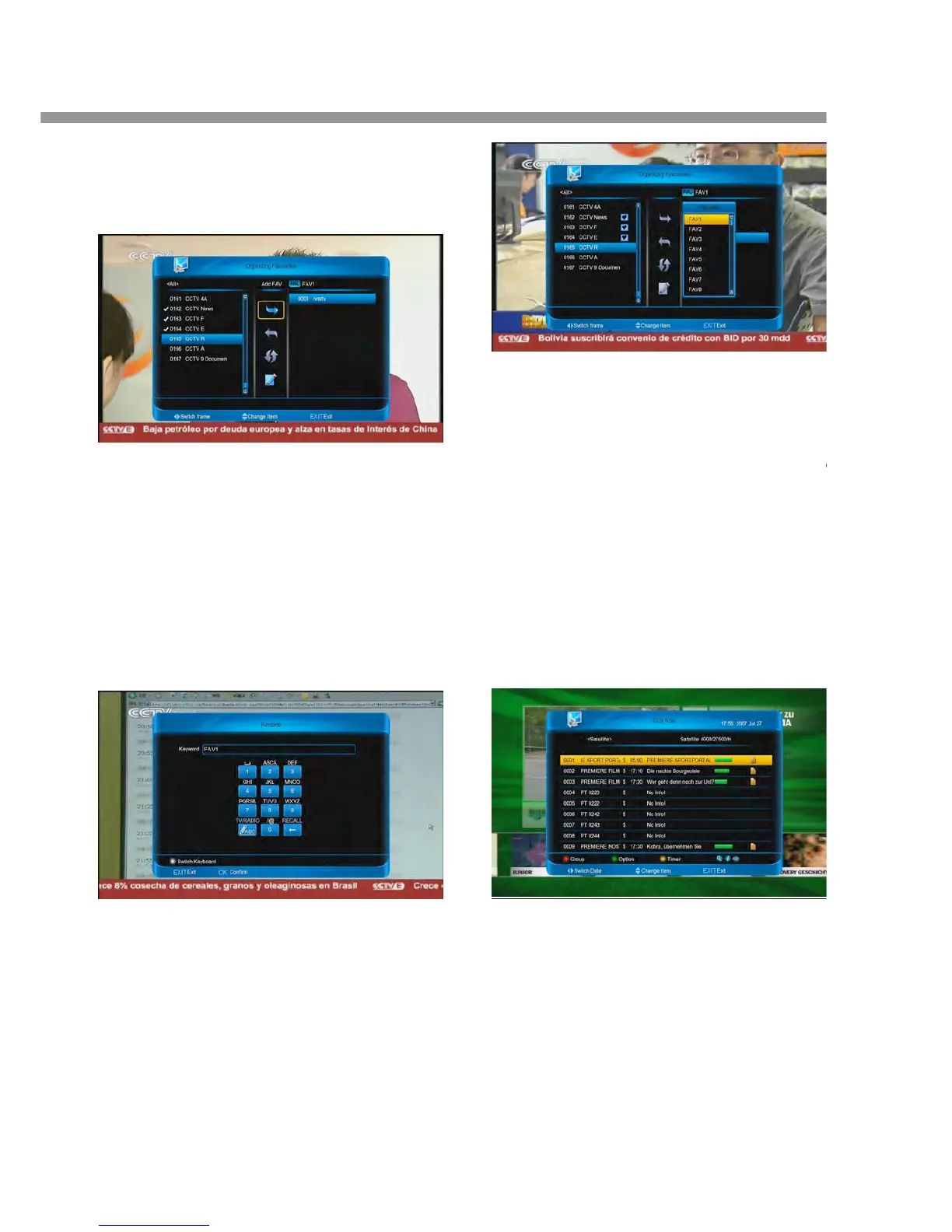
Note:
1. When you cancel favourite channels, you can only
using [ok] to select.
2. All favourite channels in the right column.
6.2.2.2 Renaming for FAV group
1. Press [►] or [◄] button.
2. Select Rename.
3. Press [ok] button to input the name in keyword.
4. Press [red] button.
Note:
1. Press [green] button to move cursor preceding.
2. Press [yellow] button to move cursor next.
3. Press [blue] button to clear the keyword.
6.2.2.3 Moving favourite channels
1. Press [◄] button.
2. Select Move and Press [ok] button.
3. Press [▲, ▼] buttons.
4. Press [ok] button.
6.2.2.4 Changing favourite group
1. Press [FAV] button.
2. Press [▲, ▼] buttons to select a group.
3. Press [ok] button.
7 EPG
The EPG(Electronic Programme Guide) displays
detailed programme information of each channe
time and date order. You can customize your
the chosen programme.
2. Press [P+/P-] button to skip to the next page.
3. Press [TV/Radio] button to switch between TV
Radio list.
7.1 Changing Group
You can display the list of the selected channel grou
All, FAV, Satellite, A-Z, Provider, CAS, HD.
1. Press [red] button ant then press [▲, ▼] butto


 To Next Page