Record Setting, Timeshift Setting and Youtuble
Record Setting.
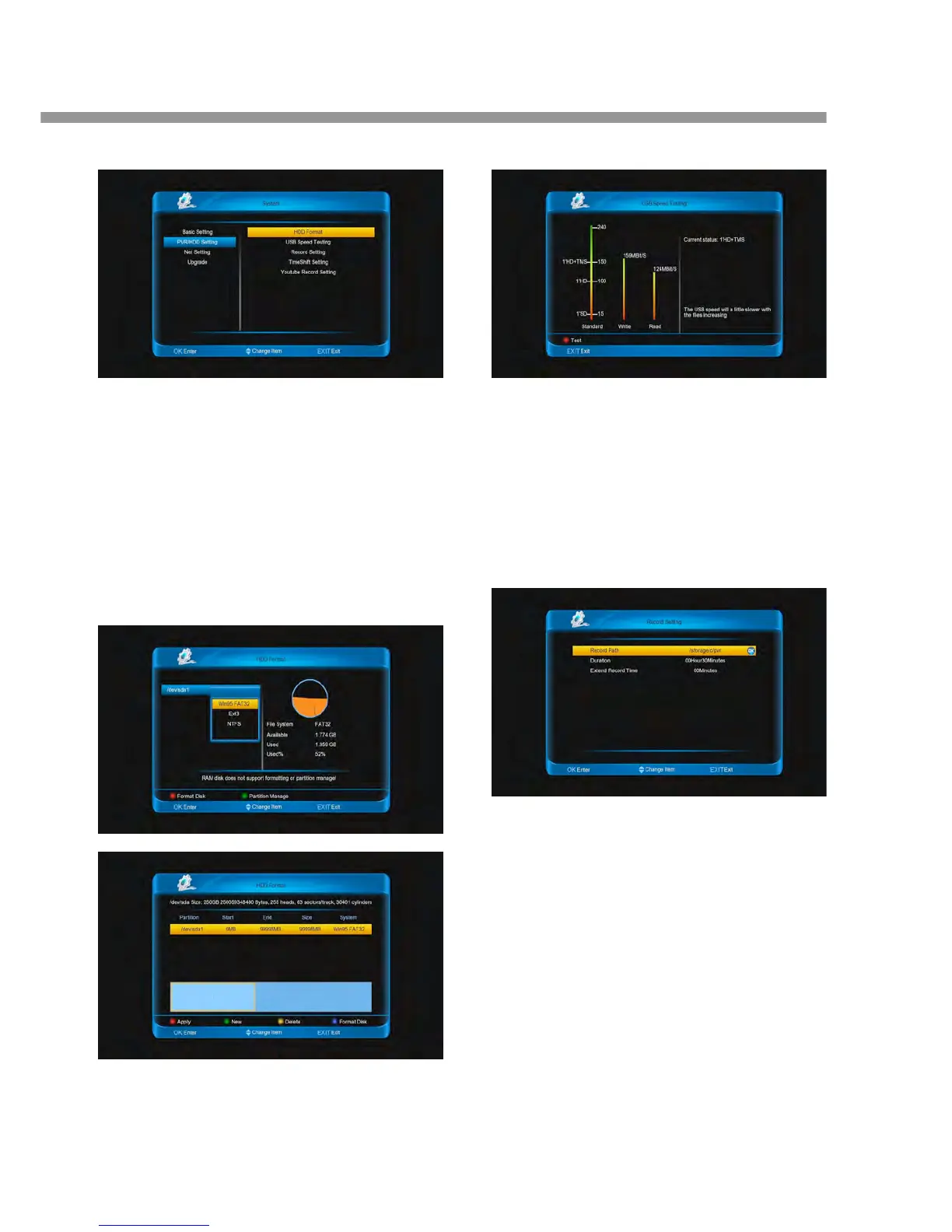
9.2.1 HDD Format
The menu show the message about the USB disk.
Format Disk:
1. Press [red] button and press [▲, ▼] buttons to
select a format for the disk, then press [ok] button
to start. This case can hold subarea
2. Press [green] button to enter into the menu:
a. [green] button: Add a new subarea.
b. [yellow] button: Delete a subarea.
c. [red] button: Save and partition the disk.
d. [blue] button: Format disk.
Note: Format disk will lost the disk data.
9.2.2 USB Speed Testing
This menu use to test the write and read speed of the
USB. You can press [red] button to test again. And the
right column show current speed can do what.
9.2.3 Record Setting
This menu include Record Path, Duration and Ex
Enable: Press [ok] button to select ON and OFF.
TimeShift Path: Press [ok] button to change
TimeShift path.
Time: Press [◄, ►] buttons to change the Time


 To Next Page