EasyManua.ls Logo

Amped Wireless SR10000 - User Manual

Amped Wireless SR10000
57 pages
Print Icon
To Next Page IconTo Next Page
Loading...
SR10000
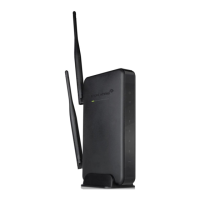
High Power Wireless-N 600mW Smart Repeater
User’s Guide

Other manuals for Amped Wireless SR10000

Question and Answer IconNeed help?

Do you have a question about the Amped Wireless SR10000 and is the answer not in the manual?

Summary

SETUP GUIDE

Find a Setup Location

Provides guidance on choosing an optimal location for the repeater.

Connect your PC to the Smart Repeater

Step-by-step instructions for connecting a PC to the repeater.

Open your Web Browser to Access the Setup Wizard

Instructions on how to access the device's web interface.

Welcome to the Smart Setup Wizard

Introduces the setup wizard and its purpose.

Scan for a Wireless Network

Guides users on scanning for available Wi-Fi networks to repeat.

Connecting to a Secure Network

Details how to input a security key for a secured network.

Repeater Settings (SSID)

Explains how to configure the Extended Network's SSID.

Repeater Settings (Security)

Describes how to set or change the security key for the Extended Network.

WIRELESS SETTINGS

Home Network Settings

Allows adjustment of settings for the connection to the Home Network.

SMART FEATURES

IP SETTINGS

MANAGEMENT FEATURES

TECHNICAL SPECIFICATIONS

DEFAULT SETTINGS

TROUBLESHOOTING AND SUPPORT INFORMATION

Summary

SETUP GUIDE

Find a Setup Location

Provides guidance on choosing an optimal location for the repeater.

Connect your PC to the Smart Repeater

Step-by-step instructions for connecting a PC to the repeater.

Open your Web Browser to Access the Setup Wizard

Instructions on how to access the device's web interface.

Welcome to the Smart Setup Wizard

Introduces the setup wizard and its purpose.

Scan for a Wireless Network

Guides users on scanning for available Wi-Fi networks to repeat.

Connecting to a Secure Network

Details how to input a security key for a secured network.

Repeater Settings (SSID)

Explains how to configure the Extended Network's SSID.

Repeater Settings (Security)

Describes how to set or change the security key for the Extended Network.

WIRELESS SETTINGS

Home Network Settings

Allows adjustment of settings for the connection to the Home Network.

SMART FEATURES

IP SETTINGS

MANAGEMENT FEATURES

TECHNICAL SPECIFICATIONS

DEFAULT SETTINGS

TROUBLESHOOTING AND SUPPORT INFORMATION

Amped Wireless SR10000 Specifications

General IconGeneral
Maximum data transfer rate300 Mbit/s
Antenna connector typeR-SMA
Antenna gain level (max)5 dBi
Frequency band2.4 GHz
DC-in jackYes
Ethernet LAN (RJ-45) ports5
Security algorithmsWEP, WPA, WPA2, WPS