7
Calibration Mode
CO2 calibration
1. Place the meter in an outdoor area with well
ventilated air. Turn on the meter and hold down
“CAL” and “p” simultaneously to enter CO2
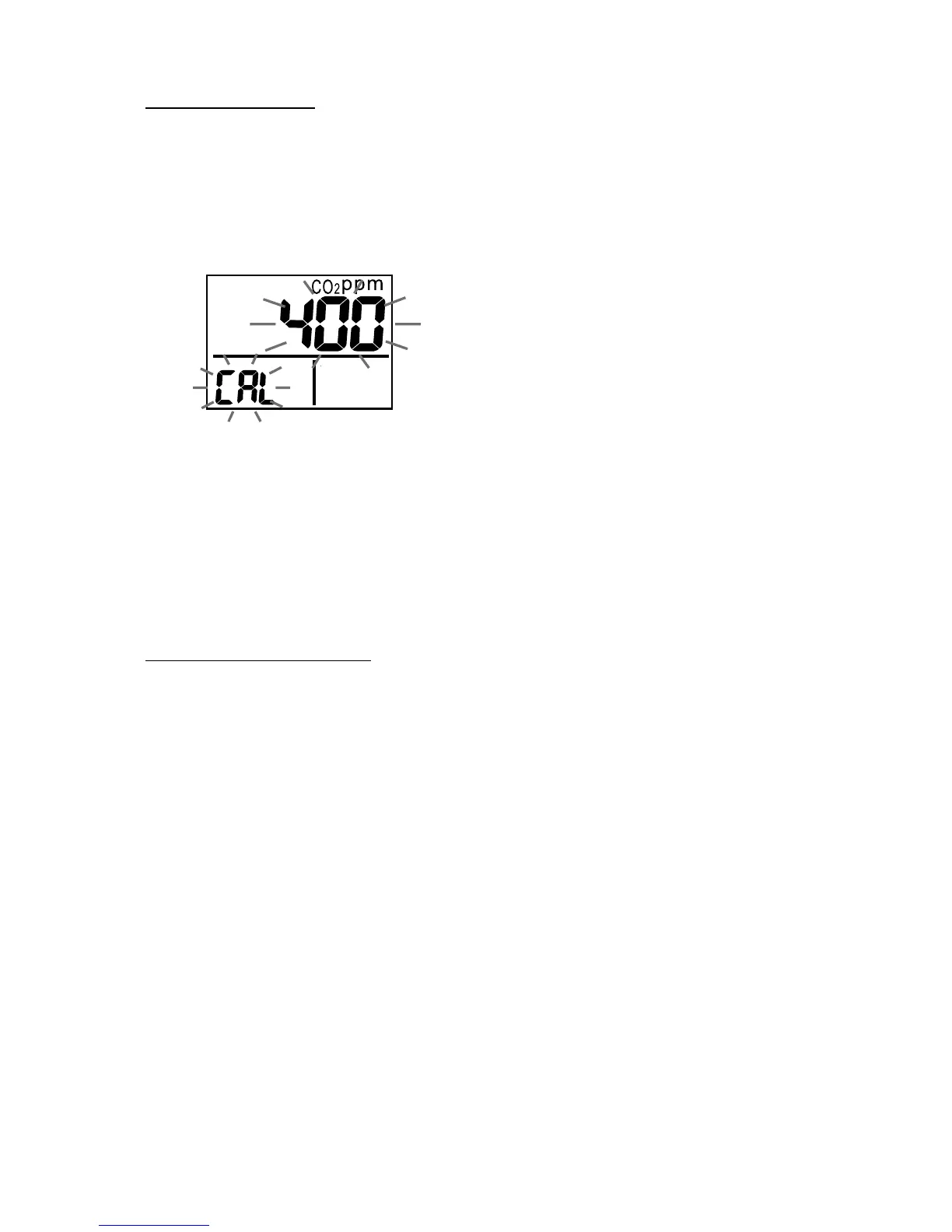
calibration mode. 400ppm and “CAL” are blinking
on the LCD while performing calibration (Fig.5).
Fig.5
2. Wait about 5 minutes until it stops blinking and
the calibration completes automatically and back
to normal mode.
3. To abort the calibration, turn off the meter at any
time.
Humidity calibration
1. Plug the sensor probe into 33% salt bottle. Hold
down “CAL” and “q” under normal mode to
enter 33% calibration. “CAL” and calibrating
value (32.7% if at 25°C) are blinking on the LCD
with current temperature at the left. Meter is now
calibrating, and will finish in about 60 minutes
when “CAL” and humidity value stop blinking.
2. After 33% calibration, plug the sensor probe into
75% salt bottle, then press “ENTER” to enter 75%
calibration. “CAL” and calibrating value (75.2%
if at 25°C) are blinking on the LCD with current
temperature at the left. Meter is now calibrating.
Wait about 60 minutes until blinking stops, then
calibration is completed and it returns to normal
mode.



 To Next Page