Amtech
3-3-1
Automatic tuning operation procedures
Separate the motor and load, machine, etc., and con
1)
Selecting and executing the automatic tuning mode
Select the automatic tuning mode and execute automa
•
The operation panel's operation mode must be set to
sure that the "LCL" LED is ON. If not, press the
LED turns ON.
• Set A05-
0 to 1. (Set the expanded setting display ON.)
• Using B19-
0 (automatic tuning selection), select the automati
working conditions.
•
The automatic tuning standby state will be entered
•
During the automatic tuning standby state and the a
will flicker.
•
To exit the automatic tuning standby state, press t
2) Starting automatic tuning
Automatic tuning will start when the
rotation direction.
To stop, press the
key or input the emergency stop signal (EMS) from t
*
Once automatic tuning starts, all panel operations
are disabled until the operation ends.
3)
During automatic tuning execution
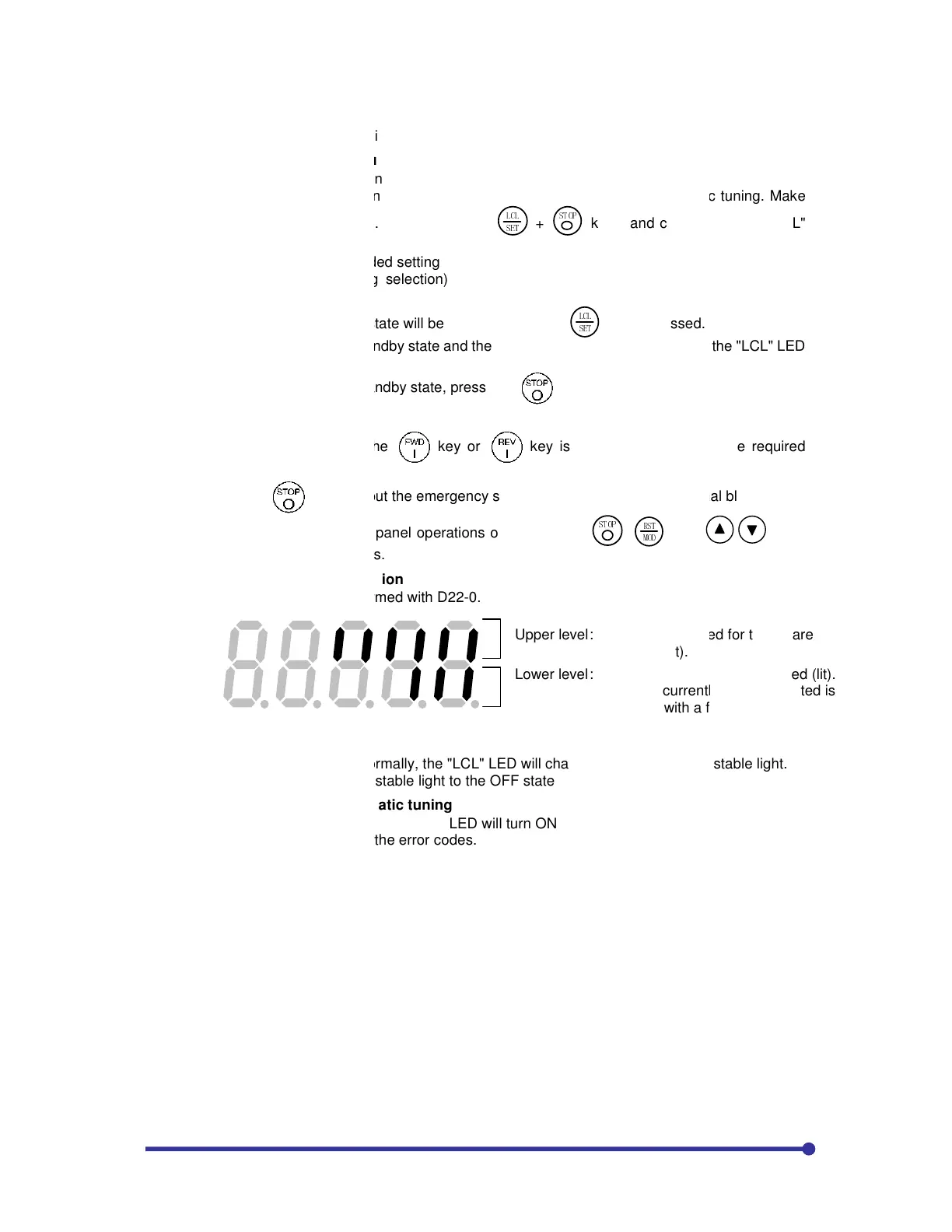
The progression state can be confirmed with D22
4) Normal
completion of automatic tuning
When the automatic tuning ends normally, the "LCL"
The "RUN"
LED will change from a stable light to the OFF stat
5
) Abnormal completion of automatic tuning
If automatic tuni
ng ends abnormally, the "FLT" LED will turn ON and
Investigate and check according to the error codes.
Automatic tuning operation procedures
(V/f control mode)
Separate the motor and load, machine, etc., and confirm the safety on the load side.
Selecting and executing the automatic tuning mode
Select the automatic tuning mode and execute automatic tuning
.
The operation panel's operation mode must be set to "Local" to execute automatic tuning. Make
sure that the "LCL" LED is ON. If not, press the
!
"#$
+
"$%&'
keys, and confirm that the "LCL"
0 to 1. (Set the expanded setting display ON.)
0 (automatic tuning selection), select the automatic tuning mode according to the
The automatic tuning standby state will be entered when the
!
"#$
key is pressed.
During the automatic tuning standby state and the automatic tuning execution state, the
To exit the automatic tuning standby state, press the
key.
Automatic tuning will start when the
key or
key is pressed according to the required
key or input the emergency stop signal (EMS) from the terminal block.
Once automatic tuning starts, all panel operations other than the
"$%&'
,
!"
#$%
and
are disabled until the operation ends.
During automatic tuning execution
The progression state can be confirmed with D22
-0.
completion of automatic tuning
When the automatic tuning ends normally, the "LCL" LED will change from a flicker to a stable light.
LED will change from a stable light to the OFF state.
) Abnormal completion of automatic tuning
ng ends abnormally, the "FLT" LED will turn ON and a message will appear.
Investigate and check according to the error codes.
Upper level :
The steps required for tuning are
indicated (lit).
Lower level :
The finished steps are indicated (lit).
The step currently being executed is
indicated with a flicker.
"Local" to execute automatic tuning. Make
keys, and confirm that the "LCL"
c tuning mode according to the
utomatic tuning execution state, the
"LCL" LED
key is pressed according to the required
keys
LED will change from a flicker to a stable light.
The steps required for tuning are
The finished steps are indicated (lit).
The step currently being executed is
indicated with a flicker.


 To Next Page