Amtech
Chapter-2: Operation Panel (Digital Keypad)
2-1 Outline of operation panel types and functions
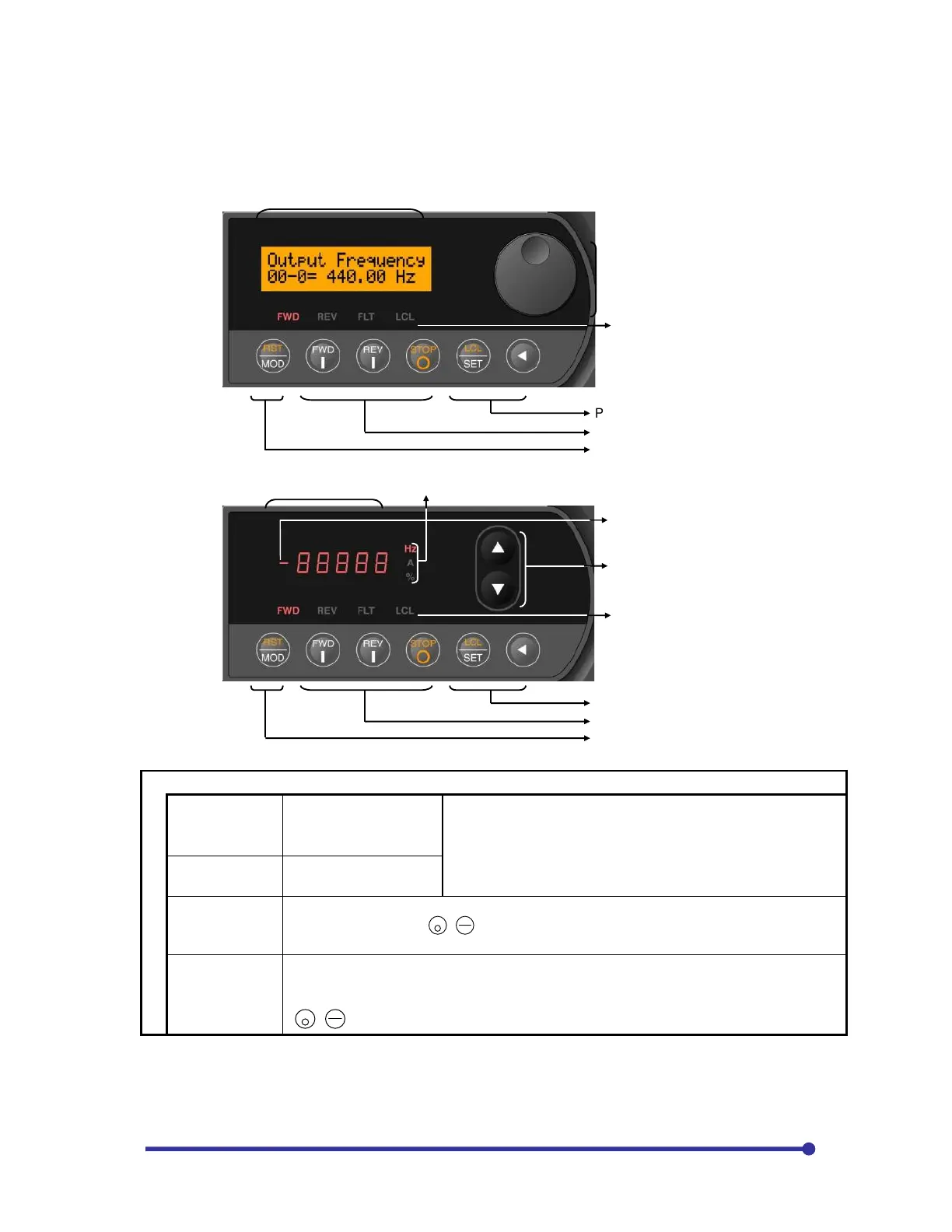
LCD operation panel (V24-OP1)
LED operation panel (V24-OP2)
Status indications LEDs
FWD (Forward)
The drive is running in
the forward direction.
When both LEDs flicker simultaneously, it indicates that DC
Brake or pre-excitation is in action.
If only the "FWD" or "REV" LED is flickering, this indicates
that a command in the reverse direction has been received,
and the drive is decelerating.
REV (Reverse)
The drive is running in
the reverse direction.
FLT (Fault)
The drive has detected a fault and has stopped.
Turns OFF when the
+
STOP
RS
MO
keys are pressed or the sequence input RESET signal
is input.
LCL (Local)
The drive is in the Local Mode and can be operated from the Operation Panel (FWD,
REV and STOP only). When LED is off, the drive is in the Remote Mode and can be
controlled from the terminal block. To change Modes between Local and Remote, pres
+
STOP
LC
.
Change this setting in stop condition.
Parameter increase/decrease knob
Status indications LED
Data display section (LCD)
Parameter operation keys
Operation keys
Parameter operation keys
Data display section (LCD)
Parameter operation keys
Operation keys
Unit indications LED
Sign display LED
Parameter/value increase/decrease
keys
Status indications LED


 To Next Page