Start up Guide for Axpert-VT240S Series AC Drive
3
1-1 Turning Power ON and Starting VT240S
Turn the power ON.
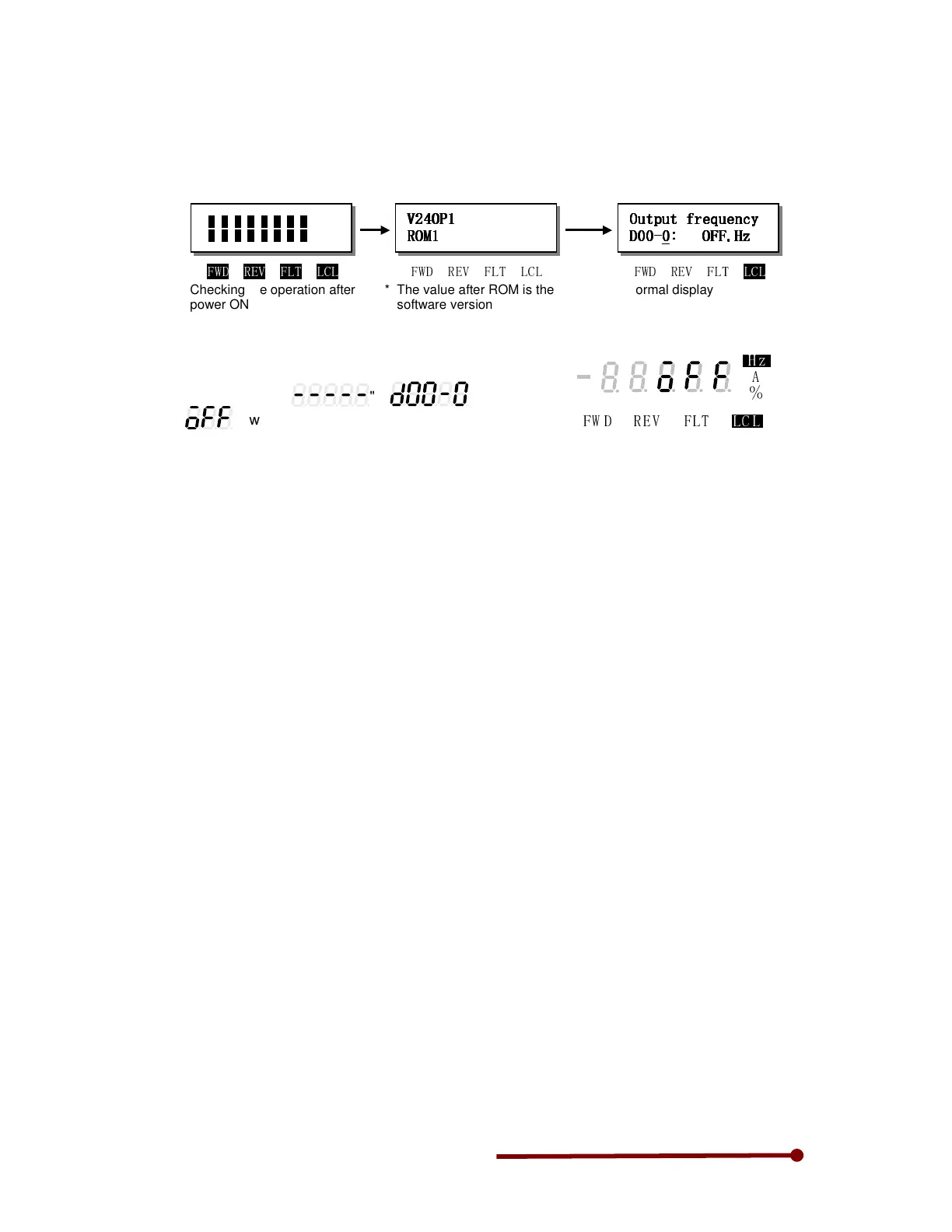
(1) LCD operation panel (V24-OP1)
The LCD operation panel startup screen is shown below.
(2) LED operation panel (V24-OP2)
All LEDs on the numeric display will turn ON for a
short time, and then "
", "
"
and "
" will appear.
The "LCL" and "Hz" LEDs will also turn ON.
!"
#"
$"
%& %"'( )" *+," '%-"
!"#$%
!"#$% !"#$%
!"#$%&
&&
&
'#(%
'#(%'#(%
'#(%&
&&
&
&
&&
&
#)*+)*&,-./).012
#)*+)*&,-./).012#)*+)*&,-./).012
#)*+)*&,-./).012&
&&
&
344
344344
3445
55
54
44
46&&ṭ:
6&&ṭ:6&&ṭ:
6&&ṭ:&
&&
&
Normal display
Checking the operation after
power ON
!"##$%&## '(##')'# !"##$%&## '(##')'# !"##$%&## '(##')'#
* The value after ROM is the
software version


 To Next Page