Amtech
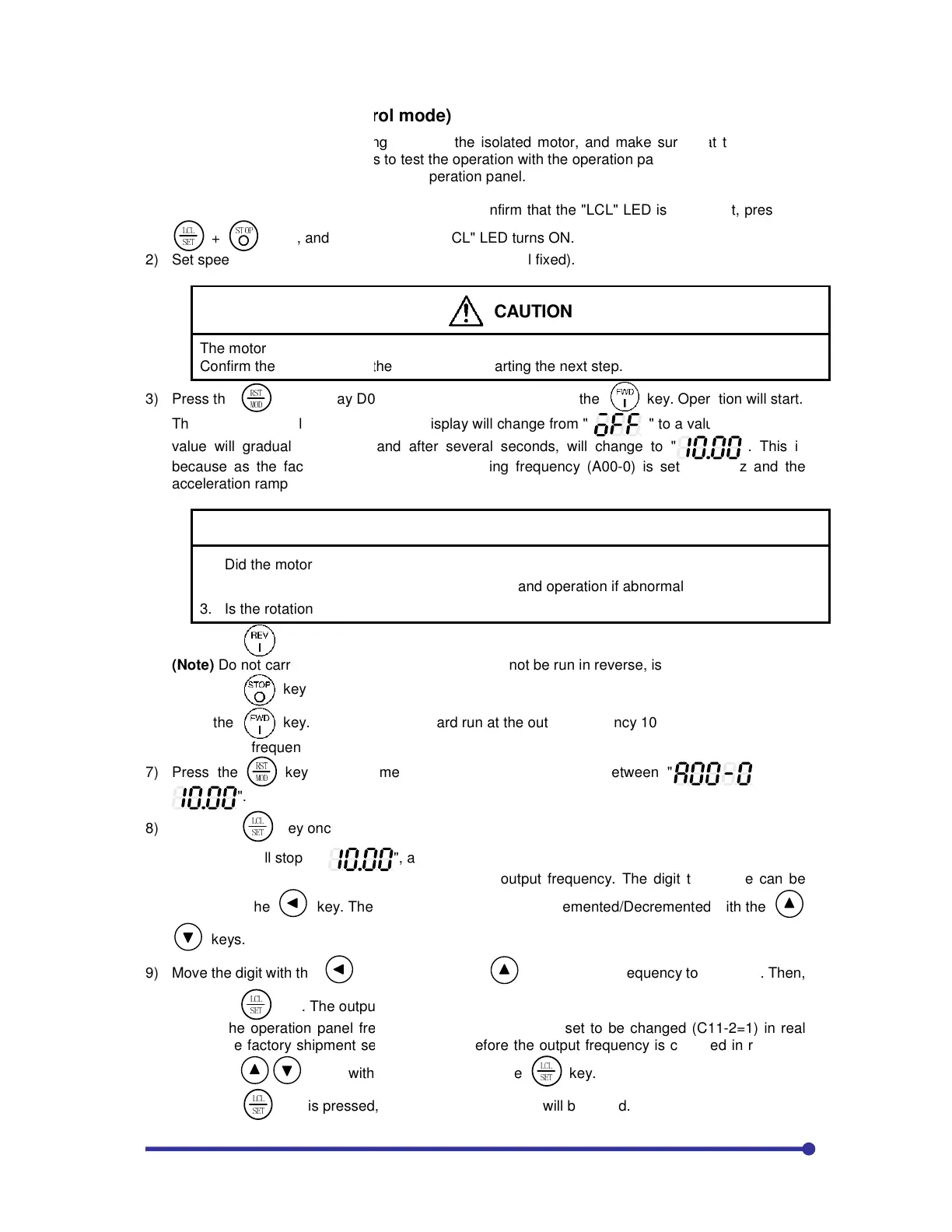
3-4 Test
operation (V/f control mode)
When finished with automatic tuning, test run the i
errors. Use the following procedures to test the op
Refer to Chapter 3 for details on using the operati
1) To
enable operation with the operation panel, confirm
!
"#$
+
"$%&'
keys, and confirm that the "LCL" LED turns ON.
2) Set speed
setting input point selection: C02
The motor will rotate with the next step.
Confirm the safety around the motor before starting
3) Press the
!"
#$%
The "FWD"
lamp will turn ON, and the display will change from
value will gradually increase, and after several se
be
cause as the factory settings, the direct setting
acceleration ramp time 1 (A01-
1. Did the motor run?
2.
Is the run direction correct? Check the wiring and
3. Is the rotation smooth?
4) Press the
key and confirm that the motor runs in reverse.
(Note)
Do not carry out this step if a
5) Press the
6) Press the key.
Change the frequency to 50
Hz with the following operation.
7) Press the
!"
#$%
".
8) Press the
!
"#$
key once.
The display will stop at "
This completes the preparation for changing the out
moved with the
ke
y. The output frequency can be Incremented/D
keys.
9) Move the digit with the
press the
!
"#$
key. The output frequency will rise to 50 Hz.
(Note) T
he operation panel frequency change operation is se
time at the factory shipment settings, and therefor
using the
keys, without having to press the
When the
!
"#$
key is pressed, the current setting value will be s
operation (V/f control mode)
When finished with automatic tuning, test run the isolated motor, and make
errors. Use the following procedures to test the operation with the operation panel.
Refer to Chapter 3 for details on using the operation panel.
enable operation with the operation panel, confirm that the "LCL" LED is ON. If not, press the
keys, and confirm that the "LCL" LED turns ON.
setting input point selection: C02
-0= 3 (panel fixed).
CAUTION
The motor will rotate with the next step.
Confirm the safety around the motor before starting the next step.
-0 on the monitor. Then press the
key. Operation will start.
lamp will turn ON, and the display will change from "
" to a value display. The
value will gradually increase, and after several seconds, will change to "
cause as the factory settings, the direct setting
frequency (A00-
sec.
CHECK
Is the run direction correct? Check the wiring and operation if abnormal.
key and confirm that the motor runs in reverse.
Do not carry out this step if a
load, which cannot be run in reverse,
forward run at the output frequency 10 Hz.
Hz with the following operation.
The Display will alternate between "
", and the last digit will flicker.
This completes the preparation for changing the output frequency. The digit to change can be
y. The output frequency can be Incremented/D
key
, raise the frequency to 50
key. The output frequency will rise to 50 Hz.
he operation panel frequency change operation is set to be changed (C11
time at the factory shipment settings, and therefore the output frequency is changed in real time
keys, without having to press the
!
"#$
key.
key is pressed, the current setting value will be saved.
that the "LCL" LED is ON. If not, press the
key. Operation will start.
" to a value display. The
". This is
Hz and the
" and "
put frequency. The digit to change can be
, raise the frequency to 50
.00 Hz. Then,
-2=1) in real
e the output frequency is changed in real time


 To Next Page