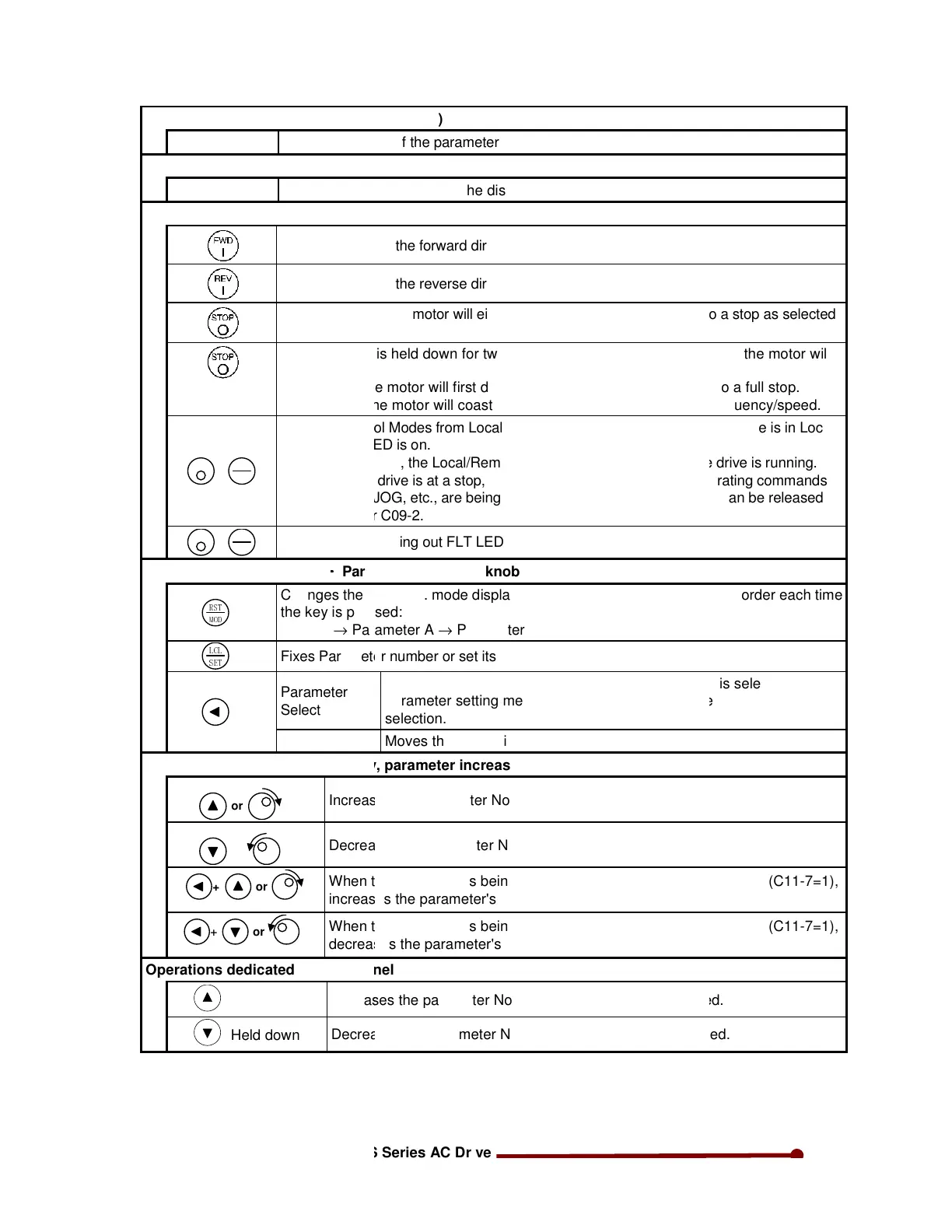
Unit indication LEDs
Hzƒ A ƒ %
Indicates the unit of the parameter value shown on
Minus polarity indication LED (
—— Lights
when the number on the display is a minus number.
Operation keys
Starts the drive in the forward direction in Local
Starts the drive in the reverse direction in Local
Stops the drive. The motor will either coast to a
on C00-1.
Held down for 2
sec.
When this key is held down for two seconds or longe
coast to stop.
During LCL, the motor will first decelerate to a st
During RMT, the motor will coast to a stop from the
+
STOP
LC
SE
Changes control Modes from Local to Remote, or vice
In default condition, the Lo
Even while the drive is at a stop, this selection c
such as RUN, JOG, etc., are being received at the t
+
STOP
RS
MO
Resets a fault, putting out FLT LED.
Parameter operation keys
!"#
$%&#
Changes the block No. mode displayed on the indicat
Monitor →
'('#
!)"#
Fixes Parameter number or set its values.
Parameter
Select
Valve change
Parameter increase/decrease key, parameter increase
or
or
Decreases the parameter No. or parameter setting va
When the parameter is being set with the sub
increases the parameter's main
+
When the parameter is being set with the sub
decreases the parameter's main No.
Operations dedicated for LED panel
Held down
Increases the parameter No. or
Held down
Decreases the parameter No. or setting value at a f
Indicates the unit of the parameter value shown on the display.
when the number on the display is a minus number.
Starts the drive in the forward direction in Local Mode only.
Starts the drive in the reverse direction in Local Mode only.
Stops the drive. The motor will either coast to a
stop or ramp down to a stop as selected
When this key is held down for two seconds or longer during operation, the motor will
During LCL, the motor will first decelerate to a stop, and then coast to a full
During RMT, the motor will coast to a stop from the current output frequency/speed.
Changes control Modes from Local to Remote, or vice
-
versa. When the drive is in Local
In default condition, the Lo
cal/Remote selection is disabled while the drive is
Even while the drive is at a stop, this selection cannot be made if operating commands
such as RUN, JOG, etc., are being received at the terminal. This lock can be released
-2.
Resets a fault, putting out FLT LED.
Changes the block No. mode displayed on the indicator in the following order each time
→ Parameter B → Parameter C →
Fixes Parameter number or set its values.
When main & sub-No. Selection method (C11-
parameter setting method, moves from sub-No. S
selection.
Moves the digit to increment or decrement.
Parameter increase/decrease key, parameter increase/decrease knob
No. or parameter setting value.
Decreases the parameter No. or parameter setting value.
When the parameter is being set with the sub
-
No. selection method (C11
increases the parameter's main
No.
When the parameter is being set with the sub
-
No. selection method (C11
decreases the parameter's main No.
Operations dedicated for LED panel
Increases the parameter No. or
setting value at a fast speed.
Decreases the parameter No. or setting value at a fast speed.
stop or ramp down to a stop as selected
r during operation, the motor will
op, and then coast to a full
stop.
current output frequency/speed.
versa. When the drive is in Local
cal/Remote selection is disabled while the drive is running.
annot be made if operating commands
erminal. This lock can be released
or in the following order each time
No. selection method (C11
-7=1),
No. selection method (C11
-7=1),
setting value at a fast speed.


 To Next Page