AMYET S6 E-BIKE
11
PARAMETERISATION
1.Backlight Brightness
Each setting item needs to be carried out when the vehicle is stationary. The operation
steps of parameter setting are as follows: In the power-on state, when the instrument
shows the speed as 0.
When an error code appears on the display interface, please troubleshoot the problem in
time, the electric car will not be able to drive normally after the problem occurs.
Level 1 is the darkest and level 3 is the brightest. Press and Enter parameter change
status P01 or Select the parameter and press preservation parameter setting
and returns to the parameter setting screen.
The following options are available on the personalisation parameter selection screen.
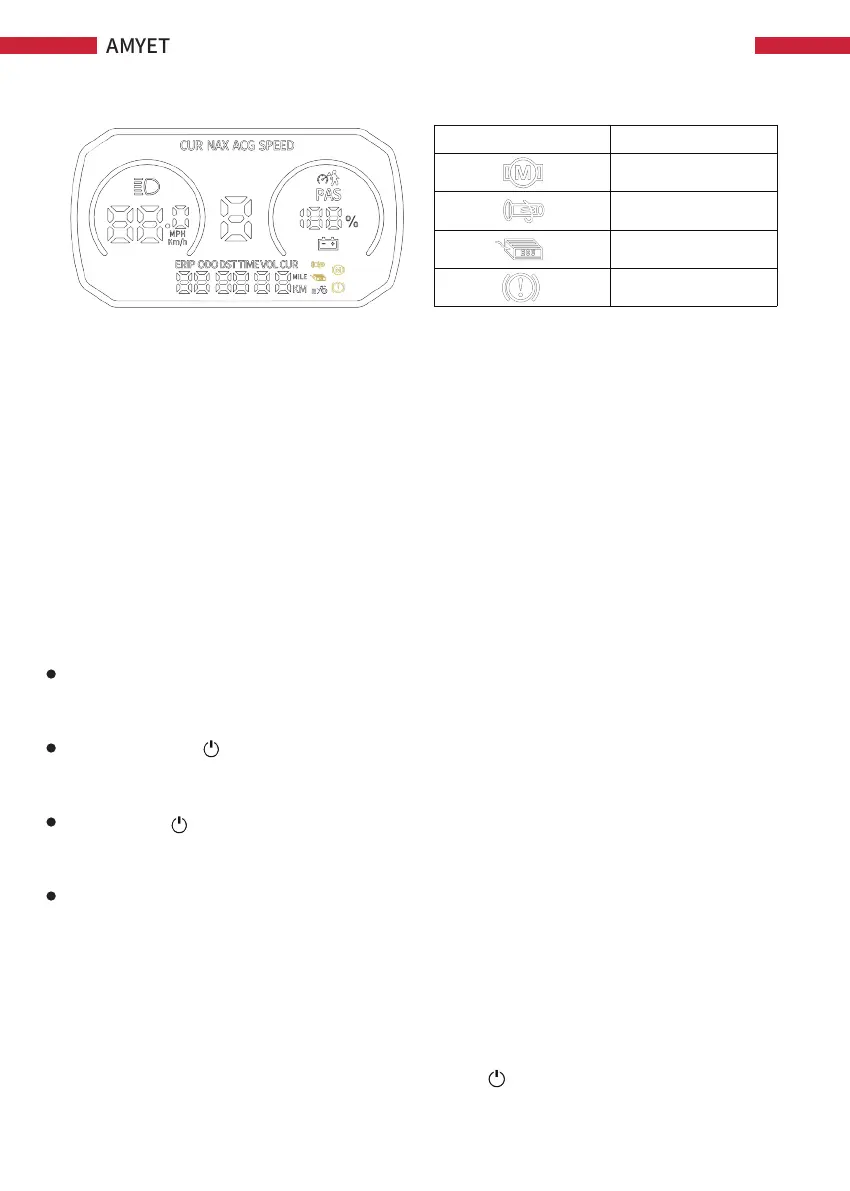
Figure 7.1 Error Code Display Screen Figure 7.2 Error Code Contents
Simultaneously press and hold the and key for more than 2 seconds to enter
the parameter setting item selection interface;
Short press the button to switch the parameter setting item selection interface,
short press the or button to enter the parameter changing state;
Short press key to save the parameter setting and return to the parameter setting
item selection interface;
Long press and key to exit the parameter setting item selection interface.
Error Icon Define
Motor Failure
Failure of the speed
control handle
Controller Failure
Brake Failure
+
+
-
-
+
+
-
-
+
-


 To Next Page