USER MANUAL DENTAL UNIT - QS4-451-01 / SD 300 Scandinavian
13
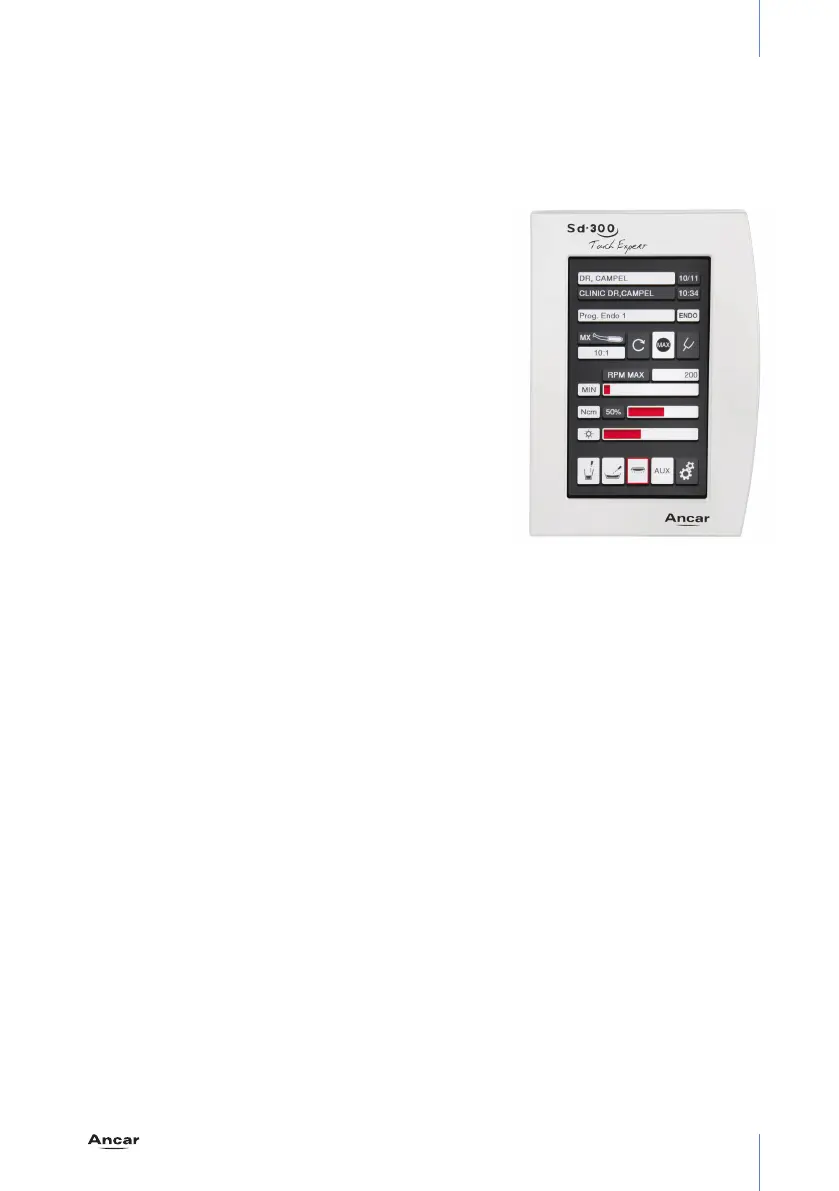
8.4.- Control panel
MAIN CHARACTERISTICS:
Consult the user manual provided for the Touch Expert Content control element
Contents:
Interface interpretation guide
Main screen
General fields: Names of the doctor and centre, date
and time.
Up to 4 different users can be selected, each of
which will have their personalised adjustments and
work statistics associated.
Seat position controls
Auxiliary controls
Micro-motor screen:
Counter-angle, turning direction, cancelling the
progressive pedal and ensuring that the micromotor
always turns at maximum speed, activation of
instrument irrigation in water or spray mode.
Speed controls: Select the working mode (reduction
or normal), define the maximum working speed,
vary the turning speed adjustment while working
with the drill.
Switch on/off the lamp built into the instrument,
adjust its lighting.
MX micro-motor screen
Working mode programming (Endo or Operative)
Adjusting counter-angle value, turning direction, set speed (cancelling the pedal), activating
irrigation in water or spray mode.
Speed controls: Select the working mode (reduction or normal), define the maximum
working speed, vary the turning speed adjustment while working with the drill.
Par controls
Control the lamp built into the instrument (on/off, adjust the lighting)
Turbine screen
Define set speed working mode (cancelling the pedal).
Activate instrument irrigation in water or spray mode.
Turbine turning speed display.
Control the lamp built into the instrument (on/off, adjust the lighting).
Ultrasound screen
Adjustment of the working mode in which it will be used (perio, end and scaler)
Control of the power of the instrument
Control the lamp built into the instrument (on/off, adjust the lighting).
Dental equipment general configuration screen
Definition of the dental centre identifier, changes to date and time.
Entering the names of the user doctor and their activation.
Change working language
Statistics screen
Access for all doctor users to equipment usage statistics
Zeroing partial information counters
Technical mode (via the password) provides access to the technical configuration screens,
advanced adjustment of the instruments and of the advanced configuration parameters.



 To Next Page